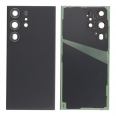
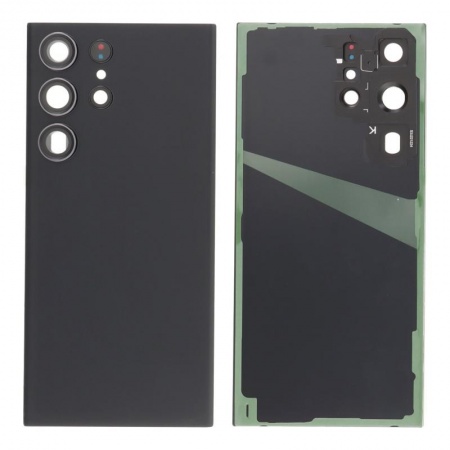
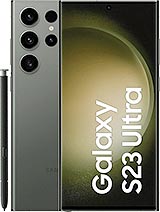
Complete Samsung S23 Ultra back cover with adhesive and camera lenses
The back of the Galaxy S23 Ultra is a glass panel that covers almost the entire body of the phone, measuring 163.4 × 78.1 mm, and houses the five-opening camera module. When it cracks, the phone will still switch on and work. However, the damage is no longer merely cosmetic. Cracks allow dust and moisture to reach the wireless charging coil, NFC antenna and camera area, while chipped edges can cut your fingers. This Samsung S23 Ultra back cover replaces the complete part and restores the finish, feel and protection the device had when it left the factory.
While you're considering a new back cover for your Samsung S23 Ultra, it might come in handy to also check out some other essential components. For instance, if your screen has seen better days, the Samsung Galaxy S23 Ultra Screen could be a great option to restore your phone's display to its original brilliance. Additionally, if you're experiencing battery issues, the Samsung S23 Ultra 5G Battery is an excellent choice to ensure your device stays powered throughout the day. Upgrading these parts can significantly enhance your phone's performance and longevity.
The part arrives ready to install: the pre-fitted perimeter adhesive and the camera and flash glass lenses are already in place. In practice, this avoids the most delicate step of the repair: manually aligning each lens over its sensor.
OEM quality: what it means for a back cover
OEM stands for Original Equipment Manufacturer, meaning the manufacturer of the original equipment. An OEM-quality replacement part is made to the specifications of the part originally fitted to the phone: the same dimensions, the same curvature along the sides, the same sensor openings and the same colour finish. Once installed, the S23 Ultra regains its original factory feel. There are no gaps around the Armor Aluminium frame or unevenness around the lenses, which can be noticeable with generic back covers.
Samsung S23 Ultra back cover compatibility and colours
This part is exclusively designed for the Galaxy S23 Ultra and is compatible with all of its market variants: SM-S918B, SM-S918B/DS, SM-S918U, SM-S918U1, SM-S918W, SM-S918N, SM-S9180 and SM-S918E. It is not compatible with the Galaxy S23 or S23+, which have different dimensions and a different camera layout. This is the question most frequently received by the iLevante team, because all three models share a similar commercial name.
It is available in the eight shades Samsung launched for this model. The four standard colours are Phantom Black, Cream, Green and Lavender. The other four, Sky Blue, Lime, Red and Graphite, were originally sold as exclusive colours through the brand's official store. There is one detail that often surprises customers: Graphite is a dark mineral grey rather than black, specifically to distinguish it from Phantom Black. If your device was an exclusive colour and you could never find a replacement, you can find it here. Alternatively, if you would like to use the repair as an opportunity to change the colour, that is also possible, as the side frame matches all of them well.
When should you replace the S23 Ultra back cover?
The S23 Ultra left the factory with Corning Gorilla Glass Victus 2 on both the front and back. This glass is designed to withstand drops onto rough surfaces such as concrete and contains around 22% recycled material. In scratch tests, it starts to show marks at level 6 on the Mohs scale, with deeper grooves appearing at level 7. It is highly resistant, but not invulnerable: a drop onto a corner is enough for a crack to spread across the entire surface, even when the phone is protected by a case.
There is another, less well-known reason. Many users have seen the rear glass come away on its own, without any previous impact, after a year or 18 months of use. The adhesive loses strength over time, especially in hot climates or when the phone frequently heats up while charging. If the back cover lifts for no apparent reason, the iLevante team recommends checking the battery as well: a swollen battery can push the glass outwards from inside and is a risk that must be addressed before closing the device.
The most common situations in which replacement makes sense are:
- Cracked or chipped rear glass, even if the crack appears small.
- Broken or scratched camera lenses, which can cause hazy or out-of-focus photos.
- A back cover that is separating from the frame or leaving a visible gap along one side.
- Deep scratches that reduce the device's resale value.
How to replace the Samsung S23 Ultra back cover
Replacing it does not require completely dismantling the phone, but it does require patience. Samsung secures the glass with highly aggressive, water-resistant adhesive. According to the iLevante team's experience, it grips most strongly at the bottom-right and top-left corners, which is where the glass most often breaks during removal.
- Switch off the phone and, for safety, ensure that the battery is below 25%. Remove the SIM tray.
- Heat the bottom edge for a few minutes to approximately 80°C, using a heating pad or hairdryer. Avoid using heat guns at maximum power, as excessive heat can damage the screen and battery.
- Attach a suction cup, gently lift the glass and insert a plastic pick. Near the top edge and left side, do not insert it more than 4 mm: the cameras, antenna flex cable and power button cable are located underneath.
- Work around the perimeter with several picks and reapply heat whenever the adhesive hardens.
- Remove all adhesive residue from the frame using tweezers and high-purity isopropyl alcohol. Any remaining residue will prevent the new cover from sitting flat.
- Remove the protective film from the new adhesive, align the cover starting at the camera module and press around the entire perimeter. Apply even pressure for approximately 30 minutes, for example by placing it under a light, flat weight.
Before considering the job complete, the iLevante team always checks three things: that wireless charging works, that NFC responds when a card is brought close to the phone and that the cameras focus without haze. It is also advisable to remove and reinsert the S Pen, as its slot is located right in the bottom corner.
Water resistance after replacement
Out of the box, the S23 Ultra has an IP68 rating, which means it can withstand immersion in up to 1.5 metres of water for 30 minutes. This cover includes perimeter adhesive that reseals the device against dust and splashes. However, no repair carried out outside the factory can restore or certify the original water resistance. We recommend not submerging the phone after replacement, regardless of how well it has been sealed.
If you would rather not open the phone yourself, iLevante also offers suitable opening tools. If you have any questions during installation, our technical team can guide you through the process.
• Product Weight: 0.05 kg.The technical specs of Samsung Galaxy S23 Ultra
can help you to choose the correct repair part for your device. Make sure your model reference is the same as this element. Here are some tech specs to help you:
- Brand: Samsung
- Samsung Galaxy S23 Ultra Size: 163.4 x 78.1 x 8.9 mm.
- Release date: 2023, February 01.
- Weight: 234 g.
- Screen specs: Dynamic AMOLED 2X, 120Hz, HDR10+, 1200 nits , 1750 nits.
- Screen size: 6.8 inches, 114.7 cm2.
PVP:
SNK.AS1198059.95€ AvailableInStockNewCondition