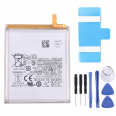
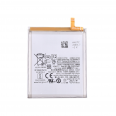
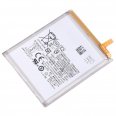
Samsung S23 Ultra EB-BS918ABY Battery
When it was released, the Galaxy S23 Ultra was one of the smartphones with the longest battery life on the market. In laboratory tests published after its launch, it achieved 126 hours of combined endurance, more than 39 hours of talk time, over 21 hours of Wi-Fi browsing and around 13.5 hours of active mixed use. Behind these figures is the EB-BS918ABY, the same reference used by this Samsung S23 Ultra battery.
Time takes its toll on every lithium-ion cell. After two or three years of daily charging, the chemistry loses capacity and the phone that used to last comfortably until the evening runs out of battery halfway through the afternoon. Replacing the battery restores that autonomy without having to buy another phone.
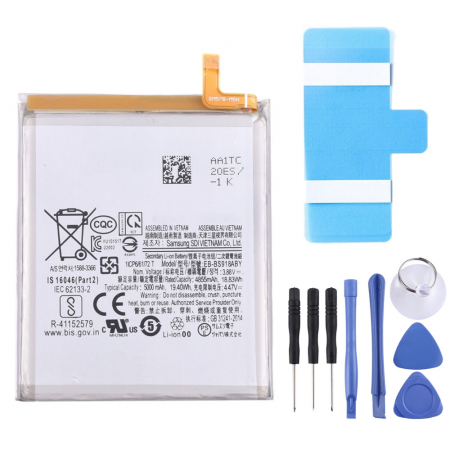
Many people are surprised to see two different capacities on the label. Samsung states the rated capacity of 4855 mAh, which is the minimum guaranteed under standardised test conditions, and the typical capacity of 5000 mAh, which is the production average and the figure shown in the phone's commercial specifications. Both figures describe the same battery, so this unit has exactly the same capacity as the original factory-fitted model. Be wary of “upgraded” 5500 or 6000 mAh batteries for this model: there is no room for more chemistry in the same housing.
OEM-quality S23 Ultra battery: what does it mean?
Brands do not manufacture all their components themselves. They commission many parts from specialised manufacturers that work according to their designs and specifications. An OEM (Original Equipment Manufacturer) part comes from that production chain or is manufactured to the same specifications as the part fitted at the factory, even if it is sold outside the brand's official channel. In practice, it fits in the same way, has the same capacity and voltage, and works correctly with the phone's power management system. A generic replacement part, on the other hand, only attempts to resemble the original.
Samsung S23 Ultra EB-BS918ABY battery specifications
- Model: EB-BS918ABY
- Rated capacity: 4855 mAh (typical: 5000 mAh)
- Nominal voltage: 3.88 V
- Chemistry: lithium-ion polymer, single cell (1ICP7/61/72)
- Integrated protection: overcharge, deep discharge, short circuit, overcurrent and temperature protection
- Quality: OEM
- Includes: adhesive strips for securing it to the chassis
Compatible models
Suitable for all Galaxy S23 Ultra variants:
- SM-S918B and SM-S918B/DS
- SM-S918U and SM-S918U1
- SM-S918W
- SM-S918N
- SM-S9180
- SM-S918E and SM-S918E/DS
It is not suitable for the S23 (3900 mAh) or the S23+ (4700 mAh). They have different sizes and connectors, even though all three share the same name. You can check the exact model under Settings > About phone.
When to replace the Samsung S23 Ultra battery
Battery wear becomes apparent before the phone becomes unusable. The most common symptoms reported on user forums and in repair shops are quite specific. The phone switches off while there is still 15 or 20% showing on the screen. The percentage jumps up and down. It gets hotter than usual during fast charging. And even with moderate use, it no longer lasts until the end of the day.
On recent versions of One UI, you can view the cell's condition and the number of cycles under Settings > Battery > Battery information, although this depends on the region and software version. The Samsung Members app also runs a diagnosis, but its “Normal” result covers any battery that retains around 80% or more of its original capacity, which is a very broad margin. The iLevante team recommends replacing it once it falls below 80%.
There is one warning sign that cannot wait: the rear cover starts to lift away at the sides. Quite a few cases of swollen batteries separating the glass from the frame have been documented on the S23 Ultra, sometimes just after a software update. If this happens, stop charging and using the phone until the cell is replaced. A swollen lithium battery poses a fire risk.
How to replace the Samsung S23 Ultra battery: the iLevante team guide
This generation introduced an improvement that technicians appreciate. It was Samsung's first flagship to feature pull tabs (blue strips beneath the battery) instead of having the battery glued directly to the chassis. The S22 Ultra almost always required isopropyl alcohol and plenty of patience. Even so, the original adhesive is still very strong, and most of the work involves opening the glued rear cover.
That is why iLevante supplies this battery with the adhesive strips included, so that it can be secured properly without having to purchase additional consumables. Before you start, you need a heat source (heat gun, hairdryer or heating pad), a suction cup, opening picks, a small Phillips screwdriver, a plastic spudger and tweezers. The complete process usually takes between 35 and 50 minutes.
- Discharge the phone below 25% and switch it off. A cell with little charge is much safer if it is accidentally punctured.
- Heat the rear cover edge by edge, for around two minutes on each side, without exceeding 65–75°C. Higher temperatures can damage the AMOLED display and camera module.
- Lift the glass with the suction cup and slide the picks around the perimeter. Near the cameras and buttons, do not insert the pick more than 4 or 5 mm: the antenna cable and power button cable run through that area.
- Remove the NFC plate and wireless charging coil, which are held in place with five 3.5 mm screws, and then remove the bottom speaker, secured with a further six screws.
- Disconnect the battery first and then the interconnect cables running over it.
- Pull the central blue tab with steady, even force and without sudden movements. If the adhesive resists, one or two drops of more than 90% isopropyl alcohol on the left edge, followed by a one-minute wait, will usually be enough. Do not lever it with metal tools or bend the cell.
- Fit the new adhesive strips, position the EB-BS918ABY and connect it before closing the phone.
- Test the phone while the rear cover is still open: wired and wireless charging, the S Pen, fingerprint reader, cameras and audio. If everything works, secure the cover with new adhesive.
Common mistakes when replacing the S23 Ultra battery
- Overheating one area and leaving marks on the curved display.
- Breaking the rear glass by levering it while cold. This happens more often than you might think on the Ultra.
- Reusing the old rear-cover adhesive. When the cover is opened, it stretches, collects dust and no longer seals properly.
- Forgetting a connector and assuming that the new battery does not work.
One honest warning: after opening the phone, its IP68 water resistance can no longer be guaranteed, even if the seal is applied correctly. Your data, however, is not at risk. Photos, apps and chats will remain, because replacing the battery does not reset the phone.
Charging and caring for your new Samsung S23 Ultra battery
The new battery supports the same charging systems as the phone: 45 W wired charging (USB Power Delivery PPS), 15 W wireless charging and 4.5 W reverse charging. According to published tests, with the 45 W charger it goes from 0 to 68% in half an hour and reaches a full charge in under an hour. With a 25 W charger, it takes between 71 and 73 minutes. During the first few days, it is normal for the percentage and health readings to take a few cycles to stabilise.
To help it last, the iLevante team recommends enabling Settings > Battery > Battery protection. Depending on your One UI version, you can limit charging to 80 or 85%, use Adaptive mode, which completes charging shortly before you wake up, or Basic mode, which stops charging at 100% and does not resume until the level drops to 95%. If you charge your phone overnight, this option makes a real difference. USB power bypass while gaming also helps: the phone draws power directly from the charger, so the cell does not heat up while you play.
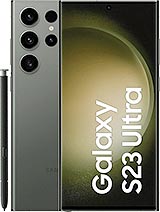
• Product Weight: 0.10 kg.The technical specs of Samsung Galaxy S23 Ultra
can help you to choose the correct repair part for your device. Make sure your model reference is the same as this element. Here are some tech specs to help you:
- Brand: Samsung
- Samsung Galaxy S23 Ultra Size: 163.4 x 78.1 x 8.9 mm.
- Release date: 2023, February 01.
- Weight: 234 g.
- Screen specs: Dynamic AMOLED 2X, 120Hz, HDR10+, 1200 nits , 1750 nits.
- Screen size: 6.8 inches, 114.7 cm2.
PVP:
SNK.AS12030611.95€ AvailableInStockNewCondition