
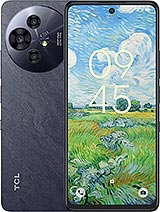
 Repair parts TCL 50 Pro NxtPaper



Receive it on monday 26 de october


This category brings together spare parts for the TCL 50 Pro NxtPaper: screen assembly, battery and back cover, for both people repairing their own phone and professional repair shops. This is a 5G phone with a 6.8-inch, 120 Hz NxtPaper matte display and a physical button for reading modes, features worth bearing in mind when choosing each part.
T803D, T803E or T702D: how to tell the TCL 50 Pro NxtPaper apart from its sibling
The TCL 50 Pro NxtPaper is sold under the codes T803D and T803E, two regional variants of the same phone. TCL's official service manual is for the T803D, and screen replacement parts on the market are listed for both codes. You can check yours under Settings > System > About phone or on the device's identification label.
The model it is most often confused with is the TCL 50 NxtPaper, code T702D. They share a 6.8-inch display, Dimensity 6300 processor, 108 MP rear camera and 5010 mAh battery, but the 50 NxtPaper has an 8 MP front camera instead of 32 MP and comes with 256 GB rather than the Pro's 512 GB. Their near-identical appearance does not mean that every part is interchangeable: check the model code and the compatibility stated on each product page.
What each TCL 50 Pro NxtPaper replacement part offers
OEM quality for the 120 Hz matte display
The original screen is a 6.8-inch IPS LCD with a resolution of 2460 x 1080, a 120 Hz refresh rate and an anti-glare matte surface. The Color Paper, Ink Paper and Max Ink modes are controlled by software and the NxtPaper button, but the matte feel and smoothness depend on the panel itself. The OEM screen assembly for TCL 50 Pro NxtPaper replaces the glass, touchscreen and LCD assembly; if the matte finish is your main priority, check the panel specifications on the product page before buying.
One useful detail: the fingerprint sensor is not under the display; it is in the side power button, so its operation is not linked to the panel. Also, in TCL's official parts breakdown, the screen assembly includes the frame, so the repair requires transferring the board, battery and other parts to the new one. Check the product page to see whether it comes with or without a frame.
Two Premium batteries with the TLP049DA code
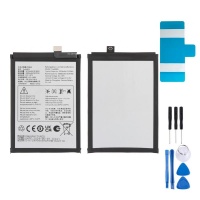
This model has a non-removable 5010 mAh battery with 33 W fast charging, identified by the references TLP049DA and TLP049D9. It is secured to the frame with pull-tab adhesive strips, and TCL recommends fitting a new adhesive sheet during installation. Two Premium quality options are available:
- The 5010 mAh battery compatible with TCL 50 Pro NxtPaper TLP049DA / TLP049D9, which includes both references for this model.
- The TLP049DA 5010 mAh battery for TCL 40 NxtPaper 4G, which shares the TLP049DA code with this phone's battery.
TCL's manual does not list the battery among the parts that may need calibration after a repair, and there are no documented warnings about non-original parts for this model. Before placing your order, check that the code printed on your current battery matches the one on the product page.
Original replacement in Purple, shared with the 50 NxtPaper
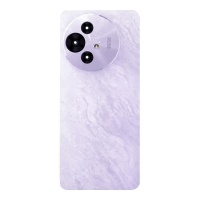
The original Purple back cover for TCL 50 NxtPaper and 50 Pro fits both models, as they share the same housing. It is Original quality and available in Purple. According to TCL's manual, it is secured to the frame with clips and can be removed with a plastic pick, making it fairly straightforward to replace.
One thing to bear in mind: the power button with fingerprint reader is housed in the back cover itself, so when replacing it, you need to carefully remove this module and transfer it to the new cover if it is not included. Check the product page to see which parts are included.
What TCL's service manual says about this model
The official manual for the T803D covers several details worth knowing when considering a repair. Most notably, when replacing the screen assembly, TCL advises fitting a new battery and adhesive sheet, as the battery must be detached from the original frame. If you are replacing the screen, it is worth adding a battery to the same order.
The document also states that after disassembling the device, the sensors, fingerprint reader, rear camera, touchscreen and speaker may need calibration, so it is worth testing the fingerprint reader and touchscreen when you finish. It also advises replacing the thermal gel between the board and the screen if it is dry, as it helps dissipate heat.
Frequently asked questions about repairing the TCL 50 Pro NxtPaper
Are parts from the TCL 50 NxtPaper (T702D) compatible?
It depends on the component. The back cover in our catalogue fits both models, and the TLP049DA battery is also listed for both. For the screen, check the compatibility stated on each product page.
Does replacing the screen affect fingerprint unlocking?
The sensor is in the side power button, not under the panel, so fingerprint unlocking is not linked to the screen. Even so, TCL advises checking and, if necessary, calibrating the reader after any disassembly.
Why replace the battery when changing the screen?
The screen assembly includes the frame to which the battery is attached, so it must be removed along with its adhesive strips. The official manual requires fitting a new battery and adhesive during this repair to ensure it is secured correctly.
My phone won't charge after replacing the screen. What should I check?
This question comes up in repair forums about this model. Since the board and battery need to be transferred to the new frame, first check that all connectors and flex cables are properly seated before assuming the replacement part is faulty.





