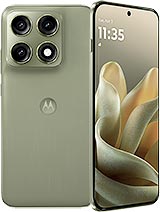
 Repair parts Motorola Edge 70 Pro


Receive it on tomorrow wednesday 04 november
Receive it on tomorrow wednesday 04 november

Receive it on tomorrow wednesday 04 november


In this section, you’ll find the replacement parts available for the Motorola Edge 70 Pro: screen assembly, battery and charging connector. This 2026 model features a 6500 mAh battery in a body just over 7 mm thick, along with a curved-edge screen. These two features affect which part you choose and how it is installed. Our catalogue is aimed at both individuals repairing their own phone and repair shops looking for reliable parts for this model.
The XT2607 code and other ways to identify your Motorola Edge 70 Pro
Motorola lists this phone under the XT2607 model family. Certification databases include at least the XT2607-1 and XT2607-2 variants, with the suffix varying according to the market the phone is intended for. To check yours, go to Settings > About phone and look for the regulatory or model and hardware information, where you’ll find the full XT code.
It’s worth checking, as the name is very similar to that of other models in the same family. The Motorola Edge 70 (codes XT2601) is thinner, has a screen of around 6.7 inches at 120 Hz and a lower-capacity battery, so its parts won’t fit the Pro. Don’t confuse it with the Edge 60 Pro either, its predecessor, which has a 6.67-inch panel and a 6000 mAh battery.
If you can’t turn on the phone, there are other useful identifiers: the Edge 70 Pro has a 6.78-inch AMOLED screen with a resolution of 2772 x 1272, an under-display fingerprint reader and a MediaTek Dimensity 8500 Extreme processor. The back varies considerably depending on the colour (silk-like, fabric, acetate or wood finishes), so its appearance alone isn’t enough to identify it.
Which replacement part fits your Motorola Edge 70 Pro and what each quality grade offers
Original quality for the curved 144 Hz screen
The factory screen is a 6.78-inch AMOLED with 1.5K resolution, a refresh rate of up to 144 Hz, an advertised peak brightness of 5200 nits and Gorilla Glass 7i. The curved edges are part of the screen assembly, so the usual approach for this model is to replace the complete screen rather than just the outer glass.
The original screen assembly for Motorola Edge 70 Pro is the option we offer for this model. Its Original quality means it retains the factory AMOLED technology, curvature and resolution, and is designed to work with the optical fingerprint reader, which reads your finger through the panel itself. It sits at the higher end of the price range and is the right choice if you want your phone to work just as it did when it left the factory.
Before ordering, check that your phone is an Edge 70 Pro and not an Edge 70: they look similar at a glance, but the screen sizes differ. After replacement, we recommend deleting saved fingerprints and registering them again.
What the Premium-quality 6500 mAh ST65 offers
The Edge 70 Pro has a 6500 mAh silicon-carbon battery with the manufacturer reference ST65. This chemistry allows for a high capacity in a very slim chassis, and the phone supports TurboPower wired charging of up to 90 W.
The compatible 6500 mAh ST65 battery for Motorola Edge 70 Pro is Premium quality: a compatible replacement with the same rated capacity and reference as the original battery, at a lower price than an original replacement. It’s the right choice when your phone’s battery life has declined with use and you want to restore it.
As for the software, we haven’t found any official Motorola documentation mentioning a non-genuine part warning when replacing the battery in this model. If you’re a repair shop, compare the reference printed on the removed battery with the one on the new battery before fitting it.
What the OEM port with USB-C 2.0 connector offers
According to the official specifications, the Edge 70 Pro connector is USB-C with the USB 2.0 standard. This means data transfers at USB 2.0 speeds and no wired video output. A replacement part won’t change these capabilities; it restores the phone’s charging and data connection.
The OEM USB-C charging port for Edge 70 Pro is OEM quality and is the part you need when the fault is with the connector rather than the battery. On the global version, which supports 15 W wireless charging, checking whether the phone charges wirelessly can help rule out the battery before you order the port.
Motorola Edge 70 Pro Indian and global editions: what to check before buying
The Edge 70 Pro launched first in India and later arrived in Europe as a global version with two extras: a 3.5x periscope telephoto lens and 15 W wireless charging, as well as 5 W wireless reverse charging. Both editions share the 6.78-inch screen, processor and 6500 mAh battery. If your phone was imported, check the full XT code and, if you’re a repair shop, compare the removed part with the new one before fitting it.
The thickness also varies: depending on the back finish, the device measures approximately 7 to 7.4 mm. It comes with IP68 and IP69 certification, but if it’s opened outside an authorised service centre, its resistance can no longer be guaranteed. We also haven’t found Motorola documentation linking the screen, battery or port to the motherboard by serial number. After replacing the screen, the most delicate component is the optical fingerprint reader, as it depends on the panel.
Common questions about the Edge 70 Pro from repair shops and forums
Is the Motorola Edge 70 screen compatible with the Edge 70 Pro?
No. The Edge 70 has a panel of around 6.7 inches at 120 Hz and uses XT2601 codes, while the Pro has a 6.78-inch panel at 144 Hz and uses XT2607 codes. The dimensions differ, so the part won’t fit.
Will the battery from the Indian version work in the global version?
According to the manufacturer’s specifications, both editions have a 6500 mAh battery. To be sure, check that the battery you remove has the ST65 reference, matching the replacement.
Will the fingerprint reader still work with the new screen?
The sensor is optical and detects your finger through the panel, so it depends directly on the screen. The screen assembly listed is Original quality and designed for this sensor. After fitting it, delete the old fingerprints and register them again.
Will a new charging port speed up file transfers?
No. The Edge 70 Pro uses USB 2.0 as standard, so data speeds will remain the same as before the fault. What you’ll restore is a reliable connection for charging and transferring files.