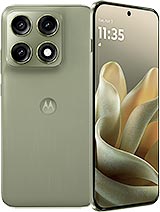
Bam! Your Motorola Edge 70 Pro screen is broken, and now you can't enjoy that massive 6.8-inch display like before. Don't worry, at iLevante.com we have the Motorola Edge 70 Pro Premium screen ready for you to have your Edge 70 Pro looking like new again. This piece is specially designed for the Motorola Edge 70 Pro, the model that Motorola will launch in 2026 and is already making waves for its large and smooth screen.
Why choose this Premium screen for the Motorola Edge 70 Pro?
The screen for the Motorola Edge 70 Pro we offer is of Premium quality, perfect for those looking for a replacement that feels like the original without complications. With its 6.8 inches, it maintains the visual experience you expect from the Edge 70 Pro, ideal for watching series, gaming, or browsing without any hassle. Forget cheap screens that fail to respond to touch or lose brightness quickly; this Premium option is designed to last and respond naturally.
Note! This is not an original Motorola screen, but it is a high-quality alternative that many Motorola Edge 70 Pro users are choosing to save money and time.
Signs that your Edge 70 Pro needs a new screen
It's not always as obvious as a huge crack. Here are the most common signs indicating it's time to change the screen of the Motorola Edge 70 Pro:
- The touchscreen responds slowly or phantom touches occur without any action.
- Strange colored spots or black areas appear that weren't there before.
- After an accidental splash, circles or water drops start to appear on the screen.
- Light escapes at the edges when you use the phone at night.
- The colors look dull or odd on the corners.
If any of these sound familiar, the Premium screen for your Motorola Edge 70 Pro is the quick and fun solution to get back into action.
What's included with your Motorola Edge 70 Pro screen
When you purchase this screen for the Edge 70 Pro, you get everything needed to make installation easier. It comes with the panel, the touch glass, the connection flex, and the image controller. Additionally, as a special gift, we include a tool kit with screwdrivers, picks, levers, and a suction cup, so you don't have to rush out to buy anything extra.
Imagine how cool it will be to have your Motorola Edge 70 Pro up and running in less than an afternoon!Repair at home or take it to a technician?
Changing your Motorola Edge 70 Pro screen yourself can be an epic adventure if you love DIY. Many Edge 70 Pro users prefer doing it at home to avoid waiting lines. If you've never opened a phone, it might be best to take your spare part to a technical service that accepts third-party parts. This way, you save on labor costs and still manage your budget.
Quick table: Premium Quality vs other lower options
| Feature | Premium Edge 70 Pro Screen | Other Low Qualities |
|---|
| Touch Response | Smooth and natural | Sometimes erratic |
| Brightness and Colors | Good indoors | Lose vibrancy |
| Thickness | Similar to original | Thicker |
| Tool Kit | Included | Not always |
How to change the Motorola Edge 70 Pro screen step by step
If you've decided to take the plunge and do it yourself, here's a super detailed guide with tips to ensure everything goes smoothly with your 6.8-inch Edge 70 Pro.
- Completely turn off the Motorola Edge 70 Pro and remove the case if it has one.
- Wear an anti-static wristband or touch something metal to discharge your body's electricity. This way, you avoid accidents on the board!
- Heat the edges with a hairdryer about 5 cm away for 30-40 seconds per side. It softens the glue and the screen comes off more easily.
- Insert the picks from the kit at the bottom and gently slide them up and down. Repeat on all four sides of the Edge 70 Pro.
- Once the edges are loosened, use the suction cup in the center and gently pull upwards. If it resists, apply a little more heat.
- Carefully disconnect the old screen's flex. Never force the connectors.
- Clean residues of old glue with isopropyl alcohol and a soft cloth. Make sure it’s spotless!
- Place the new Premium screen, connect the new flex, and turn on the Motorola Edge 70 Pro to test everything: touch, colors, and brightness.
- If everything is correct, stick the new screen and let it rest for a few hours without using the phone, so the adhesive sets well.
Young tip: Record yourself during each step in case something isn't clear the first time. The Motorola Edge 70 Pro is a powerful device and deserves to be treated with care.- Work on a well-lit table without drafts.
- Keep alcohol and cotton swabs on hand to clean connectors.
- If the adhesive is very strong, heat a bit more but never leave the dryer stationary in one spot.
- After assembly, check that no screws are left loose inside the Edge 70 Pro.
With this Premium screen for the Motorola Edge 70 Pro and the tool kit, you have everything you need to make your Motorola once again the king of the big screen. Time to get back in action!
• Product Weight: 0.20 kg.The technical specs of Motorola Edge 70 Pro
can help you to choose the correct repair part for your device. Make sure your model reference is the same as this element. Here are some tech specs to help you:
- Brand: Motorola
- Motorola Edge 70 Pro Size: 162.7 x 75.6 x 7.0 mm or 7.3 mm.
- Release date: 2026, April 22.
- Weight: 183 g or 190 g.
- Screen specs: AMOLED, 1B colors, 144Hz, PWM, HDR, 1800 , 5200 nits peak.
- Screen size: 6.8 inches, 113.1 cm2.
PVP:
SNK.AS18345575.95€ AvailableInStockNewCondition