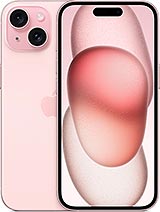
iPhone 15 Rear Glass
One slip, the pavement, and a spiderweb of cracks across the back of your phone. It happens to a lot of people with the iPhone 15, and most think the same thing: “It still works; I’ll get it fixed later.” The problem is that cracked rear glass keeps chipping, stops protecting the magnets and charging coil, and lets dust and moisture in. With this OEM-quality rear glass cover for iPhone 15, your phone will look and feel like new again, for a fraction of the cost of an official repair.
When refreshing your iPhone 15 with a new glass back cover, you might also find it beneficial to iPhone 15 Screen in case your display is damaged or malfunctioning. Additionally, if you're experiencing battery issues, consider checking out the iPhone 15 Battery, which offers a robust 3349mAh capacity for extended use. These products ensure your device runs smoothly and efficiently.
What does it mean for this rear glass cover to be OEM?
OEM (Original Equipment Manufacturer) is the term for parts made to the same specifications, tolerances and material standards as the component fitted during the device’s production. In simple terms: exact dimensions, cut-outs in the right places and a finish designed to fit the iPhone 15’s aluminium frame without gaps or raised edges. At iLevante, we inspect every unit before dispatch so that what arrives at your door is what you expect.
The iPhone 15 rear glass: a part with more technology than you might think
Apple introduced the iPhone 15’s back as the first smartphone rear made from colour-infused glass. The colour isn’t painted on top; it’s infused into the glass itself. The glass is then strengthened using a double ion-exchange process, polished with nanocrystalline particles and etched to create its distinctive textured matte feel. The practical result? It picks up very few fingerprints, and diffuses light instead of reflecting it.
That’s the finish we aim to replicate. We stock the cover in all five colours available for this model:
- Black: the most understated option. It helps disguise everyday scuffs.
- Blue: a very soft pastel shade that can look almost white in bright light.
- Green: a delicate mint shade with a subtle turquoise tint.
- Yellow: pale and warm, close to cream.
- Pink: the boldest shade in the range, with plenty of personality.
A tip from our team: check the colour of your aluminium frame carefully before choosing. The frame is a little more saturated than the back, so choosing the same colour gives you a factory-fresh look. Some people also use the repair as a chance to give their phone a new look—and pink against a black frame has a certain charm.
Exact compatibility: iPhone 15 only
This cover is made for the iPhone 15 (147.6 × 71.6 × 7.8 mm), with the diagonal dual-camera cut-out in the correct position. It is not compatible with the iPhone 15 Plus, 15 Pro or 15 Pro Max, which have different dimensions and camera layouts. If you’re unsure, go to Settings > General > About to see your exact model name.
Replacing the iPhone 15 rear glass: why it’s now much more affordable
Up to the iPhone 13, the back was practically fused to the frame, making replacement a nightmare: all the components had to be transferred to a new housing. With the iPhone 14, Apple redesigned the internal structure, and the iPhone 15 retains this design. The rear glass can be opened independently, almost like a second screen. This brought down the price of the repair through Apple’s official service, although an out-of-warranty repair still costs around €199. With our OEM part, the savings are substantial.
However, the fact that it opens from the back doesn’t mean the cover can be replaced in five minutes. You need to remove the damaged glass, clean the frame thoroughly and fit the new part with adhesive. Our technicians consider this a medium-difficulty repair: allow one to two hours if it’s your first time and you take it slowly.
What’s attached to the back (and needs careful handling)
Here’s a detail many people don’t know. On the iPhone 15, the inner side of the rear glass houses the MagSafe wireless charging coil, NFC and flash assembly. It connects to the logic board via a single flex cable that runs out beside the volume-down button. MagSafe and Qi2 charging of up to 15 W, Apple Pay and the camera flash all rely on this assembly. When transferring it from one cover to another, the coil is extremely delicate: use gentle heat, a thin opening pick and plenty of patience. One tug and you could lose wireless charging.
iLevante team’s quick guide to installing iPhone 15 rear glass
We’ve reviewed the official procedure and checked it against the work we do in our own workshop. These are the steps that make all the difference:
- Prepare the phone: let the battery drop below 25%, switch it off and cover the cracks with packing tape to stop shards from flying off. Always wear safety glasses.
- Remove the two security screws on either side of the USB-C port.
- Heat the edges with a hairdryer or heat gun until the glass feels warm to the touch. Don’t overdo it: the battery doesn’t respond well to excessive heat.
- Cut through the adhesive without going too deep. As a guide, go about 5 mm along the bottom edge, 7 mm on the right, 5 mm on the left and only 3 mm along the top. Mark your opening pick so you don’t insert it too far.
- Open it like a book, without forcing it. Don’t tilt the glass more than about 5 degrees until the cables have been disconnected.
- Disconnect the battery first, then the coil/NFC connector. Remove the small metal covers protecting them beforehand.
- Remove all the old adhesive from the frame and clean it with isopropyl alcohol above 90% concentration.
- Test everything before sealing: reconnect the battery and cover, switch on the phone and check wireless charging, the flash and Apple Pay.
- Fit the new adhesive seal, position the cover and keep the phone under pressure (using clamps or evenly distributed weight) for at least 30 minutes. If possible, leave it overnight.
We recommend adding the iPhone 15-specific adhesive seal to your order. It’s inexpensive, and it’s essential for protecting the phone from dust and splashes again.
Common problems we see in the workshop (and how to avoid them)
After carrying out many repairs, we’ve noticed a few recurring mistakes. Watch out for these:
- The cover doesn’t sit flush: this is almost always caused by a trapped flex cable or old adhesive residue. Open it again, check and clean the area.
- Wireless charging is slow or intermittent: this is usually due to a connector that hasn’t been seated properly or a coil damaged during transfer. The manufacturer itself warns that this can happen if installation isn’t carried out correctly.
- Bent spring contacts: there are several around the perimeter, and they can bend if you insert the opening pick too far.
- Loose screws stuck to the magnets: MagSafe magnets attract even the tiniest parts. Before closing the phone, check the inside of the cover; a loose screw could damage the battery.
- Dust in the camera weeks later: this can happen if a corner of the adhesive comes loose. Applying even pressure while the adhesive sets helps prevent it.
One more note: the Repair Assistant included in iOS 18 only pairs genuine Apple parts. If you fit an OEM cover, an informational message may appear in the Parts and Service History in Settings, but it won’t affect everyday use.
Not comfortable doing it yourself? That’s understandable. With the right tools and this guide to hand, the repair is within reach of anyone who’s handy and patient. If you’d rather not take the risk, you can always ask a trusted technician to install the part you’ve already bought—it’s considerably cheaper than an official repair. Choose your colour, add the adhesive seal and give your iPhone 15 the back it deserves.
• Product Weight: 0.06 kg.The technical specs of Apple iPhone 15
can help you to choose the correct repair part for your device. Make sure your model reference is the same as this element. Here are some tech specs to help you:
- Brand: Apple
- Apple iPhone 15 Size: 147.6 x 71.6 x 7.8 mm.
- Release date: 2023, September 12.
- Weight: 171 g.
- Screen specs: Super Retina XDR OLED, HDR10, Dolby Vision, 1000 nits , 2000 nits.
- Screen size: 6.1 inches, 91.3 cm2.
PVP:
SNK.AS13155910.90€ AvailableInStockNewCondition