3349 mAh iPhone 15 battery
Apple fitted the iPhone 15 with a 3349 mAh cell, around 70 mAh more than the iPhone 14. With it, Apple claimed up to 20 hours of video playback and 80 hours of audio playback. These figures apply to a brand-new phone. After a couple of years of daily charging, the lithium chemistry gradually deteriorates and performance declines: the percentage drops suddenly in the afternoon, the phone gets hotter than usual or switches off while still showing 15% charge.
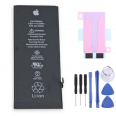
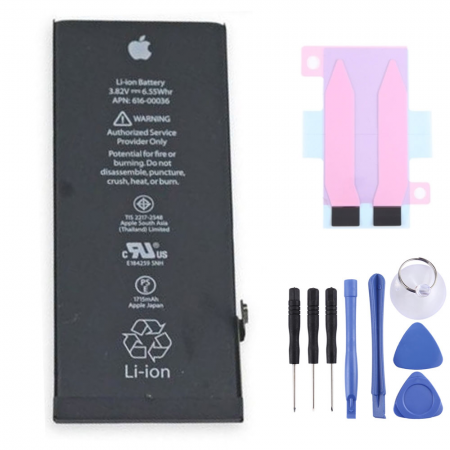
This iPhone 15 battery offers the same 3349 mAh capacity. It comes with adhesive strips included and 1 free tool kit, so opening the phone does not depend on improvising with whatever you have in the drawer. Screen protector not included, as it is not required for this repair.
What does it mean for this iPhone 15 battery to be OEM quality?
OEM stands for Original Equipment Manufacturer. For iPhone batteries, the term refers to cells manufactured within the supply chain used by Apple, or made to the same specifications for voltage, capacity, shape and connector. This is why the fit in the chassis is exact and the capacity matches the factory specification. However, it does not include Apple verification, which is only available with parts sold by the brand itself. Further down, we explain the effects this may have on iOS.
iPhone 15 battery specifications
- Capacity: 3349 mAh
- Energy: 12.98 Wh
- Nominal voltage: 3.87 V
- Chemistry: lithium-ion
- Battery reference: A3018
- Quality: OEM
- Includes: battery adhesive strips and tool kit
Compatibility: iPhone 15 models it fits
The iPhone 15 has four model numbers that vary depending on the region. Internally, they all use the same battery. The number can be found under Settings > General > About; tapping the Model Number field switches between the commercial code and the A-format code.
- A3090: international version, sold in Spain and the rest of Europe
- A2846: United States and Puerto Rico
- A3089: Canada, Japan, Mexico and other markets
- A3092: mainland China, Hong Kong and Macau
Please note that it is not suitable for the iPhone 15 Plus or Pro models: each one uses a cell with a different shape and capacity.
When to replace the iPhone 15 battery
There is one advantage that many people overlook. The iPhone 15 was the first generation to show the number of charging cycles, the battery's manufacturing date and the date of first use, under Settings > Battery > Battery Health or at the bottom of Settings > General > About. These three details provide a much more accurate diagnosis than simply looking at a percentage.
According to Apple, batteries in the 15 series retain 80% of their capacity after 1000 complete cycles under ideal conditions, twice the figure promised for the iPhone 14. In everyday use, however, there is heat, fast charging and demanding gaming. The iLevante team recommends considering a replacement when maximum capacity falls below 80% or when the phone starts reducing its performance.
One interesting detail: many of the first iPhone 15 models became hot and lost charge very quickly during their first few weeks with iOS 17. This was a software issue that Apple fixed with iOS 17.0.3, and it had nothing to do with the battery. Before replacing the cell, it is worth updating the operating system and checking whether an app is consuming too much power in the background.
The “unknown part” warning after replacing the battery
For several generations, iOS has compared the installed battery with each phone's parts record. If it is not an Apple-verified genuine part, an “Important Battery Message” warning appears the first time the phone is unlocked and again a few days later. It is then recorded under Settings > General > About > Parts and Service History.
This can also happen with an OEM battery, and the Battery Health section may not display the percentage. Battery life, charging, the percentage in the status bar and all other functions continue to work normally. From iOS 18 onwards, the iPhone's own Repair Assistant can calibrate genuine Apple batteries, but with non-Apple parts it will generally not complete the pairing process. We prefer to explain this before purchase so that there are no surprises when the phone is switched on.
How to replace the iPhone 15 battery step by step
With the iPhone 15, Apple redesigned the interior so that the rear glass could be removed without touching the screen. The battery is replaced from the back. Any guide that refers to a Home button or lifting the screen is intended for a different model. According to our technical team, the difficulty level is medium and the repair takes between 60 and 90 minutes if it is your first time.
Before opening the iPhone 15
- Reduce the battery level to below 25%. A charged lithium cell is dangerous if it is bent or punctured.
- Switch the phone off completely and make a backup.
- In addition to the free kit, you will need a heat source such as a hairdryer or heat gun, over 90% isopropyl alcohol and safety glasses.
- Have a new adhesive seal for the rear glass ready: opening the phone compromises the factory water-resistance seal.
Replacement process
- Remove the two pentalobe screws next to the USB-C port.
- Heat the bottom edge of the rear glass until it feels slightly hot to the touch. Place the suction cup and pull steadily until a gap opens.
- Insert a pick and move it around the perimeter to cut through the adhesive. Do not insert the pick more than 3 mm around almost the entire edge. Next to the volume button, a thin cable connects the glass to the board: do not run the pick through this area.
- Open the glass like a book towards the button side, without putting tension on the cable. Remove the protective plate and disconnect the battery first, followed by the wireless charging connector.
- Remove the two stretch-release adhesive strips. Wind them around the tweezers and pull slowly towards the top of the phone, almost parallel to the battery, never straight upwards.
- If a strip breaks, apply a few drops of isopropyl alcohol underneath the cell and wait for the adhesive to soften. Do not lever against the battery or bend it.
- Clean away any residue, apply the new strips and install the battery. Press evenly for a few seconds.
- Reconnect everything, replace the rear glass seal, close the phone and maintain pressure for around 30 minutes so the adhesive can set.
Common problems when replacing the iPhone 15 battery
The issue we see most often is adhesive strips breaking, almost always because they are pulled too quickly or vertically. Next are the spring contacts around the edge becoming bent because the pick was inserted too far. Then there is the rear glass cable: if it breaks, the iPhone may stop charging via MagSafe. One final warning: if the battery is swollen when you open the phone, do not puncture it or heat it further. Remove it carefully and take it to a recycling point.
When the phone is switched on, the percentage may fluctuate irregularly during the first few charging cycles. This happens while the system adjusts to the new cell. Completing a couple of full cycles, from 100% down to approximately 10%, helps stabilise the reading.
How to extend the life of the iPhone 15 battery
The iPhone 15 allows you to set a charging limit under Settings > Battery > Charging, in 5% increments between 80% and 100%. The less time the battery spends at 100%, the less it deteriorates. If you need the full capacity every day, Optimised Battery Charging learns your routine and delays the final 20% until shortly before you unplug the phone.
Heat causes more damage than any charging habit. Avoid leaving the phone in direct sunlight while charging inside a car, or playing games while it is connected to a fast charger. With the new 3349 mAh iPhone 15 battery correctly installed and these settings enabled, battery life returns to what it was on the first day.
• Product Weight: 0.10 kg.The technical specs of Apple iPhone 15
can help you to choose the correct repair part for your device. Make sure your model reference is the same as this element. Here are some tech specs to help you:
- Brand: Apple
- Apple iPhone 15 Size: 147.6 x 71.6 x 7.8 mm.
- Release date: 2023, September 12.
- Weight: 171 g.
- Screen specs: Super Retina XDR OLED, HDR10, Dolby Vision, 1000 nits , 2000 nits.
- Screen size: 6.1 inches, 91.3 cm2.
PVP:
SNK.AS13919914.92€ AvailableInStockNewCondition