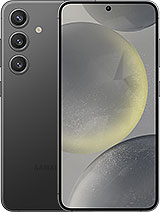
Original Samsung S24 Service Pack Screen
All it takes is one face-down drop onto a hard floor for the Galaxy S24 to be damaged. In the drop tests reviewed by the iLevante team, the base model’s panel became unusable after its first front-on impact, despite featuring Corning Gorilla Glass Victus 2. This Samsung S24 screen is an original Samsung replacement in Service Pack format and is compatible with the SM-S921B (Galaxy S24 5G).
What does Service Pack mean? It is the part Samsung supplies to its service centres through its official channel. It has the same panel, lamination and factory calibration as your phone. No refurbished parts or third-party panels.
What’s included in this Samsung S24 screen
A Dynamic AMOLED 2X panel with LTPO technology. That last part matters more than you might think. With static content, the refresh rate drops to 1 Hz and rises to 120 Hz when scrolling or gaming, helping to save battery power. As this is the original panel, the brightness stays the same: 2,600 nits peak brightness, just as your S24 had straight out of the box.
- Size: 6.2 inches
- Resolution: FHD+ 2340 × 1080 pixels, approximately 416 ppi
- Refresh rate: adaptive, from 1 to 120 Hz
- HDR: HDR10+ compatible
- Glass: Gorilla Glass Victus 2
- Fingerprint sensor: ultrasonic in-display reader, fully functional
It comes with a free tool kit (opening picks, levers, a suction cup and screwdrivers), so you’ll have almost everything you need to get started.
When should you replace your Samsung S24 screen?
Cracked glass is easy to spot. OLED faults can be more deceptive. Black or purple spots that spread after an impact mean the panel is failing internally, and they won’t fix themselves. Other clear signs include ghost touches (touches you didn’t make), areas that don’t respond and a black screen while the phone still rings and vibrates.
One issue worth knowing about: many S24 users saw horizontal green or white lines, particularly after the August 2024 update. Samsung replaced screens free of charge in some countries. If your phone is still under warranty, contact Samsung first. If it’s out of warranty, replacing the panel is the solution.
Before deciding, dial *#0*# on your phone. This opens Samsung’s diagnostic menu, with red, green and blue screen tests and a touch test. It takes two minutes to check whether the panel is damaged.
How to install the Samsung S24 screen
There’s a catch: the screen comes out from the front, but its flex cable is inside. You’ll need to open the back cover first. The iLevante team considers this a medium-difficulty repair that takes 1 to 2 hours if it’s your first time. As well as the tool kit, you’ll need a heat source (a heat gun or hairdryer), 90% or stronger isopropyl alcohol and new frame adhesive.
- Make sure the battery is below 25% and switch off the phone. A lower charge reduces the risk if anything goes wrong.
- Heat the edges of the back cover (to around 80°C, for a couple of minutes per side) and lift it with the opening picks and suction cup. Near the cameras and flash, don’t insert the pick more than 4 mm.
- Remove the wireless charging coil and loudspeaker. There are 13 Phillips screws in total.
- Disconnect the battery before touching anything else.
- Disconnect the screen flex cables: one connector at the bottom left and another on the board.
- Heat the front and separate the panel, starting at the top and avoiding the area around the front camera. The old panel will break as you remove it; that’s normal.
- Clean off the adhesive residue with alcohol, apply the new adhesive, route the flex cable and connect it.
- Test everything before closing the phone: image, touch and *#0*#. Then close it and keep the assembly pressed down for around 30 minutes.
If you’re not comfortable handling the battery or board, take it to a technician with the included tool kit. You’ll still save money.
Fingerprint sensor, water resistance and tips after replacing the Samsung S24 screen
The fingerprint reader is ultrasonic and reads through the panel. After replacing the screen, delete your saved fingerprints and register them again. Do this with the screen protector already fitted, as it can slightly affect how the reader works. Thick protectors or poorly fitted gel protectors often cause complaints that the fingerprint sensor isn’t working, even when the screen is not the problem.
As for water resistance, opening the phone means it loses its IP68 certification. Good new adhesive will provide protection against splashes and dust. Submerging it is a different matter.
One practical tip: the S24 battery has a pull tab and is one of the easiest parts to replace in the phone. If it’s getting tired and you’ve already opened the phone, you may want to replace it too.
• Product Weight: 0.15 kg.The technical specs of Samsung Galaxy S24
can help you to choose the correct repair part for your device. Make sure your model reference is the same as this element. Here are some tech specs to help you:
- Brand: Samsung
- Samsung Galaxy S24 Size: 147 x 70.6 x 7.6 mm.
- Release date: 2024, January 17.
- Weight: 167 g or 168 g.
- Screen specs: Dynamic LTPO AMOLED 2X, 120Hz, HDR10+, 2600 nits.
- Screen size: 6.2 inches, 94.4 cm2.
PVP:
SNK.GH82-33286A109.90€ AvailableInStockNewCondition