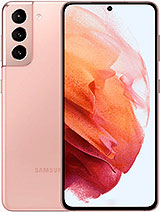
Samsung S21 screen with frame
Have you dropped your phone, leaving the screen cracked like a spider’s web and the touchscreen behaving erratically? It’s happened to us all. This Samsung S21 screen is a brand-new complete assembly: the panel, touchscreen glass and metal frame, pre-assembled at the factory. It’s designed so you don’t have to remove the panel from your old chassis, which is the step where most screens get broken during home repairs. Simply transfer your S21’s internal components to the new frame, and you’re done.
The box also includes a free screen protector to keep the new glass protected from day one, and a free screwdriver kit with the bits you need for the S21 screws.
Samsung Galaxy S21 screen specifications
This is a Premium-quality replacement part. The iLevante team compared it with the original, and here are the specifications:
- Size: 6.2 inches, 20:9 aspect ratio.
- Resolution: FHD+ 2400 × 1080 pixels, approximately 421 pixels per inch.
- Peak brightness: up to 1170 nits, more than enough for reading in the midday sun.
- Refresh rate: supports the S21’s adaptive refresh rate, ranging from 48 to 120 Hz.
- Type: complete screen with frame included, in black (the S21’s front is always black, whatever the colour of your back cover).
Is this S21 screen compatible with my phone?
Check your model under Settings > About phone. This screen is compatible with all regional versions of the Galaxy S21 5G:
- SM-G991B: European and international version with Exynos 2100 (also the B/DS dual-SIM version).
- SM-G991U and SM-G991U1: US carrier and unlocked versions with Snapdragon 888.
- SM-G991W: Canadian version.
- SM-G991N: Korean version.
- SM-G9910: Chinese version.
Be careful not to mix it up with similar models: the S21+ (G996), S21 Ultra (G99• and S21 FE (G99• have different screens, and this one won’t fit them. Every year, someone gets caught out by the model numbers. Check yours before buying and avoid having to return it.
How to replace the Samsung Galaxy S21 screen with frame
The S21 is opened from the back. Its rear cover is made of polycarbonate (Samsung called it glasstic) and is attached with fairly strong adhesive. The iLevante team estimates it will take one to two hours if it’s your first time. Make yourself a coffee and clear some space on the table.
- Prepare the phone. Make sure the battery is below 25%, switch the phone off completely and remove the SIM tray first. Opening it with the tray in place may damage the reader.
- Warm the rear cover. Apply heat around the edges with a hairdryer or a heat pack, keeping the temperature below about 65°C. As it’s made of plastic, it can warp quickly if overheated. Attach a suction cup, lift the cover slightly and insert a pick.
- Cut through the adhesive carefully. Insert the pick no more than 5 mm, and only 3 mm along the right-hand side, where an interconnect cable runs. Stop when you reach the camera housing: cutting any further could crack the cover.
- Disconnect the battery first. Remove the screws from the plate covering the motherboard and disconnect the battery connector before doing anything else.
- Clear out the old chassis. Disconnect the wireless charging coil, speaker, interconnect cables, sub-board, earpiece and motherboard. The front camera is attached with adhesive: apply a little heat and use a plastic spudger, taking your time.
- Remove the battery. This is the trickiest step. Apply isopropyl alcohol with a concentration above 90% around the edges, wait two or three minutes and gently lift it from below with a wide plastic tool. Never bend or puncture it—a damaged lithium battery can catch fire.
- Transfer everything to the new frame. Compare both frames component by component: the vibration motor, button flex cable and antennas. Transfer anything missing from the new frame from the old one.
- Test before closing the phone. Connect the battery and screen, switch the phone on and enter *#0*# in the phone dialler. This opens Samsung’s diagnostic menu, where you can check the red, green and blue colours and test the touchscreen corner by corner.
- Seal it with new adhesive. Clean off the old adhesive with isopropyl alcohol and a lint-free cloth, then apply new adhesive to the rear cover.
We’ll be upfront: once it has been opened, the S21 loses its IP68 rating. With good adhesive it can withstand splashes, but it’s best not to take it swimming.
Common issues when replacing an S21 screen (and how to avoid them)
In our workshop, we see the same problems time and again. One of the more surprising ones is losing mobile network coverage after reassembly. There’s a flexible antenna in the upper-right corner of the frame. If the new frame doesn’t include it and you forget to transfer it, the phone will switch on perfectly but won’t get a signal. Check it carefully before closing the phone.
Another classic is mixing up the screws. There are more than fifteen, and they aren’t all the same length. A screw that’s too long in the wrong place can mark the OLED panel from underneath. Lay them out in order on a piece of paper or a magnetic mat to avoid this problem.
Then there are the connectors. To fit the flex cables, press down on one side and then the other until you hear a click—never press in the middle. Pressing in the centre can bend the pins, leaving you wondering for half the afternoon why the touchscreen isn’t working.
Green line on the Samsung S21 screen: is it the panel?
Many S21 phones have developed a vertical green line, especially after some One UI updates in 2024. Sometimes it appears even if the phone has never been dropped. If it remains after restarting and also appears in the colour test under *#0*#, the fault is with the original panel, and replacing the screen will fix it. The same applies if parts of the touchscreen stop responding after an update and still don’t work after a factory reset: the problem is usually with the screen assembly, not the software.
Tips from the iLevante team to help your S21 screen last
Fit the screen protector included with your screen when the display is clean, preferably in a bathroom with a little steam in the air, as this helps keep dust from floating around. Since the fingerprint reader won’t work, you don’t need to look for an ultra-thin glass protector: you can use a thicker, more protective one without losing anything.
A case with a raised edge might seem like a small detail, but most of the broken screens we receive have been damaged in a drop onto a floor, landing edge-first. That extra millimetre above the glass can stop the screen from hitting the ground.
One thing to know before you buy: the under-display fingerprint reader does not work with this replacement screen. The S21 has a very delicate ultrasonic sensor that can even cause problems with some official screens after a repair. You can still unlock your phone using facial recognition, a pattern or a PIN.
• Product Weight: 0.14 kg.The technical specs of Samsung Galaxy S21 5G
can help you to choose the correct repair part for your device. Make sure your model reference is the same as this element. Here are some tech specs to help you:
- Brand: Samsung
- Samsung Galaxy S21 5G Size: 151.7 x 71.2 x 7.9 mm.
- Release date: 2021, January 14.
- Weight: 169 g , 171 g.
- Screen specs: Dynamic AMOLED 2X, 120Hz, HDR10+, 1300 nits.
- Screen size: 6.2 inches, 94.1 cm2.
PVP:
SNK.SPA3647B26.75€ AvailableInStockNewCondition