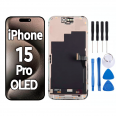
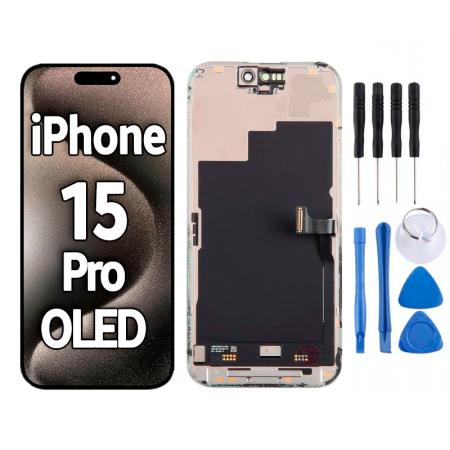
iPhone 15 Pro OLED screen with 120 Hz: a replacement that looks as good as new
It often happens in the most unexpected way. Your phone slips out of your pocket as you get out of the car, lands on its edge and a spiderweb crack appears right over the Dynamic Island. Sometimes the glass survives, but the display underneath fails: a green line, a spreading black spot or a touchscreen that goes haywire and starts typing by itself. In any of these cases, this iPhone 15 Pro OLED screen replaces the complete assembly, with the glass, panel and touchscreen digitiser already assembled.
Our team at iLevante has fitted and tested this replacement at our workbench. The first thing we checked was how smoothly it works, because that is what you miss most with a cheap replacement. This screen supports 120 Hz, so scrolling through Instagram, switching between apps and iOS animations feel just as smooth as they do on the original screen. Many compatible screens are limited to 60 Hz and, even if you do not notice it at first, your eyes will pick up the difference within a couple of days.
Brightness and technical specifications of the iPhone 15 Pro OLED screen
As it is an OLED screen, each pixel produces its own light and switches off completely when displaying black. This gives you outstanding contrast and also saves battery power when using dark backgrounds. It offers highly competitive brightness:
- 800 nits typical maximum brightness
- 2556 × 1179 pixels at 460 ppi on a 6.1-inch screen (6.12 inches when measured as a complete rectangle)
- Compatible with models A2848, A3101, A3102 and A3104, covering all iPhone 15 Pro versions. Do not confuse it with the iPhone 15 Pro Max or standard iPhone 15.
Here is a detail not many people know: the original iPhone 15 Pro panels were made by Samsung and LG using LTPO technology. A third supplier missed out on the order because it could not cut the Dynamic Island opening accurately enough. This opening is the most delicate part of the panel, and on this replacement it lines up with the front camera and sensors without any offset.
When to replace your iPhone 15 Pro screen (and when you do not need to)
A cracked screen is an obvious sign. Other, less obvious symptoms can also point to a faulty panel:
- Areas of the touchscreen that do not respond, or ghost touches that open apps by themselves
- Green or pink vertical lines, especially after an impact, even if the glass is still intact
- Black spots that gradually spread: this is damage to the OLED pixels, and it will get worse
- Flickering or a screen that goes black while the phone continues to ring and vibrate
However, if the screen looks dimmer, check a few things before ordering a replacement: make sure Low Power Mode is not on, Night Shift is disabled and auto-brightness is not causing the issue. More than one enquiry we receive turns out to be solved in Settings. Something similar happened in 2023, when many iPhone 15 Pro users thought they had burn-in because they could see the keyboard marked on the screen. It was temporary image retention, which Apple addressed in iOS 17.1 by reactivating the panel's automatic calibration.
What is included with your iPhone 15 Pro OLED screen
The screen arrives ready to fit, and we have added a few extras because we know what you need for a proper repair:
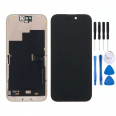
- Complete OLED screen with glass, panel, digitiser and frame
- Free tool kit: pentalobe and tri-point (Y00• screwdrivers, picks, a pry tool and a suction cup
- Free screen protector, so your new glass does not get scratched straight away
- Free dust-proof membrane, the seal used during installation
For comparison, in Spain, replacing an iPhone 15 Pro screen through Apple without AppleCare+ costs over €400. With this iLevante replacement, you pay a fraction of that price while keeping the same brightness and 120 Hz refresh rate. If you would rather not open the phone yourself, any trusted repair technician can fit it using the tools included in the box.
How to replace the iPhone 15 Pro OLED screen: a guide from the iLevante team
Allow between one and two hours if this is your first time. The repair is of medium difficulty, and patience is key. The iPhone 15 Pro opens from the front, even though the back can also be removed, so the screen comes off first.
- Discharge the battery to below 25% and switch off the phone. A fully charged battery punctured by accident is a genuine fire risk.
- If the glass is badly shattered, cover it with overlapping strips of packing tape. This helps prevent cuts and gives the suction cup a surface to grip.
- Remove the two pentalobe screws on either side of the USB-C port.
- Warm the edges with a hairdryer until they feel hot to the touch. Place the suction cup near the bottom, pull gently and insert the first pick.
- Work your way around the edge without inserting the pick too deeply: about 3 mm at the top and bottom, 5 mm along the right side and just 2 mm on the left. On the left, next to the Action button, two very thin screen cables run along the edge. On the right, near the power button, you will feel some clips that act as stops. Do not force them; release them gradually.
- Remove the metal cover over the logic board (Y000 screws) and disconnect the battery first. Then disconnect the screen connectors.
- Transfer the ambient light sensor from the old screen to the new one. It is held in place by a small bracket with two screws and a thin adhesive strip.
- Connect the new screen and the battery, switch on the phone and test everything before sealing it: check touch response in all four corners, brightness, 120 Hz and make a call to check that the screen switches off when you hold the phone to your ear.
- Fit a new adhesive seal (we recommend having one ready separately), replace the pentalobe screws, apply a little heat and leave the phone under pressure for at least 30 minutes, for example with a few books on top.
The sensor people forget, which makes the iPhone restart every three minutes
This is one of the most frequently reported problems on repair forums. On iPhones from the iPhone 13 series onwards, the front flex cable carrying the ambient light sensor also includes a temperature sensor. If it is left on the old screen or not connected properly, the system cannot detect it and the iPhone restarts by itself roughly every three minutes. It looks like a logic board fault, but in reality it is a forgotten cable. The good news is that Face ID is not part of the screen. On the iPhone 15 Pro, the TrueDepth module stays in the chassis, so you do not need to touch it.
True Tone, the Unknown Part message and what iOS tells you
Apple identifies each screen by its serial number. When you fit a replacement that does not come from Apple's own supply chain, an Unknown Part message will appear in Settings > General > About. The iPhone will work as normal; the message is for information only. True Tone, the automatic colour adjustment that adapts to the light in the room, may be disabled. Since iOS 18.3, the system only checks the touchscreen chip data and True Tone calibration. A technician with a programmer can therefore copy this data from your old screen to the new one, or transfer the chip, to restore the feature. If you do the repair yourself without a programmer, the message will remain and the screen will still work normally; the only thing you lose is this colour tone adjustment.
One last tip from our workshop: keep the broken screen until you have checked that everything is working properly. It contains the original True Tone data and ambient light sensor, and you never know when you might need them again.
• Product Weight: 0.14 kg.The technical specs of Apple iPhone 15 Pro
can help you to choose the correct repair part for your device. Make sure your model reference is the same as this element. Here are some tech specs to help you:
- Brand: Apple
- Apple iPhone 15 Pro Size: 146.6 x 70.6 x 8.3 mm.
- Release date: 2023, September 12.
- Weight: 187 g.
- Screen specs: LTPO Super Retina XDR OLED, 120Hz, HDR10, Dolby Vision, 1000 nits , 2000 nits.
- Screen size: 6.1 inches, 91.3 cm2.
PVP:
SNK.AS15355447.90€ AvailableInStockNewCondition