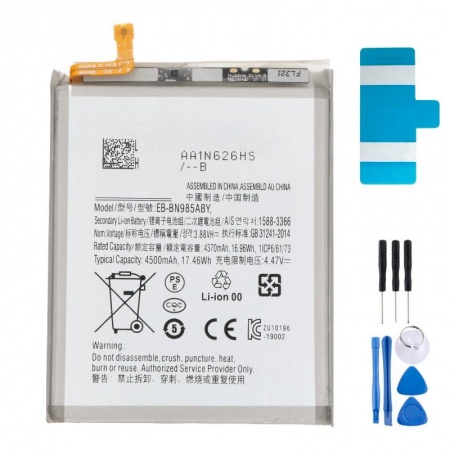
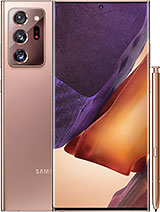
4500mAh Battery for Samsung Note 20 Ultra 5G / EB-BN985ABY
Your Note 20 Ultra is still a powerhouse. A huge display, S Pen, great cameras… but if you are already looking for a charger by the afternoon, the battery is almost certainly the problem. This 4500mAh EB-BN985ABY battery is the replacement used by the Note 20 Ultra, with the same specifications as the original: 17.46 Wh, 3.88 V nominal voltage and lithium-polymer chemistry. It is a Premium-quality battery selected by the iLevante team because it restores the battery life your phone had when it was new.
One detail that can be confusing: it works with both the Note 20 Ultra 4G (SM-N985F) and the Note 20 Ultra 5G (SM-N986B, N986U, N986U1, N986W, N986N). Both versions use the same battery. However, be careful with the standard Note 20, which uses a different 4300mAh battery with a different shape, and with the S20 range, which is not compatible either.
What your Note 20 Ultra can give you again
With a healthy battery, the Note 20 Ultra can last around 11 and a half hours of browsing with the display set to adaptive 120Hz. If you reduce it to 60Hz, this increases to more than 14 hours. Video playback follows a similar pattern, increasing from around 13 hours to more than 17 depending on the refresh rate. When a worn battery cannot even reach half of these figures, replacing it makes a huge difference.
Fast charging is not lost either. The EB-BN985ABY supports 25W wired charging with a Super Fast Charging charger—approximately 31% in 15 minutes, 92% in one hour and a full charge in around 71 minutes—as well as 15W wireless charging and 4.5W Wireless PowerShare for charging your watch or earbuds by placing them on the back of the phone. Charging deliberately slows down after 50% to protect the cell, so do not be concerned when you notice this.
Signs that your Samsung Note 20 Ultra battery is worn out
These are the signs we see most often at iLevante:
- You reach the middle of the afternoon with an almost dead phone despite not using it very much.
- It switches off suddenly at 20 or 30%, especially in cold conditions or when opening the camera.
- The percentage jumps unpredictably, or the phone becomes excessively hot while charging.
- The back cover starts to lift at one corner, the display bulges, or the phone wobbles when placed on a table.
The last sign is serious. It means the battery is swollen. Unplug the phone, do not charge it again and replace the battery as soon as possible, because a swollen lithium cell can be punctured and end up damaging the display from the inside. It happens more often than you might think with this model: some users have reported the back cover lifting after just a year and a half of use.
Would you like to check before ordering? Open Samsung Members → Support → Phone diagnostics → Battery status. If it says Weak or Bad, you know what needs to be done. This battery comes with battery adhesive included and a free tool kit, so you have everything you need to get started.
How to replace the Note 20 Ultra EB-BN985ABY battery safely
Let us be honest: this repair is not particularly easy. Samsung glued the back cover in place and also secured the battery with fairly strong adhesive, without pull tabs. It is not impossible, but you need to take your time. The free tool kit includes the basic tools for opening the phone—a suction cup, picks, screwdriver and spudger. You will also need a gentle heat source, such as a hairdryer, and at least 90% isopropyl alcohol.
- Discharge the battery below 25% and switch off the phone. A battery with a low charge is much less dangerous if it is accidentally damaged.
- Heat the back cover to soften the adhesive, then separate it using the suction cup and picks. Do not insert the pick more than 5mm, as there are delicate components close to the edge.
- Remove the screws from the mid-frame and loudspeaker. Before touching anything else, disconnect the battery. Then disconnect the wireless charging and NFC coil connector.
- Apply isopropyl alcohol around the edges of the battery, wait a couple of minutes and repeat if necessary. Pry it up with a plastic spudger, never a metal tool, and do not bend the cell.
- Fit the new adhesive strips, position the battery and connect it. Switch on the phone and check that everything works before closing it.
A workshop tip: if wireless charging cuts out or NFC stops working after the replacement, in 90% of cases the coil connector has not been properly seated. Open the phone again, press the connector down until it clicks and you are done. Remember that the back cover needs new adhesive to be properly sealed.
Your first few days with the new Samsung Note 20 Ultra battery
During the first few days, the battery percentage may behave slightly unpredictably. This is normal. Complete one full cycle: charge it to 100%, leave it plugged in for another half an hour, use it until it switches off and then charge it fully in one go. After two or three cycles, the reading should be reliable.
To help it last for years, enable Protect battery under Settings → Battery and device care → More battery settings. As the Note 20 Ultra was limited to One UI 5.1, the available option here is a fixed charging limit of 85%, which can make a noticeable difference to battery lifespan. If you also want to extend battery life throughout the day, the iLevante team recommends reducing the display refresh rate to 60Hz and the resolution to FHD+. This setting provides the greatest increase in battery life with barely any loss of sharpness.
• Product Weight: 0.06 kg.The technical specs of Samsung Galaxy Note 20 Ultra
can help you to choose the correct repair part for your device. Make sure your model reference is the same as this element. Here are some tech specs to help you:
- Brand: Samsung
- Samsung Galaxy Note 20 Ultra Size: 164.8 x 77.2 x 8.1 mm.
- Release date: 2020, August 05.
- Weight: 208 g.
- Screen specs: Dynamic AMOLED 2X, 120Hz, HDR10+.
- Screen size: 6.9 inches, 116.7 cm2.
PVP:
SNK.AS0701549.95€ AvailableInStockNewCondition