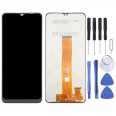
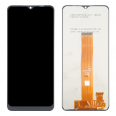
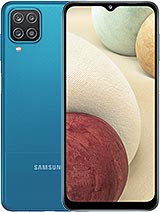
Samsung A12 / A125 Screen
The Galaxy A12 went on sale in late 2020 and was one of Samsung’s best-selling phones for a long time. Its users often want to extend its life rather than replace it. The parts that most commonly break on an A12 are usually the same: the front glass and, underneath it, the LCD. This Samsung A12 screen is a high-quality replacement part that replaces the entire front module. It is fitted as a complete unit, without having to glue the glass onto the panel or separate the layers.
The module comes with the LCD panel, touchscreen digitiser and glass already laminated together, as well as the flex cable that connects to the motherboard. This means you don’t have to separate the glass from the LCD, which is exactly the operation that causes the most screen damage during DIY repairs. We also include a screwdriver kit free of charge with your order to help you open the phone.
What this Samsung A12 screen offers: panel specifications
As a high-quality replacement, the panel has the same specifications as the one fitted to the phone at the factory. Here are the reference specifications:
- Size: 6.5 inches, 20:9 aspect ratio, with a teardrop-shaped notch (Infinity-V) for the front camera.
- Technology: PLS TFT LCD, 16 million colours.
- Resolution: HD+ 720 x 1600 pixels, approximately 270 ppi.
- Refresh rate: 60 Hz.
- Brightness: around 400 nits with manual brightness adjustment, rising to between 458 and 472 nits with automatic brightness in direct sunlight.
- Colour: covers approximately 96% of the sRGB colour space, with a slightly cool colour temperature (around 7,500 K).
One detail that few people know: the factory-fitted panel uses PWM (brightness-control flickering) at around 337.8 Hz when the brightness is below 20%. If you noticed some eye strain at very low brightness before the screen broke, the replacement screen will behave in the same way. This is a characteristic of the panel, not a fault.
Samsung A12 screen compatibility: check your model before buying
This replacement part is compatible with the SM-A125, meaning the original Galaxy A12 with a MediaTek Helio P35 processor, including the SM-A125F, SM-A125F/DS and SM-A125F/DSN variants.
Here’s the most common mistake. In 2021, Samsung launched the Galaxy A12 Nacho (SM-A127F), which many shops simply sell as the “A12”. It has a different processor (Exynos 850), and its screen has different part numbers. The iLevante team has dealt with many cases where a screen that “won’t turn on” was actually an A127F fitted with an A125F screen, or vice versa. This screen is not compatible with the Galaxy M12 (SM-M127F) or the F12 either, even though they share the same screen size and resolution.
To check your model, go to Settings > About phone > Model number, check the original box or look at the label under the SIM tray. If the phone no longer displays an image, the model number is often printed on the flex cable of the old screen.
Replacing the Samsung A12 screen: how we do it in the workshop
The A12 is fairly easy to open. It has a plastic back cover secured by clips and light adhesive, small Phillips screws, and the battery does not get in the way when accessing the screen connector. Even so, the iLevante team recommends paying particular attention to a couple of points where parts can break if you rush. Here’s a general overview of the process:
- Turn off the phone and remove the SIM tray. If you leave it in, the back cover will not come off properly and you could bend the eject mechanism.
- Open the back cover with a plastic pick, starting at a bottom corner and working your way around the edge. Apply gentle heat if it resists. Take care along the right-hand side: the fingerprint reader is built into the power button, and its flex cable is attached to the cover. Lift the cover as if opening a book and disconnect this cable before moving it aside.
- Remove the six screws from the upper motherboard cover (they are all the same: PH000, 1.5 mm) and lift the cover by its edges.
- Disconnect the battery before touching any other connectors. It is a 5,000 mAh battery, and accidentally shorting it with a metal tool could damage the motherboard.
- Release the screen flex cable connector by gently levering it from underneath, without pulling on the cable. Depending on the extent of the phone’s damage, you may need to remove the remaining flex cables and the motherboard to clear the way for the screen cable.
- Remove the broken screen by applying heat around the front edge. Around 80–90 °C is enough: higher temperatures do soften the adhesive, but they can also leave marks on an LCD you still plan to use or warp the plastic parts. Insert the pick at the edge, never through the centre.
- Thoroughly clean the frame. Adhesive residue is the main reason a new screen lifts or presses against one corner. We use fine tweezers or the tip of a precision craft knife.
- Test the screen before closing the phone. Connect the new screen flex cable and the battery, switch on the phone, and check the image and touchscreen across the entire display. Only then should you glue the screen in place and close the phone.
One warning we always repeat: do not apply adhesive to the centre of the screen. Apply it only around the perimeter, using double-sided adhesive tape or a thin bead of flexible adhesive. If the screen ever needs to be removed again, one glued across its entire surface is almost impossible to take off without breaking something.
Common problems after replacing the Galaxy A12 screen
Based on the repairs that come into our workshop and the questions from customers who have tried doing it themselves, the iLevante team sees the same issues time and again:
- The phone vibrates, but the screen stays black. In most cases, the flex cable connector has not been fitted correctly or the screen is for a different model (the A125F / A127F mix-up). Before assuming the part is faulty, reconnect the cable and press down evenly until you feel it click into place.
- Ghost touches (apps open by themselves or numbers are dialled). This is usually caused by a poorly seated flex cable, a screw pressing on the cable or adhesive residue pushing against the digitiser. Repositioning the cable and cleaning the frame usually fixes the issue.
- Low call volume after the repair. This is an unusual one: the A12 has small grey foam seals around the speaker and microphone. If they get lost during disassembly, the sound loses its fullness. Keep them safe with tweezers and put them back in place.
- The fingerprint reader stops working. This is almost always because the side-button flex cable was left disconnected when the back cover was closed.
For context, one of the first firmware updates Samsung released for the SM-A125F, in early 2021, specifically focused on touchscreen stability. If the touchscreen behaves erratically with a properly installed screen, it is worth checking that your phone has the latest update. For this model, the latest update is from November 2024, with Android 12 and One UI Core 4.1.
Do I need to replace my Samsung A12 screen, or is it just the screen protector?
Before ordering a replacement, it’s worth checking the obvious first. Remove the tempered-glass screen protector if you have one: often, the crack is only in the protector and the glass underneath is intact.
If the glass is broken but the image looks fine and the touchscreen responds, you can keep using the phone for a while. However, cracks that start at the corners tend to spread as the phone flexes during everyday use. Other signs that the module has been damaged internally include black or ink-like spots that grow, coloured lines, areas where the touchscreen does not respond, or a screen that lights up but displays nothing. At this point, the LCD or digitiser has failed, and the only solution is to replace the complete module. You can use the Samsung Members app to test the touchscreen area by area.
After installing your new Samsung A12 screen
We include a screen protector free of charge with every screen, so the new glass is protected from day one. The protector helps guard against scratches and minor knocks, but a strong impact or a sharp object can still break the panel. If you use your phone on construction sites, in warehouses or outdoors, a case with raised edges or a folio case can help you avoid another repair. The A12 is not certified as water- or dust-resistant, and this remains the case after repair. Avoid exposing it to moisture, especially during the first few days while the adhesive finishes setting.
• Product Weight: 0.12 kg.The technical specs of Samsung Galaxy A12
can help you to choose the correct repair part for your device. Make sure your model reference is the same as this element. Here are some tech specs to help you:
- Brand: Samsung
- Samsung Galaxy A12 Size: 164 x 75.8 x 8.9 mm.
- Release date: 2020, November 24. Released 2020, December 21.
- Weight: 205 g.
- Screen specs: PLS LCD.
- Screen size: 6.5 inches, 102.0 cm2.
PVP:
SNK.SPA229615.55€ AvailableInStockNewCondition