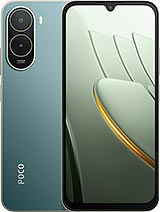
 Repair parts Xiaomi Poco C81 Pro



Receive it on tomorrow friday 06 november


Original parts for the Xiaomi Poco C81 Pro
In this section, you’ll find Original-quality components for the Xiaomi Poco C81 Pro, the 2026 entry-level model with a 6.9-inch 120 Hz display and a 6000 mAh battery. The available catalogue focuses on the back of the device: the camera lens and the complete cover with its frame. They’re useful both for anyone looking to restore the original finish and for repair shops that need a manufacturer-reference part to carry out repairs smoothly.
The 25128PC17G code and its twin, the Redmi A7 Pro 4G
The global variant of the Poco C81 Pro received its certifications under model code 25128PC17G. To check it on your device, go to Settings, About phone and Detailed specifications: the exact code appears in the Model field. It’s also printed on the box label. If the code you see is different, it’s a different model, even if it looks very similar.
Confusion is common because Xiaomi released several phones with almost identical internals at the same time. These are the ones most often mixed up in searches:
- Redmi A7 Pro 4G (25128RN17A): shares the Unisoc T7250 processor, 6.9-inch display and 6000 mAh battery. Specialist media consider it to have the same hardware under a different brand, although the exterior design differs.
- Redmi A7 Pro 5G: a different device, with a different processor and a different main camera. Don’t use it as a reference for C81 Pro parts.
- Poco C81 and Poco C81x: they share a commercial name, but are sold as separate models. Always check the code before ordering a replacement part.
The Poco C81 Pro is only available in a 4G version, so there’s no need to distinguish between 4G and 5G variants with the same name. The practical takeaway: for the back of the phone, always select the part listed for the Poco C81 Pro, as the exterior finish is precisely what sets it apart from its Redmi twin.
Which rear part does your Xiaomi Poco C81 Pro need, depending on the damage?
The back of the C81 Pro is made of plastic, and the camera module contains the 13 MP main sensor and a low-resolution auxiliary sensor. The two parts in the catalogue cover different types of damage, so first check exactly what’s damaged.
| Part | When to choose it | Scope of replacement |
|---|---|---|
| Rear camera lens (Original) | The cover is in good condition and only the camera glass is broken or badly scratched | Targeted replacement, the most affordable option |
| Complete rear cover with camera frame (Original) | Cracks, impact damage to the corners, or a deformed or detached cover | The entire rear housing is replaced |
If only the camera glass is damaged
The original rear camera lens for Poco C81 Pro is the glass that protects the rear sensors. If the rest of the cover is in good condition, it’s the most straightforward and lowest-cost solution. It’s best to replace it promptly, as broken glass leaves the sensors exposed to dust and further scratches. Bear in mind that the lens only replaces the glass: if the sensor underneath was also hit, replacing the lens alone won’t fix it.
If the cover is cracked, dented or detached
The original complete rear cover with camera frame replaces the entire rear housing and includes the frame around the camera module, so the assembly is aligned as it was when it left the factory. It’s the right choice if there are cracks, the part has become deformed or the camera frame has come loose. The phone was sold in black, gold and green: check the product listing for the available colour before ordering. If your phone’s lens is also broken, check whether the cover includes it in the product listing, or order both parts together.
Adhesive, side-mounted fingerprint sensor and IP52 on the Poco C81 Pro
The rear cover isn’t held in place by pressure alone: Xiaomi’s official spare parts catalogue for this chassis includes a specific adhesive for the cover. In practice, when replacing it, you need to remove the old cover and apply new adhesive so it fits correctly and there are no gaps around the edges. For a repair shop, this means having the adhesive as well as the cover.
The fingerprint reader is integrated into the side button, not the back or under the display. For this reason, replacing the cover or lens doesn’t affect the biometric sensor or require you to handle its connection. Finally, the C81 Pro has an IP52 rating for dust and splashes: once the phone has been opened, this protection depends on the repair seal, so you shouldn’t assume it’s guaranteed.
Frequently asked questions about Xiaomi Poco C81 Pro replacement parts
Is the Redmi A7 Pro 4G cover compatible with the Poco C81 Pro?
They share hardware inside, but the exterior design isn’t the same. For the cover and lens, the safest option is to use parts intended for the Poco C81 Pro. This helps you avoid differences in the camera module or finish.
Is there a 5G version of the Poco C81 Pro?
No. The Poco C81 Pro is 4G only. The similarly named 5G model is the Redmi A7 Pro 5G, which has a different processor and main camera, so it doesn’t share these rear parts.
Are these parts compatible with the Poco C81 without Pro?
Don’t assume they are. The Poco C81 and C81x are sold as different models. The replacement parts in this category are for code 25128PC17G, so check it in Settings before buying.
Is IP52 protection lost when the cover is replaced?
It may be lost if the seal isn’t fitted correctly. The cover is bonded to the chassis, and protection against dust and splashes depends on applying new adhesive properly. After the repair, avoid exposing the phone to water.