
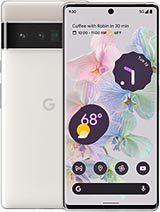
 Repair parts Google Pixel 6 Pro
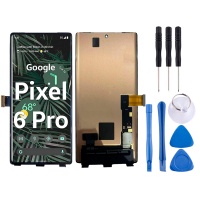

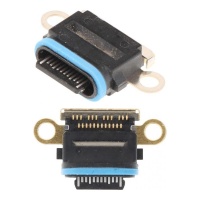



Receive it on monday 02 de november


Here you’ll find spare parts for the Google Pixel 6 Pro, the 2021 model with a 6.7-inch curved screen and Google Tensor processor. We currently stock a full OLED screen, a 5003 mAh battery and a USB-C charging connector. Before choosing a part, check the model code and bear in mind that almost all repairs on this handset require the display to be removed, as it opens from the front.
GLU0G, G8V0U and GF5KQ: the three Google Pixel 6 Pro model codes
Google manufactured the Pixel 6 Pro in three variants: GLU0G (the global version, sold in Europe), G8V0U (United States and Australia) and GF5KQ (Japan). The only differences between them are the network bands, such as 5G mmWave. Google’s original screen is identical across all three, so the code is mainly useful for checking that you have a 6 Pro and not another Pixel model.
To check the code, go to Settings > About phone > Regulatory labels. Bear in mind that the codes contain a zero, not the letter O: they are GLU0G and G8V0U, although they are often written incorrectly in spare-parts listings. If you see a different code, your handset is not a Pixel 6 Pro. The standard Pixel 6 has a smaller screen, while the Pixel 7 Pro, which is also curved and 6.7 inches, has its own codes. Don’t assume its parts are compatible with yours.
The Google Pixel 6 Pro has its fingerprint reader built into the screen assembly
The original panel is a 6.7-inch LTPO OLED with a resolution of 1440 x 3120 and a variable refresh rate of 10 to 120 Hz, with curved side edges. The fingerprint reader is optical and integrated into the screen assembly, so replacing the panel also means replacing the sensor. For this reason, once the new screen is fitted, you need to calibrate the fingerprint reader using Google’s online repair tool. You’ll need a computer and a USB cable, and the phone will be restored to factory settings when the process is complete. Let the customer know they should back up their data beforehand.
We currently stock the full OLED screen for Google Pixel 6 Pro. A compatible OLED screen is considerably less expensive than an original Google part. However, it’s worth checking certain functions after installation:
- Fingerprint reader: several technicians report that calibration does not always complete successfully on panels not supplied by Google. If the customer needs the fingerprint reader to work, let them know in advance.
- 120 Hz refresh rate: check in the display settings that the Smooth Display option is still working.
- Touch response on the curved edges: check that touches register correctly all the way to the edge of the glass.
5003 mAh and part number G63QN: the Pixel 6 Pro battery is attached beneath the screen
The factory-fitted battery is the G63QN, with a nominal capacity of 5003 mAh (3.85 V and 19.26 Wh). Google guarantees a minimum of 4905 mAh. The compatible 5003 mAh G63QN battery for Google Pixel 6 Pro is currently available in Premium quality. This is a compatible part with the same part number and capacity as the original, and it is usually cheaper than a genuine replacement.
To choose the right part, it’s important to know how the battery is secured. The battery is glued to the chassis with adhesive. It has a plastic pull tab for removal, but this can break easily during disassembly and may not release the battery properly. What’s more, you can only access it by removing the screen first, and it also has graphite sheets that dissipate heat towards the chassis. If the screen already has a crack or mark, replace both parts at the same time: this way, you only have to open the phone once.
The Google Pixel 6 Pro USB-C connector is soldered to the motherboard
On the Pixel 6 Pro, the charging port is not a separate module with its own flex cable: the USB-C connector is soldered to the motherboard. This design is one of the reasons the model scored 5.5 out of 10 for repairability. Replacing the connector alone requires microsoldering with a hot air station. Otherwise, the alternative is to replace the entire motherboard.
In this category, you’ll find the original-quality USB-C charging port, listed under the Pixel 7 Pro, which also has a connector soldered to the motherboard. It is intended for repair shops with soldering equipment. Before soldering it, compare its shape and solder points with the connector on your board.
All Google Pixel 6 Pro repairs start with removing the screen
This model opens from the front: the first part to be removed is the screen, with the battery and motherboard underneath. In addition to the adhesive, the screen has a plastic frame with tabs that secures it to the chassis. This frame allows it to be refitted without shifting, but if you don’t apply new adhesive, the phone will lose its factory seal.
This has two implications when choosing parts. Firstly, even if you’re only replacing the battery or port, you still have to remove and refit a curved panel that breaks easily. Secondly, the factory IP68 water resistance depends on how the screen is resealed, so don’t assume it will be maintained after opening the device.
Fingerprint calibration, model codes and a soldered connector: frequently asked questions about the Pixel 6 Pro
Do the GLU0G and G8V0U have the same screen?
Yes. Google’s original screen is the same part for GLU0G, G8V0U and GF5KQ. The differences between the three variants are in the network hardware, not the panel.
Why does the fingerprint reader stop working after replacing the screen?
The reader is built into the screen and linked to the phone for security. That’s why you need to calibrate it using Google’s online tool; when the process is complete, the phone is reset to factory settings. If the tool returns an error, the fingerprint reader will not work until calibration is completed successfully.
Does the screen need to be removed to replace the Pixel 6 Pro battery?
Yes. The battery is adhered beneath the screen, so you need to remove the panel first. If the screen is already damaged, it’s worth replacing it during the same repair.
Can you replace just the charging port?
Yes, but it requires microsoldering, as the connector is attached to the motherboard. Without soldering equipment, the only alternative is to replace the entire motherboard.





