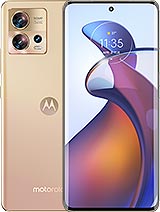
This power and volume button flex cable for Motorola Edge 30 Fusion is the ideal component if your phone no longer responds well when you increase or decrease the volume, or if the power button is faulty, gets stuck, or simply stops working. With this replacement, you can use the side buttons of the Motorola Edge 30 Fusion as if it were new.
In many repairs, it?s quite common to discover that a faulty power and volume button flex cable for Motorola Edge 30 Fusion is not the only issue after a drop or prolonged use; the same impacts or internal stress that affect the side-button assembly can also compromise the display or the device?s autonomy. For that reason, you may also need a compatible replacement such as the Motorola Edge 30 Fusion Full Screen if the panel shows cracks, touch failures, or image defects, or the 4400mAh Battery for Motorola Edge 30 Fusion and Edge 40 NP44 if the phone powers off unexpectedly, drains too quickly, or no longer holds a stable charge, ensuring the handset returns to consistent, factory-like operation.
What type of flex cable is this for Motorola Edge 30 Fusion?
This is a side button control flex cable, meaning the internal component that connects the physical power and volume buttons to the motherboard of the Motorola Edge 30 Fusion. The small push buttons that detect each click are soldered onto this flex when:
- You turn the screen on or off on your Motorola Edge 30 Fusion
- You increase or decrease the volume during calls, videos, or games
- You hold the power button to restart the phone
As a high-quality replacement, it is designed to offer responsive tactile feedback, precise clicking, and longevity comparable to the original factory component.
The power and volume flex cable is a very thin and delicate piece, so it's quite common for it to get damaged with use. Some of the most common reasons for damage to this flex in the Motorola Edge 30 Fusion are:
- Lateral drops or impacts that deform the mobile's structure and damage the internal flex.
- Pressing too hard the power or volume buttons repeatedly.
- Moisture entry that oxidizes the contacts and causes intermittent failures.
- Previous internal manipulations (other repairs) where the flex has been bent beyond its limit.
When the flex breaks or is damaged, you start experiencing typical symptoms: the button sometimes responds, sometimes doesn't; you need to press harder, or the phone stops responding to any button inputs.
Advantages of replacing the power and volume flex on your Motorola Edge 30 Fusion
Replacing this flex cable component for Motorola Edge 30 Fusion is a very effective solution when the side buttons start to fail. Some advantages of installing this replacement are:
- Regain full control over turning the screen on and off.
- Volume buttons that are smooth and precise, with clean clicks and no delays.
- Avoid using tricks like on-screen volume apps or turning on only with the charger.
- Extend the life of your Motorola Edge 30 Fusion without having to replace the phone.
- Perfect fit designed specifically for the Motorola Edge 30 Fusion model.
Additionally, its lightweight of about 5 grams fits perfectly into the device's internal structure, without affecting the use or feel of the buttons.
Details and features of the flex cable for Motorola Edge 30 Fusion
This power and volume button flex cable for Motorola Edge 30 Fusion is intended to offer clean installation and stable operation. Key features include:
- Specific compatibility: designed for the Motorola Edge 30 Fusion model.
- High quality: durable materials for intense daily use.
- Precise connectors: fit perfectly into the board ports without looseness.
- Thin and flexible design: adapts to the internal curvature of the chassis.
- Integrated buttons: includes the power and volume push button section.
All of this makes it an ideal replacement when the original buttons stop working as they should, maintaining the same factory functionality.
If you notice any of these failures on your Motorola Edge 30 Fusion, it is very likely that this is the component you need to replace:
- The power button does not respond or needs to be pressed multiple times.
- The volume goes up or down by itself, or doesn't move when pressing the buttons.
- The buttons feel loose, sunken, or without a click.
- After a drop or impact, the buttons no longer work.
With this button flex cable for Motorola Edge 30 Fusion, you can restore your phone to the comfort of controlling the volume and turning it on or off with total normality.
Buy your Motorola Edge 30 Fusion flex at iLevante
At iLevante.com, you'll find this and many other replacements for Motorola Edge 30 Fusion and other phone models. We are committed to quality parts, fast shipping, and a simple shopping experience so you can have your phone as good as new in no time. If you're looking for a power and volume flex cable for Motorola Edge 30 Fusion, this part is just what you need to bring life back to your phone's buttons.
• Product Weight: 0.05 kg.The technical specs of Motorola Edge 30 Fusion
can help you to choose the correct repair part for your device. Make sure your model reference is the same as this element. Here are some tech specs to help you:
- Brand: Motorola
- Motorola Edge 30 Fusion Size: 158.5 x 72 x 7.5 mm or 7.7 mm.
- Release date: 2022, September 08.
- Weight: 168 g / 175 g.
- Screen specs: P-OLED, 1B colors, 144Hz, HDR10+, 1100 nits.
- Screen size: 6.55 inches, 103.6 cm2.
PVP:
SNK.AS1238153.25€ AvailableInStockNewCondition