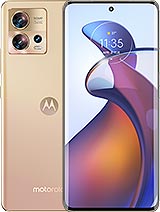
Full Screen for Motorola Edge 30 Fusion: Make Your Phone Like New Again
This full screen for Motorola Edge 30 Fusion in black is the piece you need when your phone screen is broken, has stripes, stains, unresponsive touch areas, or has turned completely black. With this replacement, you can replace the damaged screen and enjoy your smartphone like the first day.
When You Need This Screen Replacement for Motorola Edge 30 Fusion
Many day-to-day situations can put your Motorola Edge 30 Fusion screen out of action: a drop to the floor, a hit on a corner, carrying the phone in your pocket with keys, or even a small liquid accident. If you notice any of these symptoms, this piece is for you:
- Visible cracks or breaks on the front glass.
- Ghost touches or areas where the touch does not respond.
- Black screen although the phone is still on.
- Color stripes, flickering, or stains on the image.
- Very low brightness or faded colors that were not there before.
With this full screen, you can fix all these problems at once since it includes the panel and the touch system ready to be mounted.
Features of the Motorola Edge 30 Fusion Screen in Black
This replacement is specifically designed for the Motorola Edge 30 Fusion, so it perfectly fits the device's chassis and its internal connectors. Among its key points are:
- Color: Black, ideal for maintaining the original look of the phone.
- Type of piece: Full screen (panel + touch in a single module).
- Compatibility: Only valid for Motorola Edge 30 Fusion.
- Approximate weight: 120 g (including the complete set).
Being a full screen, you do not need to separate the glass from the internal panel, which makes the replacement operation much easier and with a better final result.
Testing Process Before Installing the Screen
Before definitively attaching the piece to the chassis of the Motorola Edge 30 Fusion, it is important to test the screen with the phone open. To do this, connect the flex of the new screen to the connector on the device's main board, turn on the phone, and check that everything works normally: clear image, correct brightness, and touch response on the entire surface.
During this test, do not remove the protections or bend the flex cable excessively. An angle greater than 90 degrees can cause failures such as black screen or the appearance of stripes. Once verified that everything is fine, you can proceed to mount the full screen on the chassis with the assurance that the replacement works correctly.
Advantages of Replacing the Screen on Your Motorola Edge 30 Fusion
By installing this full screen, you can enjoy all the features of your Motorola Edge 30 Fusion without having to buy a new phone. Here are some of the most obvious advantages:
- Savings compared to buying a new terminal.
- Recover the original visual and touch performance of the device.
- Avoid cuts on fingers from broken glass and improve safety in use.
- Extend the lifespan of your smartphone and generate less electronic waste.
If you use your Motorola Edge 30 Fusion to work, study, or play, having a screen in good condition makes a huge difference in comfort and productivity.
iLevante and Your Screen for Motorola Edge 30 Fusion 📱
At iLevante, we focus on mobile and tablet replacements, offering specific parts like this full screen for Motorola Edge 30 Fusion. By purchasing in our online store, you get a replacement adapted to your model, with fast shipping and a specialized catalog in the smartphone world.
If your screen is broken, has stripes, or the touch has stopped responding, this piece is the solution you've been looking for to bring your Motorola Edge 30 Fusion back to life and continue enjoying all its functions without compromising on a good user experience.
| Situation | Without replacing the screen | With full screen Motorola Edge 30 Fusion |
| Broken screen | Distorted image, risk of cuts | Smooth and safe surface, clear vision |
| Faulty touch | Ghost touches, frustration using apps | Precise touch response across the entire screen |
| Stripes and flickers | Difficult to read, watch videos, or play games | Clear and fluid visual experience |
| Cost | Consider changing phones | Significant savings while keeping your device |
With this full screen, your Motorola Edge 30 Fusion is back to its usual self, ready to keep up with your daily pace.
• Product Weight: 0.14 kg.The technical specs of Motorola Edge 30 Fusion
can help you to choose the correct repair part for your device. Make sure your model reference is the same as this element. Here are some tech specs to help you:
- Brand: Motorola
- Motorola Edge 30 Fusion Size: 158.5 x 72 x 7.5 mm or 7.7 mm.
- Release date: 2022, September 08.
- Weight: 168 g / 175 g.
- Screen specs: P-OLED, 1B colors, 144Hz, HDR10+, 1100 nits.
- Screen size: 6.55 inches, 103.6 cm2.
PVP:
SNK.AS11842155.75€ AvailableInStockNewCondition