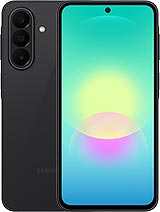
Samsung Galaxy A27 Premium Screen - iLevante.comScreen for Samsung Galaxy A27 5G: Give your phone a new life!
Hey! Did the screen of your Samsung Galaxy A27 break and now it looks like it's been through a spider war? Don't worry, at iLevante.com we have the perfect solution with our Samsung A27 Premium quality screen. This replacement is intended for the model released in 2026 and comes with a generous 6.7-inch screen. Whether your phone corresponds to the references SM-A276E, SM-A276E/DS, SM-A276E/DSN, SM-A276B, SM-A276B/DS, SM-A276B/DSN, SM-A276U, SM-A276U1 or SM-A276W, this piece fits like a glove.
The Galaxy A27 is one of those phones that goes with you everywhere, and when the screen breaks, everything gets complicated. That's why we've prepared this Premium option so you can restore the user experience without drama. It’s a screen similar to the original in feel and performance, perfect for continuing to enjoy your series, photos, and social networks as before.
Looking for a Premium quality screen for Samsung A27?
When you search for “Samsung Galaxy A27 screen†or “A27 screen replacementâ€, what you really want is something that works well and won't let you down mid-conversation. Our Premium version stands out because it offers smooth touch response and vibrant colors that make the Samsung A27 shine again.
Additionally, it comes ready to install with all necessary components: the panel, the touch glass, the connection flex, and the image controller. Everything included so you don't have to hunt for loose parts. And as a bonus, we give you a basic tool kit including screwdrivers, picks, and suction cup to make the repair more manageable.
Main features of the Galaxy A27 screen
- 6.7-inch size that perfectly fits the design of the Samsung Galaxy A27.
- Premium quality with good clarity and smooth touch.
- Compatible with all variants: SM-A276E, SM-A276B, SM-A276U and their DS and DSN versions.
- Includes a free screen protector to start off on the right foot.
- Designed to make installation easier at home or in a workshop.
Signs your Samsung Galaxy A27 screen needs to be replaced
Sometimes the glass doesn’t need to be shattered to decide it's time. Here are some hints that often appear on the Galaxy A27:
- The touch is slow to respond or doesn’t detect your fingers at all.
- Strange color spots or dark areas appear that weren't there before.
- After an accidental dip, circles or drops appear on the image.
- You notice light leaking from the edges even though the brightness is low.
- Colors look dull or have odd hues in the corners.
If any of these situations sound familiar, a screen for Samsung A27 is the fastest way to return to normal.
How to change the Samsung Galaxy A27 screen step by step
Feel like doing it yourself? Awesome! Changing the screen of the Samsung A27 can be a quite satisfying experience when you follow the steps calmly. We explain the process in a simple and detailed way:
Preparation before starting
Completely power off your Galaxy A27 and make sure there's no battery left. It's recommended to use an anti-static wrist strap or touch something metal to discharge any charge you may have in your hands. Have the tool kit we give you at hand and work on a clean, well-lit surface.
Step 1: Heat the edges
Use a hair dryer or heat gun about 5-10 cm away. Go around the four sides of the phone for a few seconds each. The goal is to soften the adhesive without burning anything. Don’t stay too long in one spot.
Step 2: Lift the glass
Carefully insert a plastic pick on one side. Move it gently up and down to separate the adhesive. Repeat on all four sides until the glass is loose enough. Then place the suction cup in the center and gently pull to detach the screen completely.
Step 3: Disconnect the flex cables
Once the old screen is lifted, you’ll see several flex connectors. Disconnect them very carefully using the plastic lever. Never pull them hard. Remove the old screen and clean any adhesive residue with a bit of isopropyl alcohol if necessary.
Step 4: Install the new Premium screen
Place the new Samsung Galaxy A27 screen and connect the flex cables in the same order you removed them. Make sure they fit well. Turn on the phone to check that everything works: touch, colors, and brightness. If everything is correct, you can stick the new screen in place.
Step 5: Final Fixing
Press gently on the edges for several minutes. Leave the phone to rest for a few hours for the adhesive to work. Done! Your Samsung A27 will have that 6.7-inch screen looking brand new again.
Why choose Premium quality for your Samsung A27?
The Premium quality is the top choice for those who want a good balance between price and feel. It offers a thickness similar to the original and quick touch response that makes using the Galaxy A27 a pleasure again. It's a very practical option if you don't want to complicate life by going to the official services.
Quick compatibility table
| Model | Compatible references | Screen size |
| Samsung Galaxy A27 | SM-A276E, SM-A276B, SM-A276U | 6.7" |
| Galaxy A27 Dual SIM | SM-A276E/DS, SM-A276B/DS | 6.7" |
| A27 international versions | SM-A276U1, SM-A276W, SM-A276E/DSN | 6.7" |
Fun tips to avoid messing up when changing the A27 screen
Work with background music, it relaxes you! If you get stuck at any point, take a deep breath and check the flex cables again. Many Samsung Galaxy A27 users have managed to change the screen in less than an hour following these steps. And if you prefer not to take the risk, you can always take the part to your trusted technician and save on the full labor cost.
Remember that the Galaxy A27 is a sturdy phone, but accidents happen. With this Premium screen, you’ll regain that 6.7-inch visual experience you love. Get to work, and make your Samsung A27 as good as new!
• Product Weight: 0.20 kg.The technical specs of Samsung Galaxy A27 5G
can help you to choose the correct repair part for your device. Make sure your model reference is the same as this element. Here are some tech specs to help you:
- Brand: Samsung
- Samsung Galaxy A27 5G Size: 162.4 x 78.2 x 7.8 mm.
- Release date: 2026, June 10.
- Weight: 200 g.
- Screen specs: Super AMOLED, 120Hz.
- Screen size: 6.7 inches, 110.2 cm2.
PVP:
SNK.LCDSAMA2775.45€ AvailableInStockNewCondition