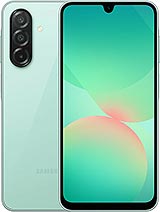
Samsung A26 5G screen: bring your Galaxy's display back to the way it looked when you first got it
Have you dropped your phone and left the glass looking like a spider's web? Perhaps there isn't a crack, but a green line has appeared, running from the top of the screen to the bottom. Or there's a black spot in one corner that's growing by the day. We see all three problems with the Galaxy A26 5G almost every day at iLevante, and they all have the same solution: replace the complete Samsung A26 5G screen. This Premium-quality part is designed for the model Samsung launched in March 2025.
One thing worth knowing first: damaged pixels on an AMOLED panel don't recover. Black spots that spread like ink, coloured lines and ghost touches won't be fixed by restarting your phone or performing a factory reset. We've seen plenty of customers spend an afternoon backing up their data for nothing. The fault is in the hardware, and replacing the part is the only fix.
What's included with this Samsung A26 screen
This is a complete assembly, ready to install. That means you won't have to separate layers or struggle with optical adhesives, which is where most DIY repairs go wrong. It includes:
- 6.7-inch display panel with FHD+ resolution of 1080 x 2340 pixels (around 385 ppi) and the original 19.5:9 aspect ratio.
- Integrated touch glass, with the Infinity-U notch for the 13 MP front camera in exactly the right place.
- Display controller and flex cable, already fitted, with a connector that plugs straight into the motherboard.
As for brightness, our technicians measured a peak brightness of around 1,080 nits on this Premium screen. In everyday use, it delivers around 330 nits with manual brightness and reaches about 700 nits with automatic brightness in direct sunlight. Reading WhatsApp on the patio, watching a video at night or checking the GPS in the car: everything looks clear, with vivid colours and sharp text.
Compatibility: check your Samsung Galaxy A26 5G model
Before ordering, check the model number under Settings > About phone. This screen is compatible with:
- SM-A266B, SM-A266B/DS and SM-A266B/DSN (the European version, most commonly found in Spain)
- SM-A266E, SM-A266E/DS and SM-A266E/DSN
- SM-A266U, SM-A266U1, SM-A266W and SM-A266M
A common mistake is confusing it with the Galaxy A25 5G. That model has a 6.5-inch screen and a different housing, so this part won't fit. It's not suitable for the A36 or A16 either, even though they may look similar. If you're unsure, send us your model number and we'll confirm compatibility straight away.
Why replacing the Samsung A26 5G screen is easier than it looks
The A26 5G has an advantage many people don't know about. Its fingerprint reader isn't under the screen; it's built into the side power button. On other Galaxy models, replacing the panel can affect fingerprint unlocking. That won't happen here: the fingerprint reader will keep working as usual after the replacement, with no unusual calibration needed.
The trickiest part is something else, and we'll be upfront about it: the A26 5G has an IP67 rating for water and dust resistance. That protection depends on the adhesive sealing the phone. When you open it, the factory seal is broken. If you want it to resist splashes again, apply new adhesive when closing it and don't reuse the old one. Even then, don't take it swimming after a repair.
So you don't need to buy anything else, we include the following with your Samsung A26 5G screen:
- Free screen protector, so your new glass won't get scratched by your keys from day one. As the fingerprint reader is on the side, the protector won't affect unlocking.
- 1 free tool kit, including a precision screwdriver, picks, a plastic pry tool and a suction cup. It's just what you need to open the phone without scratching the frame.
If your broken screen is ruining your day, order now and you'll receive it very soon with everything you need.
The iLevante team's guide to fitting your Samsung A26 screen
Our technicians rate this repair as medium difficulty. With patience and an hour to spare, you can do it at home. Here are the steps we follow in our workshop:
- Back up your data and switch off your phone. Also remove the SIM tray using the eject tool.
- Heat the back cover to around 70°C for several minutes using a hairdryer or heating plate. This softens the adhesive so the glass cover doesn't crack when you lift it.
- Lift the cover with the suction cup and a thin pick, working gradually around the edge. Be careful near the side buttons, as the fingerprint reader's flex cable is located there.
- Remove the Phillips screws from the motherboard cover and disconnect the battery before anything else. Always use a plastic tool: a short circuit on the motherboard can be very costly.
- Disconnect the screen flex cable and any other necessary connectors, without bending the motherboard or inserting tools underneath it.
- Test the new screen before closing the phone. Connect it, switch on the phone and check the touch response, brightness and that there are no dead pixels. This step can save you a lot of trouble.
- Reassemble and seal the phone with new adhesive. Leave something slightly heavy on the phone for a few minutes to help it bond properly.
A workshop tip: after fitting the screen, go to Settings > Display > Motion smoothness and check which mode is selected. Many customers tell us the display looks 'odd', only to find that the setting has switched back to Standard mode.
Signs that your Samsung A26 5G screen needs replacing
Sometimes the damage isn't immediately visible. These are the symptoms we see most often on the A26 5G and, in our experience, they can only be fixed by replacing the part:
- Fixed green, pink or white lines, especially after an impact.
- Black or purple spots that spread from a corner.
- Areas that don't respond to touch, or touches that seem to happen by themselves.
- A black screen even though the phone vibrates, makes sounds and receives notifications.
- Glass lifting at the edges, often because the battery has swollen. If this happens, check the battery too.
If any of these sound familiar, don't wait for the problem to get worse. A cracked screen lets dust and moisture in, and an AMOLED spot never gets smaller. Add your Samsung A26 5G Premium screen to your basket with the free screen protector and tool kit, and get back to using your phone as normal as soon as possible.
• Product Weight: 0.20 kg.The technical specs of Samsung Galaxy A26
can help you to choose the correct repair part for your device. Make sure your model reference is the same as this element. Here are some tech specs to help you:
- Brand: Samsung
- Samsung Galaxy A26 Size: 164 x 77.5 x 7.7 mm.
- Release date: 2025, March 02.
- Weight: 200 g.
- Screen specs: Super AMOLED, 120Hz.
- Screen size: 6.7 inches, 110.2 cm2.
PVP:
SNK.SPA474830.75€ AvailableInStockNewCondition