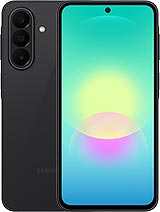
Screen for Samsung Galaxy A27 5G: give your phone a new lease of life!
Hey! Has the screen on your Samsung Galaxy A27 broken and now it looks like it has been through a spider invasion? Don't worry: at iLevante.com, we have the perfect solution with our Premium-quality Samsung A27 screen. This replacement part is designed for the 2026 model, which comes with a generous 6.7-inch screen. Whether your phone has the model number SM-A276E, SM-A276E/DS, SM-A276E/DSN, SM-A276B, SM-A276B/DS, SM-A276B/DSN, SM-A276U, SM-A276U1 or SM-A276W, this part is a perfect fit.
The Galaxy A27 is one of those phones that goes everywhere with you, so when its screen gets damaged, everything becomes more complicated. That's why we've prepared this Premium option, so you can get back to using your phone without any hassle. It offers a feel and performance similar to the original, making it ideal for enjoying your shows, photos and social media just like before.
Looking for a Premium-quality screen for your Samsung A27?
When you search for a Samsung Galaxy A27 screen or an A27 screen replacement, what you really want is a part that works properly and won't let you down mid-conversation. Our Premium version stands out for its smooth touch response and vivid colours, bringing your Samsung A27 back to life.
It's also ready to install and includes all the necessary components: the display panel, touchscreen glass, connection flex cable and display controller. Everything is included, so you don't have to search for separate parts. As an extra, we'll also give you a basic tool kit with screwdrivers, opening picks and a suction cup to make the repair easier.
Key features of the Galaxy A27 screen
- 6.7-inch size, designed to fit the Samsung Galaxy A27 perfectly.
- Premium quality, with good clarity and a smooth touch response.
- Compatible with all variants: SM-A276E, SM-A276B, SM-A276U and their DS and DSN versions.
- Includes a free screen protector, so you can get off to a good start.
- Designed to make installation easier, whether you're repairing it at home or in a workshop.
Signs that your Samsung Galaxy A27 screen needs replacing
The glass doesn't have to be completely shattered to know it's time for a replacement. Here are some common signs to look out for on your Galaxy A27:
- The touchscreen responds slowly or doesn't detect your fingers at all.
- Unusual coloured marks or dark areas appear on the display.
- After an accidental splash, circles or spots start appearing on the image.
- Light appears to leak around the edges, even when the brightness is low.
- Colours look washed out or have unusual tints in the corners.
If any of this sounds familiar, a Samsung A27 screen is a quick way to get your phone back to normal.
How to replace the Samsung Galaxy A27 screen step by step
Fancy doing it yourself? Great! Replacing the screen on your Samsung A27 can be very satisfying if you take your time and follow the steps carefully. Here's a simple, detailed guide:
Before you get started
Switch off your Galaxy A27 completely and make sure the battery is fully discharged. We recommend using an anti-static wrist strap or touching a metal object to discharge any static electricity from your hands. Have your tool kit ready and work on a clean, well-lit surface.
Step 1: Heat the edges
Use a hairdryer or heat gun from a distance of around 5–10 cm. Move it around all four sides of the phone for a few seconds at a time. The aim is to soften the adhesive without damaging anything. Don't leave the heat in one spot for too long.
Step 2: Lift the glass
Carefully insert a plastic opening pick along one of the sides. Gently move it up and down to separate the adhesive. Repeat on all four sides until the glass is loose enough. Then place the suction cup in the centre and gently pull to lift the screen completely.
Step 3: Disconnect the flex cables
Once the old screen has been lifted, you'll see several flex connectors. Carefully disconnect them using a plastic tool. Never pull on them forcefully. Remove the old screen and, if necessary, clean away any adhesive residue with a little isopropyl alcohol.
Step 4: Install the new Premium screen
Position the new Samsung Galaxy A27 screen and reconnect the flex cables in the same order in which you disconnected them. Make sure they're firmly in place. Switch on the phone to check that everything works: touchscreen, colours and brightness. If everything is working properly, you can secure the new screen in place.
Step 5: Secure the screen
Gently press around the edges for a few minutes. Leave the phone to rest for a few hours so the adhesive can set. That's it! Your Samsung A27 will have its 6.7-inch screen looking like new again.
Why choose Premium quality for your Samsung A27?
Premium quality is a popular choice for anyone looking for a good balance between price and feel. It offers a thickness similar to the original and a fast touch response, making your Galaxy A27 a pleasure to use again. It's a practical option if you'd rather avoid the hassle of going to an official service centre.
Quick compatibility table
| Model | Compatible model numbers | Screen size |
|---|
| Samsung Galaxy A27 | SM-A276E, SM-A276B, SM-A276U | 6.7" |
| Galaxy A27 Dual SIM | SM-A276E/DS, SM-A276B/DS | 6.7" |
| International A27 versions | SM-A276U1, SM-A276W, SM-A276E/DSN | 6.7" |
Helpful tips to avoid mishaps when replacing your A27 screen
Put on some music while you work—it can help you relax! If you get stuck at any point, take a deep breath and check the flex cables again. Many Samsung Galaxy A27 users have managed to replace their screen in under an hour by following these steps. And if you'd rather not take any risks, you can always take the part to a technician you trust and save on the cost of a full repair service.
Remember, the Galaxy A27 is a durable phone, but accidents happen. With this Premium screen, you'll be able to enjoy the 6.7-inch viewing experience you love once again. Let's get started and make your Samsung A27 look like new!
• Product Weight: 0.20 kg.The technical specs of Samsung Galaxy A27 5G
can help you to choose the correct repair part for your device. Make sure your model reference is the same as this element. Here are some tech specs to help you:
- Brand: Samsung
- Samsung Galaxy A27 5G Size: 162.4 x 78.2 x 7.8 mm.
- Release date: 2026, June 10.
- Weight: 200 g.
- Screen specs: Super AMOLED, 120Hz.
- Screen size: 6.7 inches, 110.2 cm2.
PVP:
SNK.LCDSAMA2775.45€ AvailableInStockNewCondition