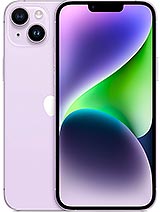
iPhone 14 Plus screen
A knock in one corner, a green line running across the panel or a touchscreen that no longer responds at the bottom. We see many iPhone 14 Plus devices arrive at our workshop with these symptoms, and in most cases the fix is the same: replace the complete screen assembly. This replacement part comes with all its layers joined together as a single unit: glass, display panel, touchscreen digitiser, plastic perimeter frame and flex cables. All you need to do is disconnect the old part and connect the new one.
It is a Premium-quality part, designed for anyone who wants a sharp picture and a responsive touchscreen without paying the price of an original screen at an authorised service centre. The iLevante team has tested it in real devices, and it fits the chassis perfectly. The edges line up, and there is no play when you press the sides.
iPhone 14 Plus screen specifications
- Replacement part: complete screen (glass + panel + touchscreen + frame).
- Size: 6.7 inches.
- Resolution: 2778 × 1284 pixels, 458 ppi.
- Typical maximum brightness: 720 nits.
- Touchscreen: capacitive multitouch with Haptic Touch.
- Quality: Premium.
At 720 nits, the screen is easy to read outdoors and offers plenty of brightness for high-contrast videos and photos. If you are replacing a screen with a touchscreen that only works intermittently, you will notice the difference as soon as you unlock your phone.
Models compatible with this iPhone 14 Plus screen
Before buying, check the model number under Settings > General > About. Tap the part number to see the code beginning with “A”. This screen is compatible with:
- A2886
- A2632
- A2885
- A2896
- A2887
How to replace the iPhone 14 Plus screen step by step
Before you start, here is a useful fact: the iPhone 14 Plus, along with the iPhone 14, was the first iPhone since the 4S that can be opened from both the front and the back. Apple redesigned the inside around a central aluminium chassis and separated the screen from the other components. In practice, this means the battery is on the other side, so you do not need to touch it. This considerably reduces the risk of accidentally damaging something compared with the Pro models.
We include a free screwdriver kit with the required bits. There are two 6.8 mm Pentalobe P2 screws at the bottom, and tiny Tri-point Y000 screws inside, on the connector brackets. You will also need a suction cup, an opening pick, a hair dryer and isopropyl alcohol of over 90% concentration. Allow around 45 minutes if this is your first time.
- Turn off your iPhone and remove the two Pentalobe screws next to the Lightning port.
- If the glass is badly cracked, cover it with clear packing tape. This will help prevent cuts and give the suction cup a better grip.
- Warm the bottom edge with the hair dryer until it is a little too hot to touch comfortably. Attach the suction cup, pull gently and insert the opening pick into the gap.
- Run the pick along the right side, the top edge and the left side, applying heat to each as you go. Watch how deep you insert it: no more than 3 mm on the right side and along the top, where the sensors are, and no more than 2 mm on the left, where delicate cables run. Mark the pick with a pen so you do not insert it too far.
- Open the screen like a book and prop it up so it does not pull on the flex cables.
- Remove the screen connector bracket (one Y000 screw) and disconnect the connector by lifting it straight up. Then do the same with the front sensor bracket and connector.
- Clean away any adhesive residue with isopropyl alcohol. Never use water.
- Connect the new iPhone 14 Plus screen without closing it yet, switch the phone on and test the touchscreen across the whole surface, the brightness and calls. If everything works, turn it off and close it.
One detail that many people miss: when connecting the flex cables, press down on one end of the connector first and then the other, never in the middle. Pressing in the middle is the most common way to bend a pin, which can then cause unusual faults that seem to be caused by the screen.
Front sensors: it is best to transfer your original ones
There is a small assembly at the top of the screen that includes the proximity sensor, ambient light sensor and a microphone. If your replacement part does not already include it, you will need to transfer it from your old screen. It is held in place by two Y000 screws and can be removed with a little heat. Even if your replacement includes one, the iLevante team recommends transferring the original whenever it is in good condition. The proximity sensor turns off the screen when you hold the phone to your ear, and the original factory-fitted sensor usually works better than a generic replacement.
What to expect in iOS after replacing the screen
After you install a non-Apple screen, iOS will display an Unknown Part notification under Settings > General > About. It is for information only: it does not disable anything, affect everyday use or require any action.
True Tone is a separate matter. This feature relies on calibration data stored in the factory-fitted screen, and the iPhone may no longer offer it when a non-Apple part is installed. Many technicians restore it by transferring the data with a programmer. Home users generally lose the feature and do not miss it too much. Face ID is not affected by replacing the screen on this model: its components are separate, in the front camera assembly, which you do not touch.
Common problems when replacing the iPhone 14 Plus screen
We have put together the issues we see most often in our workshop and in customer enquiries. Almost all of them can be fixed in five minutes:
- Black screen when switching on: the screen connector is not fully seated. Disconnect it, check for dust and press it down again at both ends.
- Ghost touch or areas that do not respond: this is usually caused by a connector that is not fully seated or a frame that has been slightly bent by the impact. It could also be a badly fitted screen protector pressing against one edge.
- The screen does not turn off during calls: the front sensor assembly is missing, or its connector is not properly connected.
- The screen does not sit flat: check that there is no old adhesive left on the frame and that the metal connector bracket is properly secured.
- The phone does not respond after installation: perform a force restart. Press and release the volume-up button, press and release the volume-down button, then press and hold the side button until the Apple logo appears.
As for water resistance, it is worth being clear: the iPhone 14 Plus left the factory with an IP68 rating, but once the phone has been opened, that protection is no longer guaranteed. Fitting a new screen adhesive when closing it will restore much of its protection against dust and splashes.
Does your iPhone 14 Plus screen need replacing?
It is not always obvious. Some drops leave the glass intact but damage the panel underneath. These are the signs we look for before recommending a replacement:
- Black or purple spots that gradually spread from one corner.
- Vertical coloured lines, even if they appear only intermittently.
- The phone registers touches by itself, or there are areas where it does not register your finger.
- Flickering when the brightness is low.
- Cracks in the corners. Even if everything looks fine now, the glass in that area can split further over time and let moisture in.
To help your new screen last, we also include a free screen protector in the package. Fit it on the day of installation, while the surface is still clean. Add a case with an edge that sits slightly above the glass, and a face-down drop is much less likely to reach the panel.
• Product Weight: 0.20 kg.The technical specs of Apple iPhone 14 Plus
can help you to choose the correct repair part for your device. Make sure your model reference is the same as this element. Here are some tech specs to help you:
- Brand: Apple
- Apple iPhone 14 Plus Size: 160.8 x 78.1 x 7.8 mm.
- Release date: 2022, September 07.
- Weight: 203 g.
- Screen specs: Super Retina XDR OLED, HDR10, Dolby Vision, 800 nits , 1200 nits.
- Screen size: 6.7 inches, 109.8 cm2.
PVP:
SNK.IP4P004624.90€ AvailableInStockNewCondition