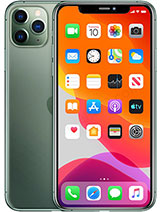
iPhone 11 Pro Max screen
The iPhone 11 Pro Max was released in September 2019. It was the first iPhone with a Super Retina XDR display: a 6.5-inch OLED with a resolution of 2688 x 1242 pixels and 458 ppi. In that year's laboratory tests, it achieved the highest score ever given to a smartphone. With a display like this, a drop can quickly take its toll: if the OLED screen is hit, damaged pixels can go dark, black spots may appear and spread, or green and purple lines may develop. The touchscreen may also stop responding in certain areas. The fix is straightforward: replace the complete assembly.
That's exactly what we offer: a Premium-quality full screen assembly for iPhone 11 Pro Max, with the display panel, touchscreen digitiser and flex cables already joined together, ready to connect directly to the logic board. Your order also includes a free screwdriver kit and, as a free gift, a screen protector to help keep your new screen safe from day one.
Premium screen brightness and image quality
Our iLevante team has measured this screen's performance so you know what to expect before buying. It offers typical brightness of 720 nits and reaches 1080 nits with HDR content. This makes it easy to read outdoors while preserving the depth of HDR videos. Its format matches the iPhone 11 Pro Max: the same 6.5-inch diagonal, the precisely shaped top notch and correctly positioned frame mounts. It fits securely, with no gaps or raised edges against the stainless-steel chassis.
Touch response matters too. This model doesn't have 3D Touch: Apple removed it in this generation and replaced it with Haptic Touch, which recognises long presses and responds with a vibration from the Taptic Engine. With the Premium screen, contextual menus, the keyboard cursor and Lock Screen shortcuts work just as before.
When to replace your iPhone 11 Pro Max screen
A crack is the clearest sign, but it's rarely the only one. When a customer asks us for advice, the iLevante team usually recommends checking for these symptoms:
- Black or purple spots that spread over time. These are damaged OLED pixels and won't recover.
- Vertical green or white lines after an impact or strong pressure in a pocket.
- Areas of the touchscreen that don't respond, or ghost touches that open apps by themselves.
- A black screen while the phone is on: it rings, vibrates and receives notifications, but displays nothing.
There's one issue worth ruling out before you buy. In 2020, some iPhone 11 Pro Max models began showing a greenish tint for a few seconds after unlocking, especially at low brightness. This coincided with iOS 13.4 and 13.5, and replacing the screen didn't fix it in documented cases. If that's your only symptom, update iOS before opening the phone.
Compatibility: models A2218, A2161 and A2220
This iPhone 11 Pro Max screen is compatible with all three models made by Apple. The A2218 is the international version sold in Spain and most of Europe. The A2161 is for the United States and Canada, while the A2220 is for mainland China, Hong Kong and Macau, with a dual physical SIM tray. The only differences between them are their network bands and SIM configuration. The screen is identical for all three. To find out which model you have, go to Settings > General > About and tap the model number. The code starting with A will appear.
How to replace the iPhone 11 Pro Max screen: an iLevante team guide
This is a moderately difficult repair and, if it's your first time, it takes between one and two hours. The trickiest part is the sensor assembly at the top, rather than removing the screen. It includes the earpiece speaker, proximity sensor, ambient light sensor and Face ID infrared illuminator, and is factory-paired with your iPhone. It must be transferred from the old screen to the new one. If it gets damaged, Face ID will stop working.
The included screwdriver kit covers the three screw head types used in this model. Keep the screws organised on a marked surface: several are similar in length, and putting a long screw into a short screw hole can puncture the logic board.
- Pentalobe P2: two 6.7 mm screws on the bottom edge, either side of the Lightning connector.
- Tri-point Y000: two 1.3 mm screws on the battery connector cover and six 1.3 mm screws on the display connector cover.
- Phillips #000 and Y000: two 1.6 mm Phillips screws and one 1.4 mm Y000 screw securing the earpiece and sensor assembly.
- Prepare the phone. Let the battery drain below 25% and switch the phone off. If the glass is badly cracked, cover it with packing tape to stop shards coming loose and help the suction cup grip.
- Warm the bottom edge. Use a hairdryer or a low-power heat gun for about one minute, until the glass feels warm to the touch. The adhesive around the edge provides the seal and is harder to loosen when cold.
- Open it with a suction cup and opening pick. Lift the bottom edge slightly and insert the pick no more than 3 mm. Going deeper could damage the front sensors. Loosen the left side and top first, then work more carefully along the right side, where the display cables run.
- Open the screen like a book towards the right and support it without pulling on the flex cables.
- Disconnect the battery first. Remove its connector cover and disconnect the battery before touching anything else. Disconnecting the screen while the battery is connected could damage components on the logic board.
- Disconnect the three screen connectors: the OLED panel, the front sensor assembly and the digitiser. When reconnecting them, press down at both ends rather than in the centre, as the pins can bend.
- Transfer the sensor assembly. Remove its three screws, gently warm the top area and lift the assembly without stretching the flex cable. Place the ambient light sensor's white diffuser on the new screen in the same position as before.
- Test everything before closing the phone. Connect the screen and battery, switch the phone on and check the image, touchscreen, Face ID and earpiece. During a call, the screen should turn off when you bring it close to your face.
- Seal and close the phone. Clean off any remaining adhesive with isopropyl alcohol, apply new screen adhesive, fit the top tabs first and lower the screen until it clicks into place.
After the replacement: True Tone, warnings and water resistance
Since iOS 13.1, iPhone 11 models check the screen when they start up. If you install a screen that isn't paired with the phone, a warning appears on the Lock Screen for the first few days. After that, it's recorded under Settings > General > About as an “Unknown Part” (or as an “Important Display Message” in iOS 15.1 and earlier). Apple says this warning doesn't prevent you from using the iPhone. However, True Tone, the automatic colour temperature adjustment, will no longer work. This can happen even when a genuine Apple screen is fitted outside Apple's service network. A repair shop with a programmer can copy the data from the old screen's chip to the new one and restore the feature.
Water resistance is another thing to bear in mind. The iPhone 11 Pro Max was rated IP68 for up to 4 metres for 30 minutes, and this protection depends on the adhesive around the edge. Correctly applied new adhesive restores much of the seal, but the factory water resistance can't be guaranteed after the phone has been opened. That's why the iLevante team recommends treating it as a phone that can withstand splashes, and not putting it in a swimming pool. As for the screen, the free protector included with your purchase is an inexpensive way to avoid going through the whole repair again.
• Product Weight: 0.18 kg.The technical specs of Apple iPhone 11 Pro Max
can help you to choose the correct repair part for your device. Make sure your model reference is the same as this element. Here are some tech specs to help you:
- Brand: Apple
- Apple iPhone 11 Pro Max Size: 158 x 77.8 x 8.1 mm.
- Release date: 2019, September 10.
- Weight: 226 g.
- Screen specs: Super Retina XDR OLED, HDR10, Dolby Vision, 800 nits , 1200 nits.
- Screen size: 6.5 inches, 102.9 cm2.
PVP:
SNK.IP110001B18.55€ AvailableInStockNewCondition