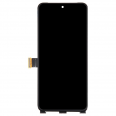
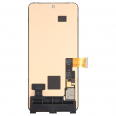
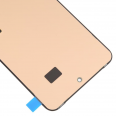
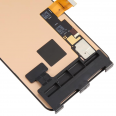
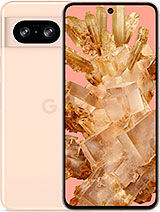
Google Pixel 8 OLED screen
The Pixel 8 arrived in shops in October 2023 with a screen that Google named Actua: 6.2 inches, OLED technology, an FHD+ resolution of 1080 x 2400 pixels and 428 pixels per inch. It is one of the phone's strongest features. It is also the part that suffers most when the phone falls to the ground, even though it has Corning Gorilla Glass Victus. In Corning's laboratory tests, this glass withstands drops from around two metres onto rough surfaces, but outdoors, a blow to a corner against the pavement is enough for the first crack to appear.
This Pixel 8 screen is a complete assembly with OLED quality. It is suitable for models GPJ41, GKWS6 and G9BQD. With this replacement part, the phone regains the image quality, touch response and smoothness it had from the factory, without having to visit an official repair centre.
The same brightness as the original Pixel 8 screen
As it is an OLED panel, this replacement offers the same brightness as the original screen. Google provides the following figures:
- Up to 1,400 nits for HDR content.
- Up to 2,000 nits of peak brightness in small areas of the image.
- Variable refresh rate from 60 to 120 Hz, which Google calls Smooth Display.
In our measurements, the iLevante team found that the Pixel 8 reaches around 1,600 nits across the entire screen with 120 Hz enabled, slightly more than the manufacturer's stated figure. With 60 Hz fixed, it reaches 1,400 nits. In other words, the higher refresh rate also affects brightness, which is worth bearing in mind when using the phone in direct sunlight.
Colour is another of its strengths. In Natural mode, white remains very close to the D65 standard (around 6,500 K), and colour errors are almost always below what the human eye can distinguish. One lesser-known detail is that the panel controls low brightness using a 240 Hz PWM frequency, so people who are sensitive to flickering may experience eye strain in low-light conditions. This was already the case with the original screen, so replacing the part does not change anything in this respect.
What the Pixel 8 screen includes and why a complete assembly matters
The assembly includes the OLED panel, the already attached touch glass (digitiser) and the flex cable for connection to the motherboard. As everything comes pre-assembled, there is no need to separate the layers, which is what most often damages a new panel. We also include a free screen protector and a free tool kit with the order. In practice, this means you can start the repair with what you need to open the phone and protect the new glass from the very first day.
Before ordering, check the exact model. There are three phones with very similar names whose screens are not compatible with one another:
- Pixel 8: 6.2 inches. This is the model compatible with this screen.
- Pixel 8 Pro: 6.7 inches, with a different resolution and panel.
- Pixel 8a: 6.1 inches, with a different screen and a different installation method.
The model code can be found under Settings > About phone > Model and also on the box.
Signs that your Google Pixel 8 screen needs replacing
If the glass is broken, there is not much to think about. Other less obvious faults can also be fixed with this replacement part:
- Vertical green or pink lines running from the top to the bottom of the screen, especially after a drop.
- A black screen even though the phone still rings and vibrates when a call comes in.
- Ghost touches or areas where the touchscreen stops responding.
- Dark or coloured spots that gradually grow, typical of an OLED panel damaged internally.
One tip before opening the phone: if lines or flickering appear without the phone having suffered an impact, try forcing a restart by holding down the power and volume-up buttons for around 30 seconds, then start the phone in safe mode. If the flickering disappears in safe mode, an app is most likely responsible rather than the screen.
There have also been reports of small waves or bumps visible on the screen under angled light. According to teardown reports, these appear to be caused by the spring contacts underneath the panel and do not affect its operation.
How to replace the Pixel 8 screen step by step
The screen is secured to the chassis with adhesive and a series of clips around the edge. The iLevante team estimates around one hour of work for someone with some experience. What really matters is being patient with the heat and knowing where the cable is located. This is the process we follow in the workshop:
- Discharge the battery below 25% and switch the phone off completely. A charged lithium battery can catch fire if accidentally punctured.
- Heat the edges one at a time (bottom, right, left and top) for around two minutes per side, using a hairdryer or a heat gun at a moderate temperature.
- Make a mark 3 mm from the tip of the pick and do not insert it beyond this mark. There are spring contacts and the screen's own cable underneath the edge, and both can be easily damaged.
- Lift the screen with the suction cup and gradually release it from right to left. The flex cable is on the left-hand side, and opening from that side makes it very easy to break.
- Remove the small metal plate covering the connector and disconnect it with a plastic pry tool, levering upwards.
- Clean any adhesive residue from the chassis using isopropyl alcohol above 90% and a microfibre cloth.
- Connect the new screen without sticking it down and switch on the phone. Check the image, touchscreen response in the corners and automatic brightness.
- If everything works correctly, switch off the phone, apply the adhesive and press all around the edge until you hear the clips engage. Allow the adhesive to set for several hours, with some weight on top if possible.
Important precaution: the back of the OLED panel is extremely delicate. A scratch or small dent on this side can make the screen unusable, so always place it on a clean, soft surface.
Fingerprint sensor after replacing the Pixel 8 screen
This is the question we receive most often after the repair. The Pixel 8 uses an optical in-screen fingerprint reader, which reads your finger through the panel itself. When the screen is replaced, the reader loses its calibration. It may not accept new fingerprints or may display an error when you try to unlock the phone. It must be recalibrated:
- On a computer, open Google's official web tool for repairing and updating Pixel devices (Pixel Update and Software Repair) using the Chrome browser.
- Connect the Pixel 8 with a USB-C cable that supports data transfer. Cables that only charge the phone will not work.
- Choose the Fingerprint Calibration option and follow the instructions. The phone will enter fastboot mode and restart several times.
- When finished, register your fingerprints again in Settings.
Adhesive residue or dust on the fingerprint reader area can also prevent it from reading your fingerprint, so clean this area carefully before closing the phone. When fitting the included screen protector, centre it correctly over the fingerprint reader and make sure there are no bubbles above it.
Water resistance after the repair
The Pixel 8 leaves the factory with an IP68 rating, but this seal cannot be fully recreated outside the factory. Even Google-authorised repair centres cannot guarantee that water resistance will be maintained after replacing the screen. With new adhesive applied correctly and sufficient drying time, the phone will be protected against splashes and rain. Even so, we recommend not submerging it.
If you would rather not open the phone yourself, you can take the screen and the phone to a trusted technician. Installing the replacement will not take long, and you can avoid the markup charged for purchasing the part directly from the repair shop.
• Product Weight: 0.15 kg.The technical specs of Google Pixel 8
can help you to choose the correct repair part for your device. Make sure your model reference is the same as this element. Here are some tech specs to help you:
- Brand: Google
- Google Pixel 8 Size: 150.5 x 70.8 x 8.9 mm.
- Release date: 2023, October 04.
- Weight: 187 g.
- Screen specs: OLED, 120Hz, HDR10+, 1400 nits , 2000 nits.
- Screen size: 6.2 inches, 91.1 cm2.
PVP:
SNK.SPS702649.90€ AvailableInStockNewCondition