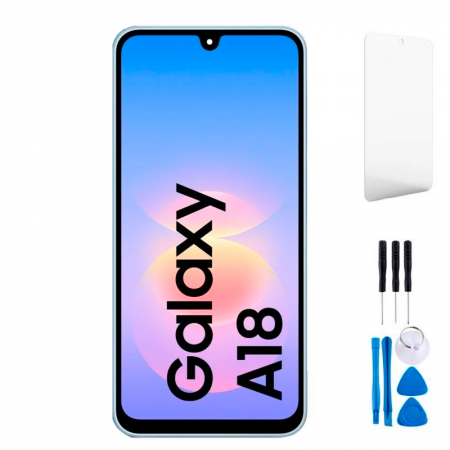
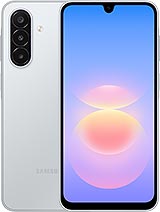
Original Samsung A18 4G screen with frame: the same one your phone came with
You dropped your Galaxy A18, didn’t you? Maybe the glass is shattered. Or worse: the glass looks almost intact, but the image is covered in black spots, or your phone vibrates with notifications but you can’t see a thing. We hear this every day, so take a breath — it can be fixed.
This is a complete, original Samsung A18 screen, the kind Samsung packages as a Service Pack for its repair centres. In other words, it’s the same part fitted at the factory: the same panel, the same touchscreen and the same colours. It also comes already attached to its frame, which is the phone’s central chassis. We’ll explain below why that makes your life a lot easier.
What does “Service Pack” mean, and why does it matter for the Samsung A18 screen?
There are all kinds of replacement parts out there. Some are copies, some are “compatible” screens with a different type of panel, and some look very similar but just don’t seem right once you switch them on. A Service Pack is a new, official part distributed by Samsung for repairs. That means no surprises with the brightness, touch sensitivity or the distinctive colour tones of Samsung AMOLED screens.
At iLevante, we always put it the same way: if you want your phone to look and respond exactly as it did when you first took it out of the box, the original part is the one to choose.
What to expect from the Samsung A18 screen you’re about to fit
This phone was released in mid-September 2026, and its screen is by far one of its best features. With this replacement, you’ll get all of this back:
- 6.7-inch Super AMOLED panel with Full HD+ resolution (1080 x 234• and around 385 pixels per inch. Blacks look truly black and colours really pop.
- 90 Hz refresh rate, which you’ll notice when scrolling through social media or browsing the web. You can keep it at 90 Hz or switch to 60 Hz in Settings to save some battery.
- Factory-original brightness: around 800 nits in high-brightness mode in full sunlight, peaks of about 1,100 nits in small areas of the screen, and a minimum of 1.8 nits for reading in the dark without straining your eyes. These are iLevante’s figures for the original panel, and since this is the same part, you won’t lose any performance.
- Gorilla Glass 3 on the front.
- The teardrop-shaped notch and slightly wider-than-usual bottom bezel, just as Samsung designed them. No thinner, no thicker.
One detail we’re often asked about: the A18’s fingerprint reader is built into the side-mounted power button, not located under the screen. So you don’t need to worry about the fingerprint sensor stopping working when you replace it.
Samsung A18 4G screen compatibility
Before ordering, check your phone’s model number in Settings > About phone, on the box or on the SIM tray label. This screen is compatible with:
- SM-A185F and SM-A185F/DS
- SM-A185F/DSB
- SM-A185M and SM-A185M/DS
Watch out for similar models. The Galaxy A17 also has a very similar 6.7-inch screen, and the 5G version of the A18 is a different phone internally. Neither uses this part. Not sure which model you have? Send us the model number and we’ll check it before you place your order.
Why the Samsung A18 screen comes with a frame
Samsung bonds the screen to the central chassis at the factory using a very strong adhesive. Removing the broken glass from the old frame is the trickiest part of the repair: it’s easy to bend the frame, damage the new panel by fitting it onto an uneven surface, or leave gaps where dust can get in.
With the frame included, you can avoid all that. The process is different: instead of removing the screen, you transfer the phone’s components (motherboard, battery, cameras, speaker, etc.) from the old chassis to the new one. It takes a little longer, but the result is much neater. Your phone also gets a new chassis, which is a bonus if the drop also damaged the corners. Since the A18 has IP64 protection against dust and splashes, starting with a new frame helps everything fit back together as it should.
And so you don’t have to go out looking for tools, we’ll include a free screwdriver kit with the screen. It has what you need to remove all the screws inside the A18.
When it’s time to replace your Samsung A18 screen
A cracked screen is obvious. What often causes confusion are faults that appear even when the glass doesn’t have a single scratch. AMOLED screens are great, but they’re also very sensitive to knocks and pressure. Look out for these signs:
Image problems
- Black or purple spots that spread like ink. This often happens after a drop or when you carry your phone in a tight back pocket. The spot won’t disappear — it will get bigger.
- Green, pink or white lines, either vertical or horizontal. On Samsung OLED panels, the well-known green line is almost always caused by physical damage to the panel, and the only real solution is to replace it.
- A completely black screen while the phone is still on: it rings, vibrates and charges, but nothing appears on the display.
- Flickering or a greenish tint when the brightness is turned right down.
Touchscreen problems
- Dead zones, especially near the bottom where the keyboard is.
- Ghost touches: the phone opens apps or types by itself.
Quick tip: on many Samsung phones, dial *#0*# to open a test menu. Select “Touch” to check whether each area of the touchscreen responds. You can also use the diagnostics in the Samsung Members app. This lets you check before taking anything apart.
How to replace the Samsung A18 screen with frame, step by step
You can do it at home if you’re patient and have good lighting. If you’re not sure, many repair shops will let you bring your own part and charge you for the labour only. Here’s the general guide prepared by the iLevante team. Read it all before you get started.
- Switch off the phone and remove the SIM tray.
- Warm the back cover with a hairdryer, but don’t overdo it: around 60°C, so it feels warm to the touch. It’s made of plastic and can warp if it gets too hot. Open it slowly around the edges using a suction cup and opening picks.
- Remove the screws from the inner cover that protects the motherboard. Take a photo first, as the screws aren’t all the same length.
- Disconnect the battery first. This helps prevent a short circuit when disconnecting the other components.
- Disconnect the screen flex cable, the cable connecting the mainboard to the charging board, and the thin antenna cables. Use a plastic tool, never a metal one.
- Remove the motherboard, charging board, speaker, vibration motor and other modules, and place them in order on your work surface.
- The battery is glued in place. Apply a few drops of isopropyl alcohol (over 90%) around the edges, wait a couple of minutes and gently lift it with a plastic card. Never bend or puncture it: a damaged lithium battery can catch fire. If it’s swollen, replace it with a new one.
- Fit everything into the new frame in reverse order. Check which parts are already fitted to the new chassis and which ones you need to transfer from the old one, such as the side buttons or any small components.
- Reconnect the battery and switch the phone on before closing the back cover. Test the display, touchscreen, fingerprint sensor, front camera and proximity sensor during a call.
- If everything works, apply new adhesive to the back cover, press it down evenly and leave it secured with soft elastic bands for a few hours.
One tip we often repeat: leave the protective film on the new screen until the very end. It can save you from fingerprints or an accidental scratch while you work.
Common problems after replacing the screen
- The screen won’t turn on: in most cases, a flex cable isn’t connected properly. Disconnect the battery, reseat the connector until it clicks into place and try again.
- No signal or poor reception: an antenna cable may have come loose. They’re extremely thin and easy to miss.
- The back cover won’t close properly: there may be old adhesive residue or a screw that hasn’t been fitted correctly. Clean everything thoroughly before sticking it back on.
Look after your new Samsung A18 screen
Gorilla Glass 3 can handle everyday use, but it’s not invincible. A tempered glass screen protector and a case with slightly raised edges can save you a lot of trouble, as corners are usually the first part to hit the ground when a phone is dropped. Avoid carrying your phone in your back pocket. Constant pressure is what causes the black spots we mentioned earlier on AMOLED screens. And if it gets wetter than it should, switch it off and don’t charge it until it’s completely dry: IP64 protects against splashes, not immersion.
• Product Weight: 0.20 kg.The technical specs of Samsung Galaxy A18 4G
can help you to choose the correct repair part for your device. Make sure your model reference is the same as this element. Here are some tech specs to help you:
- Brand: Samsung
- Samsung Galaxy A18 4G Size: 164.4 x 77.9 x 7.7 mm.
- Release date: 2026, September 15.
- Weight: 196 g.
- Screen specs: Super AMOLED, 90Hz.
- Screen size: 6.7 inches, 110.2 cm2.
PVP:
SNK.GH82-40516A49.90€ AvailableInStockNewCondition