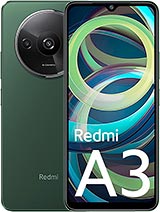
Redmi A3 screen: premium complete replacement to restore the display and touchscreen
The Redmi A3 went on sale in February 2024 and has a large screen for its range: 6.71 inches with a 20.6:9 aspect ratio, covering almost 83% of the front of the phone. Because it takes up so much space, it bears the brunt of most impacts. The most common issue we see in our repair shop is a chipped corner after a fall onto the pavement. We also get many phones with an apparently intact screen but a spreading white spot, or a touchscreen that opens apps by itself.
This premium complete screen for the Redmi A3 replaces the entire assembly: the LCD panel, the pre-laminated touch glass and the connecting flex cable. There is no need to separate the digitiser from the panel or glue the layers together separately. Connect it to the motherboard and the phone will display an image again.
Technical specifications of the premium Redmi A3 screen
The iLevante team has compared this replacement part with the factory specifications of the Redmi A3 (models 23129RN51X and 23129RN51H). Here are the details you need to know:
- Technology: IPS LCD, the same type fitted to the phone as standard.
- Size and resolution: 6.71 inches with 720 x 1650 pixels (HD+), equivalent to around 268 pixels per inch.
- Refresh rate: up to 90 Hz, so scrolling through menus and social media remains smooth.
- Touch sampling rate: up to 180 Hz.
- Brightness: around 450 nits in High Brightness Mode (HBM).
- Dimming: compatible with the system’s DC dimming, which adjusts brightness without the flicker typical of PWM.
A note about brightness: the Redmi A3 has an outdoor mode that temporarily increases brightness in strong light and switches off automatically after around 15 minutes. If you notice the brightness drop after replacing the screen without changing anything yourself, this mode may simply have switched off. It is not a fault with the replacement part.
When to replace the Redmi A3 screen
A cracked glass screen is the clearest sign, but it is not the only one. These are the faults we see most often:
- White spots or areas of light bleed after a fall, even if the glass is not cracked. The inner LCD layers have been damaged.
- Ghost touches: the phone types, opens apps or scrolls by itself. If the glass is cracked, the digitiser is almost always the cause, and replacing it should fix the problem.
- Areas that do not respond to touch, especially near the edges or at the bottom of the keyboard.
- Vertical lines, unusual colours or a black screen while the phone is switched on. You can tell because it still vibrates and makes sounds.
It is worth doing a quick check before ordering a replacement. If the touchscreen issue started just after installing an app, restart the phone in safe mode. If it still fails there, the problem is hardware-related.
How to disassemble the Redmi A3 (the surprising part)
On most phones, you open the screen from the front. The Redmi A3 is opened from the back cover, as the screen connectors are underneath the inner frame. Here is the process followed by the iLevante team:
- Switch off the phone and remove the SIM tray so it does not break while opening the phone.
- Heat the back cover to around 70°C for 5–7 minutes using a heating mat or hairdryer.
- Lift the cover with a thin opening pick and work your way around the adhesive. Take care around the cameras: the cover has the lens glass integrated into it and is firmly attached around each lens. If your model has a glass back, take even more care.
- Remove the 17 Phillips #000 screws (11 at the top and 6 at the bottom), then lift off the inner frame.
- Disconnect the flex cable for the power button, which also houses the fingerprint reader. This is the most common oversight; if you forget, the cable can break when you pull the frame away.
- Disconnect the 5000 mAh battery, then unplug the two screen connectors.
- Heat the front of the phone and remove the damaged screen. If the glass is badly broken, applying adhesive tape over it first will help stop shards from flying off.
There is something that hardly any guide mentions: on some units, the inner frame is not only screwed in but also has adhesive. If it does not come loose after removing all the screws, do not force it. Apply a little more heat and work slowly with the opening pick.
We include a free tool kit with the screen, containing a screwdriver, opening picks, levers and a suction cup — everything you need to carry out these steps at home. The suction cup and opening pick are enough for removing the frame. A regular hairdryer can provide the heat.
Installing the new Redmi A3 screen: test it before gluing
Connect the two flex cables from the new screen and the battery, then switch on the phone before gluing anything in place. Check the image against a white background, test the touchscreen in every corner and check the fingerprint reader. If something is wrong, you can fix it in a minute at this stage. Once everything is glued in place, you cannot.
Once you have tested everything, thoroughly clean the old adhesive from the frame, apply new adhesive and position the screen. With RTV-type adhesive, it is best to keep the phone pressed down and avoid heavy use for around 48 hours while it cures. After closing the back cover, the iLevante team recommends fitting the screen protector included free of charge from day one. The Redmi A3 comes with Gorilla Glass 3, which withstands everyday scratches well but is less likely to survive an edge-first drop.
- Difficulty: medium. Patience is especially important when opening the back cover.
- Estimated time: 20 to 40 minutes if it is your first time, excluding adhesive curing time.
- Most costly mistake: pulling the frame away while the fingerprint reader flex cable is still connected.
• Product Weight: 0.15 kg.The technical specs of Xiaomi Redmi A3
can help you to choose the correct repair part for your device. Make sure your model reference is the same as this element. Here are some tech specs to help you:
- Brand: Xiaomi
- Xiaomi Redmi A3 Size: 168.3 x 76.3 x 8.3 mm.
- Release date: 2024, February 14.
- Weight: 193 g or 199 g.
- Screen specs: IPS LCD, 90Hz, 500 nits.
- Screen size: 6.71 inches, 106.5 cm2.
PVP:
SNK.LCDREDMIA315.75€ AvailableInStockNewCondition