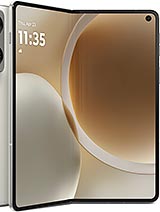
Complete Screen Motorola Razr Fold XT2651 / XT2651-1 – 8.1" Premium Quality
Has your Motorola Razr Fold stopped looking as spectacular as it did on the first day due to a fall, a bump, or a strange mark on the screen? Rest assured: with this complete screen for Motorola Razr Fold XT2651 / XT2651-1 of Premium quality, you can bring your foldable phone back to life and continue enjoying its massive 8.1-inch display without sacrificing a great user experience.
This screen is specifically designed for the Motorola Razr Fold XT2651 and XT2651-1 models, released in 2026, so it fits perfectly with the latest versions of this iconic foldable Razr. If you own one of these models, this is the part you have been looking for to make it look like new (or very close 😉).
Motorola Razr Fold 8.1" Premium Screen: What's Included in This Replacement
We are talking about a complete screen for the Razr Fold, meaning that it is a pre-assembled unit for convenient and clean repair. This replacement includes:
- 8.1-inch panel for the Motorola Razr Fold.
- Touch glass (the glass you touch with your fingers).
- Integrated touch digitizer to ensure your phone detects your taps and gestures.
- Connection flex prepared for model XT2651 / XT2651-1.
- Front frame prepared for screen assembly.
Everything comes factory-assembled, so you do not have to separate glass, touch, and panel, which is particularly delicate in a foldable smartphone like the Motorola Razr Fold.
When to Replace the Screen of the Motorola Razr Fold?
It's not necessary for the screen to be completely shattered to consider a replacement. There are several clear signs that your Motorola Razr Fold screen needs replacing:
- Visible cracks or breaks on the internal foldable panel.
- Vertical or horizontal lines that remain after restarting the device.
- Black or colored spots that gradually spread.
- Unresponsive or erratically responsive touch areas.
- Flickering or sudden brightness changes in part of the display.
- Moisture damage that leaves strange marks or internal "halos".
If any of these symptoms sound familiar, most likely the screen of your Razr Fold is asking for retirement. With this Motorola Razr Fold XT2651 / XT2651-1 screen replacement, you can solve all these problems at once.
Compatibility: Motorola Razr Fold XT2651 and XT2651-1 Models
This replacement is specifically designed for:
- Motorola Razr Fold XT2651
- Motorola Razr Fold XT2651-1
If one of these references appears on the back of your phone or in the system settings, you have the correct product. It is important not to mix screens from other Razr models or previous generations as the measurements, connectors, and internal structure differ.
| Feature | Detail |
| Compatible Model | Motorola Razr Fold XT2651 / XT2651-1 |
| Device Brand | Motorola |
| Mobile Launch Year | 2026 |
| Screen Size | 8.1 inches (main foldable screen) |
| Replacement Type | Complete Screen (panel + touch + flex) |
| Quality | Premium |
| Technical Reference | XT2651, XT2651-1 |
Advantages of this Premium Screen for Your Motorola Razr Fold
Choosing a Premium screen for Razr Fold has several interesting benefits if you want to keep enjoying your foldable phone without spending as much as for a new one:
- Good touch response: designed for fluid gestures, taps, and swipes.
- Balanced colors and brightness: a comfortable visual experience for everyday use.
- Compatibility with folding: designed for the foldable format of the Motorola Razr Fold.
- Complete replacement: no need to separate parts, reducing the risk of damaging the panel during repair.
It is an ideal option if you want to extend the life of your Razr Fold and continue enjoying its large 8.1" screen without having to change phones.
Can I Change the Screen of the Motorola Razr Fold Myself?
The big question. The short answer: yes, but with extra care. The Motorola Razr Fold is a foldable phone, meaning its internal structure is more delicate than a traditional phone. If you have replaced screens before and are comfortable with tools, you can try it. If not, you can always take your Razr Fold screen to a trusted technician.
Many service centers accept you bringing your own replacement, so you can purchase the screen here at iLevante.com and only pay for the labor at the workshop.
How to Replace the Motorola Razr Fold XT2651 Screen Step by Step
If you are up for the challenge of repairing it yourself, here is a guideline for replacing the Motorola Razr Fold XT2651 / XT2651-1 screen. Always adapt it to your skill level and available tools.
1. Preparing the Work Area
- Work on a clean and well-lit surface.
- Have a mobile toolkit on hand: precision screwdrivers, plastic picks, plastic spatulas, suction cups, fine tweezers.
- If possible, use an anti-static wrist strap to avoid discharges onto the motherboard.
- Make a backup of your data before starting.
2. Turn Off the Motorola Razr Fold and Remove the SIM Tray
- Completely turn off the Razr Fold.
- Remove the SIM tray using the appropriate tool.
3. Opening the Device
In a foldable like the Razr Fold, internal access is usually made from the back:
- Apply gentle heat on the back cover using a hair dryer or heat gun, keeping some distance.
- With the help of a plastic pick, gently pry off the back cover, taking care not to force areas near the hinge.
- Remove the screws holding the metal shields on the board.
- Lift the shields and locate the screen flex cables.
4. Disconnecting the Battery and Screen
- First disconnect the battery connector for safety.
- Using a plastic tool, disconnect the foldable screen flex cables.
5. Removing the Damaged Screen
This step is delicate as the foldable screen is integrated into the front frame:
- Apply moderate heat on the front side of the panel, always with caution.
- Using thin picks, gradually separate the damaged screen from the frame.
- Avoid excessive bending of the center of the panel while removing it.
- Clean any adhesive residues on the chassis.
6. Installing the New Razr Fold 8.1" Screen
- Place the new Premium screen in the frame, aligning the edges carefully.
- Thread the flex cables through the appropriate slots to the motherboard.
- Reconnect the screen flex cables to the board.
- Reconnect the battery flex.
7. Tests Before Closing the Mobile
- Turn on the Motorola Razr Fold before permanently sealing the cover.
- Check:
- That the image is displayed correctly across the entire surface.
- That the touch responds everywhere, with the phone both open and closed.
- That there are no flickerings or strange spots.
8. Final Closure and Assembly
- If everything works well, turn off the phone again.
- Replace the metal shields and screw them in place.
- Reattach the back cover, applying uniform pressure for a few minutes.
- Insert the SIM tray and turn on the device.
Tips for Caring for Your New Motorola Razr Fold Screen
- Always keep your phone folded when carrying it in a pocket or bag.
- Avoid placing hard objects (keys, coins) near the internal panel.
- Do not press forcefully on the center area of the hinge while opening or closing.
- Consider using a specific screen protector for foldables if you want extra protection.
With this complete screen for Motorola Razr Fold XT2651 / XT2651-1 of 8.1" in Premium quality, your foldable phone is back in the spotlight: big, eye-catching, and ready to withstand many more openings and closings.
• Product Weight: 0.20 kg.The technical specs of Motorola Razr Fold
can help you to choose the correct repair part for your device. Make sure your model reference is the same as this element. Here are some tech specs to help you:
- Brand: Motorola
- Motorola Razr Fold Size: Unfolded: 160.1 x 144.5 x 4.7 mmFolded: 160.1 x 73.6 x 10.1 mm.
- Release date: 2026, January 07.
- Weight: 243 g.
- Screen specs: Foldable LTPO P-OLED, 1B colors, 120Hz, Dolby Vision, HDR10+, 6200 nits.
- Screen size: 8.1 inches, 212.5 cm2.
PVP:
SNK.LCDMRAZRFOLD352.99€ AvailableInStockNewCondition