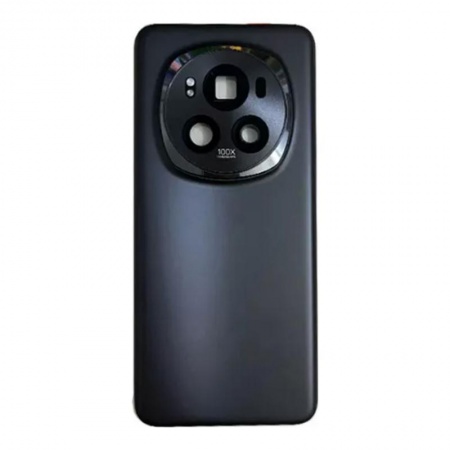
Original Rear Cover for Honor Magic 6 Pro
The Honor Magic 6 Pro has a distinctive rear design. Its large squircle-shaped camera module takes up almost the full width of the phone and around a third of its height, while the glass curves around all four edges. This design is exactly what makes it so vulnerable to drops. This complete rear cover for Honor Magic 6 Pro is an original replacement part with the same dimensions, curves and openings as the part fitted at the factory. It is compatible with the BVL-N49 (international) and BVL-AN16 versions.
Our iLevante team fitted it to a chassis measuring 162.5 × 75.8 × 8.9 mm. It sits flush against the aluminium frame, with no raised edges at the corners, and the camera module openings line up perfectly with all three cameras.
What’s included with the Honor Magic 6 Pro rear cover
There’s no need to look for separate parts. The package includes everything you need to complete the repair:
- Glass rear cover in black with a satin finish, matching the cover fitted as standard on the black version of the phone.
- Camera lens with trim for the 50 MP main sensor (1/1.3-inch, f/1.4–2.0), the 50 MP ultra-wide camera with a 122° field of view, and the 180 MP periscope camera with 2.5x optical zoom.
- Adhesive for the perimeter, needed to secure the cover to the chassis and seal the join.
A note about the finish, as it’s the question we’re asked most often. The Magic 6 Pro was sold in two materials: satin black glass and Epi Green vegan leather. The two covers are interchangeable, but they differ in feel and weight: the phone weighs around 229 g with the glass rear cover and around 225 g with the vegan leather one. Before buying, check which version you have if you want to keep the original look.
Why the Honor Magic 6 Pro rear cover breaks
The manufacturer itself acknowledges that the camera glass protrudes from the cover. When you set the phone down or drop it, the first point of impact is often the camera ring or one of the curved corners. Because the glass curves upwards, downwards and out to the sides, an impact on the edge can often cause a crack that spreads across the entire rear cover.
There’s another detail not everyone knows: the manufacturer’s warranty does not cover accidental damage to the camera glass or rear cover. Replacing the part yourself or taking it to a repair shop you trust is usually the most reasonable option. If yours already has cracks, now is the time to order an original rear cover for the Magic 6 Pro, before the damage affects other components.
When to replace the rear cover
Continuing to use cracked glass can cause more problems than you might expect. The iLevante technicians recommend replacing it as soon as possible in these cases:
- Visible cracks or pieces of glass coming loose. Glass dust can get into the camera lens and connectors.
- The cover is lifting at one of the edges. Moisture and dirt can get inside through the gap and eventually affect the internal components.
- Photos show glare, spots or a lack of sharpness caused by a scratched or broken lens.
- 66 W wireless charging fails or cuts out after an impact to the central area.
Installing the Honor Magic 6 Pro rear cover: a guide from the iLevante team
The rear cover is held in place with perimeter adhesive and has no external screws, so the job requires heat and patience. This is the process we follow in our workshop:
- Prepare the phone. Let the battery drop below 25% and switch off the phone. If the glass is badly broken, cover it with packing tape to stop fragments from flying off and to give the suction cup a surface to grip.
- Heat the edges. Apply even heat around the perimeter for 2 or 3 minutes, until the surface feels warm to the touch. Avoid concentrating the heat gun on one spot, as the battery sits directly underneath.
- Separate the adhesive. Use a suction cup to lift the bottom edge and insert plastic picks. A few drops of high-purity isopropyl alcohol can help soften the adhesive. Near the camera module, don’t insert the pick too far: on this family of phones, the wireless charging coil cables run through that area.
- Clean the chassis thoroughly. Remove all traces of the old adhesive. If any residue remains, the new cover won’t sit flat.
- Dry-fit the cover to check that it fits, apply the included adhesive and press firmly all around the edge.
- Let the adhesive cure. Hold the assembly in place with clamps or elastic bands and wait at least two hours before using the phone. The adhesive reaches maximum strength after around 24 hours.
As the wireless charging coil, NFC and flash are mounted on an internal board rather than on the glass, there are no components to transfer from one cover to the other. Once you’re finished, we recommend testing wireless charging, reverse charging and all three cameras, and checking closely for any dust trapped under the lens.
Water resistance after replacement
The Magic 6 Pro has an IP68 rating from the factory, which means it can withstand immersion in up to 1.5 m of water for 30 minutes. This rating applies to the original seal. A new adhesive strip, correctly fitted, helps protect against everyday splashes and dust, but once the phone has been opened, full water resistance can no longer be guaranteed. For this reason, iLevante advises against deliberately submerging the phone after any repair.
One tip to help your new cover last: use a case that extends beyond the camera ring. This keeps the camera module from touching surfaces when you place the phone face-up, and in a drop, the case takes the impact instead of the glass.
• Product Weight: 0.06 kg.The technical specs of Honor Magic 6 Pro
can help you to choose the correct repair part for your device. Make sure your model reference is the same as this element. Here are some tech specs to help you:
- Brand: Honor
- Honor Magic 6 Pro Size: 162.5 x 75.8 x 8.9 mm.
- Release date: 2024, January 11.
- Weight: 225 g or 229 g.
- Screen specs: LTPO OLED, 1B colors, 120Hz, Dolby Vision, HDR, 1600 nits , 5000 nits.
- Screen size: 6.8 inches, 112.8 cm2.
PVP:
SNK.AS15451119.90€ AvailableInStockNewCondition