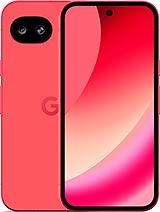
Screen for Google Pixel 10a: Revive Your Pixel 10a with Style! 🚀
Oh no! Did your Google Pixel 10a fall and now the screen looks like an abstract puzzle? Don't worry, friend, at iLevante.com we have just what you need: a Pixel 10a screen of Premium quality that will save your day. Released in 2026 by Google Pixel, this model is a champion in innovation, and our replacement screen is designed to fit perfectly in your Google 10a, maintaining that fresh and modern vibe you love. With 6.3 inches of pure visual enjoyment, this screen is similar to the original in its essence, offering a smooth and vibrant user experience. 😎
Forget about those cheap screens that fail at the first touch; our Premium version, with technical references like GE1GQ, GV0BP, and G4H7L, is made to last and shine. It's ideal for those who seek quality without complications and comes ready for you to install yourself or take to a pro. Ready to slide, touch, and enjoy again like nothing ever happened? Let's dive into the details!
Why Choose This Replacement Screen for Your Google Pixel 10a? 🤔
Imagine this: you're in the middle of an epic video call or scrolling through your favorite networks on your Pixel 10a, and suddenly... crack! The screen decides to take a vacation. Our Premium screen for Google Pixel 10a is the hero entering the scene. It's not just any replacement; it's built with high-quality materials that ensure a fast tactile response and colors that pop in your day-to-day. Perfect for the 2026 model, this 6.3-inch screen allows you to keep enjoying that clean and friendly interface that makes the Google 10a a must-have.
The cool thing is that it includes everything essential: the main panel, the touch glass, the flex connection cable, and even an initial protector to start on the right foot. Did you know that many screens on the market don't come with these extras? Well, ours does, because we want your repair to be a walk in the park, not an odyssey. And hey, if you're one of those who like DIY, we gift you a toolkit with screwdrivers, suction cups, and picks so you feel like a gadget hacker. Victory emoji! ✌️
Signs Your Google Pixel 10a Screen Needs an Urgent Change ⚠️
Sometimes, the problems aren't as obvious as a giant crack. Is your Google Pixel 10a acting weird? Here's a fun list of symptoms that scream "change it now!":
- Rebellious touch: If you touch and nothing happens, or it responds as if it had a life of its own, it's time for a new screen for Pixel 10a. Don't let it ignore you! 😤
- Mysterious spots: Do strange color blobs like black or green appear that weren't there before? It could be internal damage crying for help.
- Water effects: If your Google 10a got wet and you now see circles or drops on the screen, red alert! Water is the worst enemy.
- Light leaks: Edges that shine too much or unpredictable dark areas? Definitely a sign to look for a quality Premium replacement.
- Faded colors: If the edges look dull or the tones aren't as vibrant as before, your screen might be saying goodbye.
These little problems turn your Pixel 10a into a headache, but with our GE1GQ screen (or its siblings GV0BP and G4H7L), you'll be back to normal in no time. It's like giving it an upgrade disguised as a repair!
Key Specifications of the Premium Screen for Pixel 10a 📊
So you don't stay with doubts, here is a quick table with the most important aspects of this replacement screen for your Google Pixel 10a. Easy to read and super useful! 🌟
| Feature | Details |
| Size | 6.3 inches |
| Quality | Premium, similar to original in performance |
| Technical References | GE1GQ, GV0BP, G4H7L |
| Included Components | Main screen, touch glass, flex cable, protector |
| Compatible Model | Google Pixel 10a (released in 2026) |
| Extras | Gift toolkit: screwdrivers, picks, suction cup |
This table is your cheat sheet to confirm you're choosing the best for your Google 10a. It's not just data; it's peace of mind in the form of a replacement.
Premium Quality: What Makes It Special for Your Google Pixel 10a? 💎
In the world of replacement screens, Premium quality shines like a star. For your Pixel 10a, this means robust construction that withstands daily use without drama. We're not talking about cheap copies; this is a top option that offers a sensitive touch and sharp visuals, perfect for the 2026 model. Compared to other more basic qualities, the Premium has optimized thickness and consumes less energy, which helps your battery last longer in those marathon streaming or gaming sessions. And all at a price that won't break the bank! 😉
Remember, Google doesn't sell original replacements to everyone, so this screen for Google Pixel 10a is your best bet. Choose according to your budget and needs: if you're looking for premium, go for GE1GQ or similar for that fresh feel.
Go to the Repair Service or Do It Yourself? It's Your Decision! 👨🔧
Many Pixel 10a fans prefer the lone warrior path: changing the screen on their own to save time and money. If you're not an expert, it's okay; it's easier than you think with the right tools. But if you feel it's too much, take it to a local workshop – many accept replacements like ours and charge only for labor. Google's official option? Sure, it exists, but it involves waits that could ruin your weekend. Choose your adventure!
Step-by-Step Guide: How to Change the Screen of Your Google Pixel 10a Epically 📋
Time for action! If you dare to replace the screen of your Google 10a yourself, follow these steps with a touch of fun. It's like a YouTube tutorial, but written. Remember: be careful, and if in doubt, look for a complementary video. Here we go:
- Prepare: Turn off your Pixel 10a and download any static by touching something metallic. You don't want to fry anything by accident! ⚡
- Heat the terrain: Use a hairdryer or heat gun to soften the adhesive around the edges. Keep your distance and don't overheat – think of a gentle massage, not an extreme sauna.
- Peel with style: Insert the picks from the kit into the sides and gently move them to separate the old screen. Do it on all sides, like you're opening a gift wrapped with tape.
- Lift and separate: Place the suction cup in the center, heat a bit more and pull carefully. Disconnect the flex cable – without touching sensitive parts!
- Deep cleaning: Remove glue residues from the frame. Be meticulous, like a detective erasing fingerprints.
- Install the new star: Connect the flex of the Premium screen (GE1GQ or similar) to the board. Avoid the copper contacts to prevent shorts.
- Trial by fire: Turn on your Google Pixel 10a and verify that everything responds: touch, colors, brightness. If it shines, you're winning!
- Seal the deal: Apply new adhesive and press. Wait a few hours to let it set – go grab a coffee meanwhile. ☕
And voilà! Your Pixel 10a is back in the game. This guide is to empower you, but if something goes awry, a pro is always a good idea.
More Tips to Keep Your Google Pixel 10a Screen in Shape 📏
Once installed, take care of your new screen like a treasure. Use protective cases, avoid epic falls, and clean with soft cloths. For the 2026 model, which is all about durability, these habits will extend its life. Did you know an extra protector can prevent scratches? We include one, but you can always add more. Keep that Google 10a looking impeccable! 🌈
Exploring variations: whether you call it Google Pixel 10a, simply Pixel 10a, or the 2026 innovator, this Premium screen with refs like GV0BP elevates your experience. Keep enjoying its 6.3 inches in daily adventures, from photos to apps. The fun doesn't stop here!
• Product Weight: 0.20 kg.The technical specs of Google Pixel 10a
can help you to choose the correct repair part for your device. Make sure your model reference is the same as this element. Here are some tech specs to help you:
- Brand: Google
- Google Pixel 10a Size: 153.9 x 73 x 9 mm.
- Release date: 2026, February 18.
- Weight: 183 g.
- Screen specs: P-OLED, HDR, 120Hz, 2000 nits , 3000 nits.
- Screen size: 6.3 inches, 94.7 cm2.
PVP:
SNK.RPS122694.90€ AvailableInStockNewCondition