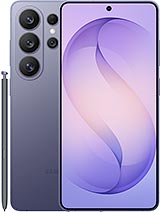
Complete Back Cover for Samsung Galaxy S26 Ultra with Camera Frame and Adhesive
Restore the style and durability of your Samsung Galaxy S26 Ultra with this complete back cover with camera lens and frame. Includes battery cover, adhesive, and camera glass with its bezel, all ready to assemble and make your mobile look brand new. Ideal if your rear glass is broken, the camera frame is bent, or if the cover is full of scratches.
Sometimes a drop that cracks the rear glass can also impact the front of the phone, so it?s worth taking a quick look at the display before finishing your repair. If you notice spiderweb cracks, touch issues, dead pixels, or a weak seal around the edges, pairing this back cover replacement with a Complete Screen for Samsung S26 Ultra can help restore both the look and protection of your device, leaving your Galaxy S26 Ultra closer to its original factory fit and finish.
Available Colors for Samsung Galaxy S26 Ultra Back Cover
This part is available in several original colors of the Samsung Galaxy S26 Ultra to maintain your mobile's factory design:
- Rose Gold – Elegant and striking, perfect for a premium finish.
- Shadow Gray – Discreet, modern, and durable for daily use.
- Sky Blue – A fresh and different color, ideal for standing out.
- Violet – Distinctive and youthful touch, very recognizable.
- White – Clean and minimalist, with a very neat appearance.
- Black – The classic that never fails, elegant and sober.
Thanks to this variety, you can choose the same color that your mobile originally came with or take the opportunity to give your Galaxy S26 Ultra a new look.
What This Back Cover for Samsung Galaxy S26 Ultra Includes
This back cover part comes ready to install and includes several key components to ensure the result is like the original:
- Back Cover / Battery Door for Samsung Galaxy S26 Ultra, with the exact size and shape of the model.
- Back Cover Adhesive, already cut to size, to ensure a proper closure and fit against the chassis.
- Rear Camera Lens with its frame or bezel, to protect the camera sensors and maintain the original aesthetic.
- Original quality, with good fit, perfect camera alignment, and feel very similar to the factory.
Everything is designed so that you can quickly replace the broken cover of the Galaxy S26 Ultra without needing to search for separate pieces like the camera glass or adhesive.
How the Samsung Galaxy S26 Ultra Back Cover Usually Breaks
The glass rear part of the Samsung Galaxy S26 Ultra often gets damaged for several common reasons:
- Drops onto hard surfaces, especially if the mobile hits a corner or lands flat on the back.
- Blows in the camera area, which can break the lens or bezel and leave marks right on the camera module.
- Pressure or twisting when carrying the mobile in the back pocket and sitting down, causing fine cracks or bending the frame.
- Deep scratches from keys, coins, or dirt that come into contact with the cover.
When the back cover cracks, in addition to the aesthetic aspect, the interior of the phone can be more exposed to dust and moisture. Therefore, replacing this part on time is a good idea if you want to extend the life of the device.
How to Know if You Need to Change the Back Cover of the Galaxy S26 Ultra
Here are some clear signs that you need a new back cover for your Samsung Galaxy S26 Ultra:
- You see cracks or small fractures in the rear glass, even if the mobile still works well.
- The camera lens has bumps, scratches, or whitish areas affecting photos.
- You notice that the cover doesn't close properly or looks slightly raised at a corner.
- The mobile has taken a strong hit and the back has become bulged or bent.
- You want to leave the phone like new to sell or gift it.
If you identify with any of these points, using this back cover with camera frame for Samsung Galaxy S26 Ultra, you can leave the mobile looking practically brand new.
How to Change the Back Cover of the Samsung Galaxy S26 Ultra Step by Step
Although the process may vary slightly, here are the general steps to change the back cover of the Galaxy S26 Ultra:
- 1. Turn off the mobile before starting any manipulation.
- 2. Soften the adhesive of the old cover by applying moderate heat to the back (for example, with a thermal blanket or heat gun on low power).
- 3. Separate the old cover with a plastic pick, slowly lifting the glass without forcing it.
- 4. Clean the adhesive residue from the phone's frame for the new cover to sit well.
- 5. Place the new adhesive (if it isn't preinstalled) on the chassis or cover, aligning it with the edges.
- 6. Set the new back cover and press it uniformly along the edges to ensure a good fixation.
Once you've installed the new cover with lens and camera bezel, your Samsung Galaxy S26 Ultra will be ready to use again, maintaining the same appearance as day one.
Comparison of Benefits of This Back Cover for Samsung Galaxy S26 Ultra
| Feature | Cover Included in iLevante | Other Generic Covers |
| Fit and Dimensions | Perfect fit specifically for Galaxy S26 Ultra | May be loose or forced |
| Camera Lens and Bezel | Included in the piece | Sometimes lacks lens or frame |
| Cover Adhesive | Included and cut to fit | Need to purchase separately |
| Colors | Various original colors available | Limited colors or poor matching |
With this complete back cover for Samsung Galaxy S26 Ultra available at iLevante, you get a convenient, aesthetic, and durable solution for your mobile, without the hassle of searching for separate pieces or ill-fitting spares.
• Product Weight: 0.06 kg.The technical specs of Samsung Galaxy S26 Ultra
can help you to choose the correct repair part for your device. Make sure your model reference is the same as this element. Here are some tech specs to help you:
- Brand: Samsung
- Samsung Galaxy S26 Ultra Size: 163.6 x 78.1 x 7.9 mm.
- Release date: 2026, February 25.
- Weight: 214 g.
- Screen specs: Dynamic LTPO AMOLED 2X, 120Hz, HDR10+, 2600 nits.
- Screen size: 6.9 inches, 115.9 cm2.
PVP:
SNK.AS17953612.25€ AvailableInStockNewCondition