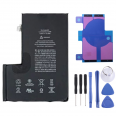
3687 mAh iPhone 12 Pro Max Battery
When the iPhone 12 Pro Max was launched, the first teardowns brought a surprise: its battery had less capacity than the 11 Pro Max battery (3687 mAh compared with 3969 mAh). Even so, the phone lasted just as long or longer. The reason lies in the 5-nanometre A14 chip and in a cell design found only in the Max version of the iPhone 12 family: a single-cell L-shaped battery rated at 14.13 Wh. The iPhone 12 and 12 Pro have rectangular batteries rated at 10.78 Wh.
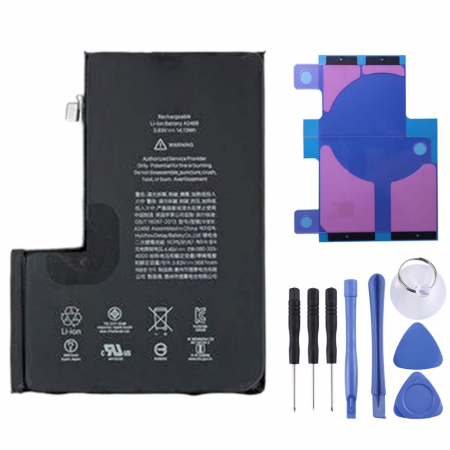
This design has implications when it is time for a replacement. The iPhone 12 Pro Max battery we offer, reference AP12PM0004, exactly matches the original shape, thickness and connector position. It fits into the space left by the original battery without any gaps or putting pressure on the logic board. On the workbench, the iLevante team has confirmed that the part sits correctly without touching the Taptic Engine or the bottom speaker, the two components it shares space with.
Technical specifications of the AP12PM0004 iPhone 12 Pro Max battery
- Capacity: 3687 mAh, the same as the factory battery.
- Nominal voltage: 3.83 V.
- Energy: 14.13 Wh.
- Chemistry: lithium-ion, single L-shaped cell.
- Quality: OEM.
- Compatible models: A2342, A2410, A2411 and A2412. These are all the regional variants of the iPhone 12 Pro Max. The version sold in Spain is the A2411.
- Includes: adhesive strips to secure the battery and a free tool kit.
With the new cell, the phone returns to the figures announced by Apple: up to 20 hours of video playback, 12 hours of streaming and 80 hours of audio. It also retains fast charging, reaching 50% in around 30 minutes with a 20 W adapter or higher, as well as MagSafe wireless charging of up to 15 W.
What it means for the iPhone 12 Pro Max battery to be OEM
OEM stands for Original Equipment Manufacturer. An OEM battery is manufactured according to the original model's specifications: the same chemistry, the same actual capacity, the same dimensions and an equivalent protection circuit against overcharging, deep discharge and short circuits. The difference is that it does not carry Apple's branding or cryptographic pairing. In practice, it behaves like the factory battery. Its capacity deteriorates more slowly than that of generic «compatible» batteries, which often exaggerate the mAh stated on the label.
It is worth knowing this before buying. Since 2018, Apple has linked the battery to each logic board using its serial number, and the iPhone 12 Pro Max is no exception. After installing any battery that has not gone through Apple's official process, iOS will display a non-genuine battery notification. In Settings > General > About > Parts and Service History, the battery will appear as «Unknown Part», and the Battery Health percentage will no longer be displayed.
Even so, the phone will charge, measure the remaining percentage and manage performance normally. The notification only indicates the part's origin. It does not restrict any functions or affect battery life. The only thing that may be affected is the trade-in value if you one day exchange the handset for a new one.
When to replace the iPhone 12 Pro Max battery
Apple considers a lithium-ion battery to be worn out when its maximum capacity falls below 80%. With intensive use, an iPhone 12 Pro Max reaches this point in around two years. Some symptoms often appear before checking the settings:
- Unexpected shutdowns when the screen shows 15 or 20% charge, especially in cold conditions.
- Battery life reduced by half compared with when the phone was new.
- Slow performance when opening the camera or games because iOS limits the processor to prevent power-consumption peaks.
- Excessive heat while charging.
- The screen lifting slightly along one of the edges. This indicates that the battery has swollen, in which case you should stop charging the phone.
It is worth taking 5G into account. The 5G modem uses considerably more power than 4G. If you move through areas with inconsistent coverage, a new battery and the 5G Auto setting instead of 5G On will give you a few extra hours of battery life.
How to replace the iPhone 12 Pro Max battery: the iLevante team guide
The difficulty level is medium and the job takes between one and two hours. The basic tools are included in the free kit. You will also need a gentle heat source, such as a hairdryer, and patience. The iLevante team insists on one preliminary step: discharge the battery below 25% before opening the phone. A charged cell can catch fire if accidentally punctured.
- Pentalobe P2 screwdriver for the two 6.7 mm external screws located next to the Lightning connector.
- Tri-point Y000 screwdriver for the four 1.1 mm screws securing the cover over the battery and screen connectors.
- Phillips screwdriver for the speaker and Taptic Engine, plus a standoff screwdriver if available.
- Suction cup, opening picks, plastic spudger and precision tweezers.
- High-purity isopropyl alcohol, in case an adhesive strip breaks.
Step-by-step process
- Turn off the iPhone and remove the SIM tray.
- Remove the two pentalobe screws from the bottom edge.
- Heat the edges of the screen for one or two minutes to soften the adhesive seal. Place the suction cup near the bottom edge, create a small gap and insert an opening pick.
- Work around the perimeter with the picks, inserting them no more than 3 mm along the bottom and right edges, or 2 mm along the left edge. Going any deeper may damage the flex cables.
- Open the screen from the right-hand side, like the cover of a book. Do not try to remove it completely: it is still connected to the logic board by very thin cables.
- Remove the metal cover secured by the Y000 screws. Disconnect the battery first, followed by the screen and front sensor connectors.
- Remove the bottom speaker and the Taptic Engine cover. Then disconnect and remove the vibration motor, which covers part of the cell.
- Pull the four stretch-release adhesive strips, two at the top and two at the bottom, slowly and keeping them as flat as possible. If one breaks, apply a few drops of isopropyl alcohol beneath the cell, wait one minute and use a wide spudger to lever it out. Never use sharp metal tools against the battery.
- Fit the new adhesive strips, align the battery and press it down for a few seconds to secure it.
- Reassemble everything in reverse order. Connect the battery last, just before closing the metal cover.
There is one detail that is often overlooked. Opening the screen breaks the seal that gives the phone its IP68 resistance (6 metres for 30 minutes). To restore water resistance, a new seal must be fitted to the frame. Without it, the phone will work perfectly, but it should be kept away from water.
Common problems after replacement and how to avoid them
Many of the enquiries we receive after an installation have the same cause: a connector that is not seated correctly. If the phone does not turn on, the screen does not respond to touch or Face ID fails, open it again and press each connector until you hear a click. Before fully closing the phone, perform a force restart: press and quickly release the volume up button, then the volume down button, and hold the side button.
During the first few days, the battery percentage may jump while the system learns the new cell. The iLevante technical team recommends this simple calibration process:
- Charge it to 100% and leave the charger connected for another two hours.
- Use the phone normally until it shuts down by itself.
- Charge it fully again without interruption.
If you do not have the time or do not feel confident handling such thin flex cables, any trusted technician can install this battery quickly using the same kit we send you.
• Product Weight: 0.10 kg.The technical specs of Apple iPhone 12 Pro Max
can help you to choose the correct repair part for your device. Make sure your model reference is the same as this element. Here are some tech specs to help you:
- Brand: Apple
- Apple iPhone 12 Pro Max Size: 160.8 x 78.1 x 7.4 mm.
- Release date: 2020, October 13.
- Weight: 228 g.
- Screen specs: Super Retina XDR OLED, HDR10, Dolby Vision, 800 nits , 1200 nits.
- Screen size: 6.7 inches, 109.8 cm2.
PVP:
SNK.AS06944413.50€ AvailableInStockNewCondition