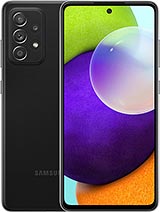
Samsung A52 and S20 FE battery: one part, the EB-BG781ABY
It often starts the same way. The phone that used to last until the evening starts asking for a charger in the middle of the afternoon, switches off at 20% when you go out in winter, or only works properly when plugged in. After a few years and hundreds of charge cycles, the cell has reached the end of its useful life. This battery for Samsung Galaxy A52 / A52s / S20 FE has the reference EB-BG781ABY, the same one Samsung fitted as standard in all three models, and restores the phone's 4500 mAh capacity.
This is an OEM-quality battery: a compatible lithium cell rated at 3.86 V nominal (around 17.4 Wh), with the same dimensions and connector as the original. It comes with pre-cut adhesive strips to secure it to the frame and, as a gift, 1 tool kit for opening your phone. Our team at iLevante has tested it in the A52 4G and S20 FE 5G, and 25 W fast charging works just as it does with the factory-fitted part.
Samsung A52 / A52s / S20 FE battery compatibility by model
Samsung used the same cell in two different ranges. That is why a 2021 A52 and a late-2020 S20 FE share a battery, despite having very different processors. Check your phone's exact model under Settings > About phone before ordering:
- Galaxy A52 4G: SM-A525F, SM-A525M (Snapdragon 720G).
- Galaxy A52 5G: SM-A526B, SM-A5260, SM-A526W (Snapdragon 750G).
- Galaxy A52s 5G: SM-A528B (Snapdragon 778G).
- Galaxy S20 FE: SM-G780F with Exynos 990 and SM-G780G with Snapdragon 865.
- Galaxy S20 FE 5G: SM-G781B, SM-G781U, SM-G781W, SM-G781N, SM-G7810.
In the S20 FE, the battery also supports 15 W wireless charging and lets you share power with another device at 4.5 W. The A52 range does not support wireless charging, but it does support the same 25 W wired charging. One detail many people don't know: the A52 came with a 15 W charger in the box. If that's the charger you have, you have never charged at the maximum speed. To reach 50% in around 30 minutes, you need a 25 W USB-C PD charger.
When to replace your Samsung A52 or S20 FE battery
These are the warning signs we see most often in the workshop. The phone suddenly switches off even though it still has charge, especially in cold weather. It restarts when you open the camera or a game. A fixed mark appears on the screen where the cell is pressing against it. Or the back cover starts to lift on one side. The latter is common with the S20 FE: sometimes the battery has swollen, and sometimes the adhesive has softened in the heat. If you notice the cover lifting or the phone bulging, stop charging it and replace the battery as soon as possible. A swollen battery is a genuine safety risk.
To check, go to Samsung Members > Diagnostics > Battery status. If it says "Weak", you have your answer. Another trick mentioned on forums is the code *#0228#. It lets you view data, but don't press the "Quick Start" button, as it resets the battery counters.
Our iLevante team's guide to installing the Samsung A52 and S20 FE battery
This repair has a medium difficulty level and takes between 45 and 90 minutes. Before you start, if the old battery is swollen, discharge it below 25%. You will need the kit included with your order (suction cup, opening picks, spudger and Phillips screwdriver), a hairdryer and isopropyl alcohol of at least 90% concentration.
- Warm the back cover for around two minutes, then lift it with the suction cup and several opening picks. Leave each pick in place so the adhesive does not stick back down. Take care around the cameras.
- Remove the 10 4.4 mm screws from the motherboard cover and disconnect the battery first. On the A52, also disconnect the interconnect flex cable and fold it back gently without creasing it.
- Apply a few drops of isopropyl alcohol around the edge of the battery, wait a minute and carefully pry it up with a plastic card. Never heat the battery directly; apply heat from the screen side, and do not puncture the battery.
- Clean away any adhesive residue. If any lumps remain, the new battery will not sit properly. Place the included adhesive strips on the frame and fit the EB-BG781ABY on top.
- Before closing the phone, reconnect the battery and test it. Check that the A52's main flex cable is seated properly, as this is the most common issue with this model. You can enter *#0*# to open Samsung's test menu.
- Apply new adhesive to the cover, press it down for a few minutes (a few books placed on top will do) and you're done.
The A52 range is rated IP67 and the S20 FE IP68. Opening the phone compromises this water resistance. It will close properly again with suitable adhesive, but do not submerge it in water.
First charge cycles and how to extend your battery's lifespan
To help the system read the new cell correctly, charge it to 100% and leave it plugged in for another couple of hours. Then use it until it switches off and charge it again without interruption. From then on, the main thing that wears it down is keeping it at 100% while it gets hot. Lithium batteries stored at 25°C lose around 20% of their capacity in a year when fully charged, and only 4% when at 40%. Turn on Protect battery in the One UI battery settings to limit charging to 85%, and remove the case when gaming while the phone is charging.
• Product Weight: 0.10 kg.The technical specs of Samsung Galaxy A52 4G
can help you to choose the correct repair part for your device. Make sure your model reference is the same as this element. Here are some tech specs to help you:
- Brand: Samsung
- Samsung Galaxy A52 4G Size: 159.9 x 75.1 x 8.4 mm.
- Release date: 2021, March 17.
- Weight: 189 g.
- Screen specs: Super AMOLED, 90Hz, 800 nits.
- Screen size: 6.5 inches, 101.0 cm2.
PVP:
SNK.AS07001311.75€ AvailableInStockNewCondition