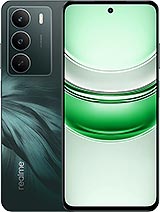
Original USB Charging Port for Realme C71, the part your phone needs ⚡
If your Realme C71 is not charging properly, the cable comes loose, only charges in certain positions, or the computer doesn't recognize it, the most likely problem is with the USB charging port. With this original replacement for Realme C71, you can charge and connect your phone like the first day, without having to change the phone.
While you?re fixing the original USB charging port for Realme C71, it?s a great moment to give your phone a full refresh with parts that work closely together: if your device has taken a few knocks, the Realme C71 Screen (complete screen replacement) can bring back clear visuals and smooth touch response; and if you?ve been dealing with short battery life or sudden shutdowns, the 6000mAh Battery Realme C71 BLPC75 can help you regain the all-day endurance your Realme C71 was built for.
Features of the USB charging port for Realme C71
This charging module is specifically designed for the Realme C71 model, fitting perfectly into the motherboard and casing of the device. Some key points:
- Original quality: manufactured following the manufacturer's specifications to ensure full compatibility.
- Complete charging board: includes the USB charging connector already soldered onto the board.
- Approximate weight of 8g: a lightweight piece, perfect for maintaining the balance and ergonomics of the phone.
- 100% compatibility with Realme C71: not universal, designed solely for this model.
Thanks to its specific design, the installation is clean, the fit is precise, and the connector remains firm so that the cable doesn't move or fail easily.
How to know if your Realme C71 has a broken USB charging port
Before buying the charging port for Realme C71, it is useful to recognize the symptoms of a damaged part. Some of the most common problems when the connector is failing include:
- The phone only charges if you place the cable in a certain position or move it.
- No charging icon appears even though the charger and cable work on other devices.
- The computer doesn't recognize the Realme C71 when connected via USB.
- Very slow or intermittent charging for no apparent reason.
- The connector appears loose or shows internal dirt or corrosion.
If any of these cases occur and you have already tried other cables and chargers, the problem is most likely with the charging port board and this part will solve your issue.
Advantages of replacing the USB charging port of the Realme C71 instead of changing phones
Opting for a charging port replacement is a smart decision if your Realme C71 works well otherwise. Changing this part offers several advantages:
- Economic savings: it costs much less than buying a new phone.
- Extends the lifespan of your Realme C71, utilizing all its power and storage.
- Quick solution: once installed, your phone charges normally again.
- Stable charging: you'll notice the cable stays firm and the charge is consistent.
Furthermore, being an original charging port for Realme C71, compatibility is guaranteed and the user experience will be just like from the factory.
How to replace the USB charging port on the Realme C71 step by step
The process of replacing the charging port on the Realme C71 involves disassembling the lower part of the phone to access the charging board. Generally, the steps usually followed are:
- Turn off the phone completely before starting.
- Remove the back cover and the lower screws.
- Disassemble the small plastic module that covers the speaker and charging port area.
- Disconnect the flex cables from the charging board and carefully lift the board.
- Place the new charging port board for Realme C71 in place.
- Reconnect the flex cables, screw in and mount the cover.
By following these steps carefully and using appropriate tools, your Realme C71 can charge normally again with this USB charging port replacement.
Comparison of the original charging port for Realme C71 vs continuing using a damaged one
| Situation | Comfortable Use | Charging Safety | PC Connection |
| With damaged charging port | You need to move the cable or keep it angled | Risk of charge cuts and constant failures | Frequent errors or doesn't recognize the device |
| With new Realme C71 charging port | Connect and forget, the cable stays firm | Stable and continuous charging | Higher probability of correct and quick connection |
As you can see, installing this new USB charging port for Realme C71 directly improves your day-to-day mobile use, avoiding cable struggles and constant energy cuts.
Buy your USB charging port for Realme C71 at iLevante
At iLevante, you will find this charging port for Realme C71 and many other replacements for mobiles and tablets. We bet on original quality parts with proven compatibility, ensuring that your repair is worthwhile and your device works like new.
If your Realme C71 doesn't charge, disconnects from the cable, or the PC doesn't recognize it, this USB charging module is the part you need to bring your smartphone back to life without spending excessively.
• Product Weight: 0.05 kg.The technical specs of Realme C71
can help you to choose the correct repair part for your device. Make sure your model reference is the same as this element. Here are some tech specs to help you:
- Brand: Realme
- Realme C71 Size: 165.8 x 75.9 x 7.8 mm.
- Release date: 2025, June 02.
- Weight: 196 g.
- Screen specs: IPS LCD, 120Hz, 725 nits.
- Screen size: 6.67 inches, 107.2 cm2.
PVP:
SNK.AS17626910.50€ AvailableInStockNewCondition