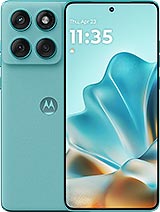
Original USB Charging Port for Motorola Edge 60 Fusion
If your Motorola Edge 60 Fusion is no longer charging properly, you have to move the cable for it to make contact, or the computer doesn't recognize it, the problem is most likely in the USB charging port. With this specific part for your model, you can replace the charging connector and have your phone as good as new without having to buy a new one.
By the way, if your Motorola Edge 60 Fusion has been giving you charging trouble, it?s also a good moment to check other key parts that often suffer from everyday wear: a cracked or unresponsive display can be fixed with the Motorola Edge 60 Fusion Screen, and if the phone still struggles to hold a charge even after repairing the port, upgrading to a fresh 5100mAh Battery Motorola Edge 60 Fusion RM52 can help bring back the battery life and reliability you miss?so you can get your device feeling truly ?like new? again.
How to identify a broken USB charging port in your Motorola Edge 60 Fusion
The symptoms of a damaged charging port are usually quite clear. If you notice any of these issues with your Motorola Edge 60 Fusion, you likely need this replacement:
- The phone only charges if you move the cable or place it in a specific position.
- The charging icon doesn't appear although the charger works on other devices.
- The computer does not detect the phone when connected via USB.
- Very slow or intermittent charging, even using the original charger.
- Loose connector, with play or internal dirt that can no longer be cleaned.
In all these cases, changing the USB charging port for Motorola Edge 60 Fusion is usually the definitive solution.
Features of the charging port for Motorola Edge 60 Fusion
This charging port board is specifically designed for the Motorola Edge 60 Fusion model, ensuring a perfect fit with the device's board and chassis. Some of its notable features include:
- Original product for perfect fit and full compatibility.
- Complete charging port board: includes USB connector and associated circuitry.
- Lightweight at approximately 8 g, same as the original part.
- Designed to maintain the device's fast charging and data transfer capabilities.
- Designed for clean assembly, respecting the internal design of the Edge 60 Fusion.
Being an original part, you won't have compatibility issues with cables, chargers, or data functions of your Motorola.
Advantages of replacing the charging port of your Motorola Edge 60 Fusion
Changing this part is one of the best ways to extend the life of your phone. Some advantages of installing this USB charging port for Motorola Edge 60 Fusion are:
- Significant savings: repair your phone instead of buying a new one.
- Stable and secure charging without interruptions or overheating due to poor contact.
- Regain the USB connection with your computer to transfer photos, videos, and files.
- Better daily experience: connect and disconnect the cable without fearing it will fail.
- Contribute to a more responsible and sustainable consumption by extending the device's life ♻️.
With this replacement, you'll have the same charging and connection sensation as when your Motorola Edge 60 Fusion was new.
How to replace the USB charging port on Motorola Edge 60 Fusion
The process of changing the USB charging port involves opening the terminal, accessing the lower area where the charging port board is mounted, and replacing the damaged part with this new one. In general terms, the steps are:
- Turn off the phone and remove the SIM tray.
- Open the back cover with suitable tools.
- Unscrew and remove the lower protectors.
- Disconnect the flex and connectors attached to the charging board.
- Remove the damaged charging port board.
- Install the new charging board and reconnect everything.
- Reassemble the phone and check that it charges and the PC recognizes it.
Being a specific part for Motorola Edge 60 Fusion, the anchorage points, connectors, and format match the factory part, facilitating assembly and a professional result.
Why choose this charging port replacement for Motorola Edge 60 Fusion
This USB charging port for Motorola Edge 60 Fusion is an ideal solution to return your phone to full functionality. It is a lightweight replacement (around 8 g), original, and designed to maintain the terminal's charging and data features. At iLevante, we focus on quality parts so you can replace only what's faulty and continue enjoying your smartphone for much longer.
Quick comparison: replacing the charging port vs. buying a new phone
| Option |
Approximate Cost |
Advantages |
| Replace Motorola Edge 60 Fusion charging port |
Low |
Keep your phone, save money, quick solution |
| Buy a new phone |
Much higher |
Only interesting if your phone has more severe damages |
If the rest of the phone works well, this charging port replacement is the smartest choice for your Motorola Edge 60 Fusion.
• Product Weight: 0.05 kg.The technical specs of Motorola Edge 60 Fusion
can help you to choose the correct repair part for your device. Make sure your model reference is the same as this element. Here are some tech specs to help you:
- Brand: Motorola
- Motorola Edge 60 Fusion Size: 161 x 73 x 8.0 mm or 8.3 mm.
- Release date: 2025, April 02.
- Weight: 177.5 g or 180 g.
- Screen specs: P-OLED, 1B colors, 120Hz, HDR10+, 1500 nits , 4500 nits.
- Screen size: 6.67 inches, 107.4 cm2.
PVP:
SNK.AS17179312.95€ AvailableInStockNewCondition