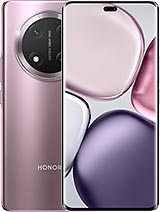
Complete screen for Honor X9c and Honor Magic7 Lite
The Honor X9c launched in late 2024 with a reputation for being almost unbreakable: it can withstand drops of up to 2 metres, has a shock-absorbing layer beneath the glass and carries SGS durability certification. Even so, the iLevante repair team still sees X9c phones with broken glass. It is almost always the same story: the impact lands on a curved edge, where the glass has less protection. In Europe, this phone is sold as the Honor Magic7 Lite, and it is identical inside. This Honor X9c screen assembly fits both models.
It comes as a single unit, with the glass, touch layer and display panel already bonded together. There is no need to separate the layers or glue glass with resin.
Features of this Honor X9c screen
The original panel is a curved 6.78-inch AMOLED with a resolution of 1224 × 2700 pixels (1.5K, around 437 ppi) and a 120 Hz refresh rate. This Premium replacement retains the same key specifications:
- 1.5K resolution at 120 Hz: scrolling through social media and menus is just as smooth as before the damage.
- Peak brightness of up to 3,600 nits for HDR content and around 1,160 nits outdoors in direct sunlight, so you can read a map at midday without looking for shade.
- Curved edges with the same shape as the original part, plus a pill-shaped cut-out for the front camera and light sensor.
- Fully functional touchscreen: gestures, double-tap and use with wet fingers all work as normal.
Here is something few people know: the X9c’s fingerprint reader is optical and located under the display. It reads your finger through the screen, so after replacing it, it is a good idea to delete your saved fingerprints and register them again. This helps the reader adapt to the new part and unlock more quickly.
What comes in the box with your Honor X9c screen
Along with the screen assembly, iLevante includes two useful extras. The first is a free screen protector. The X9c came with a protective film from the factory, so it makes sense to protect the new panel too. The second is a tool kit supplied as a gift, with a precision screwdriver, opening picks, plastic pry tools and a suction cup.
Signs your Honor X9c or Magic7 Lite needs a new screen
A crack is easy to spot. Other faults are less obvious and are often mistaken for a software issue. These are the most common signs:
- Black spots spreading from the impact point, like drops of ink.
- Green, pink or purple lines, especially near the curved edges.
- Dead pixels in a corner after a drop, even if the glass looks intact.
- Ghost touches or areas of the touchscreen that do not respond.
- A black screen while the phone is still on: it rings, vibrates and receives notifications.
Black spots on an AMOLED display cannot be repaired: the panel is damaged and the complete assembly needs replacing. Before you buy, check the model carefully. The Honor X9c Smart and Honor X9b are different phones, and this part will not fit them. The X9b, for example, has a round hole for the front camera rather than a pill-shaped cut-out.
How to replace the Honor X9c screen: tips from our repair team
The iLevante team rates this repair as medium difficulty. The screen is removed from the front, but its cable connects to the motherboard from the back. This means you need to open the phone from both sides. This is the order that works best for us:
- Switch off the phone and remove the SIM tray.
- Heat the back cover to around 70 °C for several minutes. Carefully lift it with a thin plastic opening tool, taking extra care around the camera, where there is more adhesive.
- Remove the screws at the top. They are Phillips #000 screws and are not magnetic, so keep tweezers nearby or you may end up searching for them on your workbench.
- Disconnect the battery first, then disconnect the screen cable.
- Heat the front and insert an opening pick along the flat edges at the top and bottom. Use the pick only very shallowly along the curved sides: the OLED panel reaches right to the edge and cracks easily.
- Thoroughly clean any adhesive residue from the frame and feed the new screen cable through its opening.
- Connect the screen and test it before applying adhesive: check the touchscreen, brightness, colours and fingerprint reader.
- Apply new adhesive and keep the phone clamped for a few hours.
The most common mistake with this model is closing it with old adhesive or too little adhesive. The screen may look fine, but the phone will lose its water resistance. If your X9c often gets wet, it is worth taking your time when applying the adhesive. If you would rather not open it yourself, any repair shop can fit this part and charge you for labour only.
• Product Weight: 0.16 kg.The technical specs of Honor X9c
can help you to choose the correct repair part for your device. Make sure your model reference is the same as this element. Here are some tech specs to help you:
- Brand: Honor
- Honor X9c Size: 162.8 x 75.5 x 8 mm.
- Release date: 2024, November 05.
- Weight: 189 g.
- Screen specs: AMOLED, 1B colors, 120Hz, 3840Hz PWM, 4000 nits.
- Screen size: 6.78 inches, 111.5 cm2.
PVP:
SNK.AS16141131.75€ AvailableInStockNewCondition