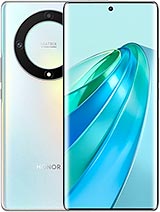
Honor X9a screen assembly: the OEM replacement to restore your phone’s curved OLED display
The Honor X9a launched in January 2023 with one clear selling point: its screen. Honor fitted it with 0.65 mm glass, thicker than the 0.55 mm commonly found in mid-range phones. It was tempered in two stages and tested against drops from one metre onto marble. Even so, glass has its limits. A knock to a corner or a fall onto a kerb can leave the Honor X9a screen cracked, with spreading black spots or a touchscreen that stops responding in one area.
On this model, the glass, touchscreen and OLED panel are laminated together as one piece. You can’t replace just the glass: the entire assembly needs to be replaced, and that’s exactly what we offer. This replacement part comes pre-assembled in black and is ready to connect to the original motherboard connector.
What does OEM mean for this Honor X9a screen?
OEM stands for Original Equipment Manufacturer. An OEM part is made to the same specifications as the component originally fitted to the phone: the same type of panel, resolution and connector. It usually comes from the same supply chain. The difference is that it doesn’t carry the brand logo or come in branded retail packaging.
In practice, once fitted, you’ll see the same display you had before the damage. As this is an OLED panel, its brightness matches the original screen: up to 800 nits peak brightness in direct sunlight and as low as 2 nits for comfortable reading in the dark.
Honor X9a screen specifications
- Type: screen assembly (OLED panel, touchscreen and glass laminated together)
- Diagonal: 6.67 inches, with 45° curved edges
- Resolution: 2400 × 1080 pixels (FHD+), around 395 pixels per inch
- Refresh rate: up to 120 Hz
- Touch sampling rate: 300 Hz
- Colour: 1.07 billion colours (8+2-bit) and 100% DCI-P3 coverage
- Peak brightness: 800 nits
- PWM dimming: 1920 Hz to reduce flickering at low brightness
- Quality: OEM
- Replacement colour: black
The 1920 Hz PWM specification matters. Many mid-range OLED panels flicker at much lower frequencies when the brightness is turned down, which some people experience as eye strain. The X9a stood out at the time for this feature, and a replacement that didn’t match it would be noticeable when using the phone at night.
Models compatible with this Honor X9a screen
The Honor X9a (model reference RMO-NX1) and the Honor Magic5 Lite are the same phone, sold under different names in different markets. They share the same chassis, dimensions (161.6 × 73.9 × 7.9 mm) and display, so this part fits both models:
- Honor X9a
- Honor Magic5 Lite
Please note that the Honor X9b is a different phone, despite the similar name, and this screen won’t fit it. If you’re unsure, check the model number under Settings > About phone before placing your order.
How to tell if your Honor X9a screen needs replacing
An OLED panel doesn’t fail in the same way as an LCD. Each pixel produces its own light, so panel damage tends to cause black or coloured areas rather than bright lines. These are the symptoms the iLevante team sees most often on this model:
- Chipped glass that sheds fragments when you clean it
- Black or purple spots that grow over time
- Vertical green or pink lines, especially after a drop
- An image that flickers or switches off when you press the frame
- Ghost images of the keyboard or status bar that won’t disappear
- Areas of the touchscreen that don’t respond, often near the curved edges
There’s one thing worth ruling out first. If a green line appears straight after an update and disappears when you restart the phone, it may be a software issue rather than a damaged part. But if the spot or line remains after restarting and appeared following an impact, the panel is damaged.
Installing the Honor X9a screen assembly: what you need to know
The X9a opens from the back. The rear cover is made of plastic, as is the frame, and it’s held in place with adhesive. Apply even heat at around 65–70°C and use a suction cup to lift it without forcing it. There’s a hidden screw beneath the camera’s black ring that’s easy to miss. Next, you’ll find 11 screws and the plate that protects the motherboard. That’s why we include a free tool kit with your order: picks, a screwdriver and plastic pry tools—the right tools for this phone.
The first thing to disconnect is the 5100 mAh battery. You must not handle the screen connector while the battery is connected. The rest of the job takes patience. Here are the iLevante team’s installation tips:
- Switch off the phone and remove the SIM tray before applying heat.
- Heat the rear cover evenly, without exceeding 70°C, to avoid damaging the OLED panel inside.
- Use plastic tools only near the fingerprint reader.
- Don’t bend the motherboard when removing it, and don’t bend the screen flex cable beyond 90°.
- Thoroughly clean away the old adhesive before fitting the new screen.
- Apply gradual, even pressure along the curved edges; never press the curve with just one finger.
Test the screen before closing the phone
Before applying any adhesive, connect the new Honor X9a screen flex cable to the motherboard, reconnect the battery and switch on the phone. Don’t remove the protective films yet. Check that:
- The image covers the whole display, with no spots or lines
- The touchscreen responds in all four corners, especially along the curved edges
- Auto-brightness increases and decreases as expected
- The fingerprint reader recognises a previously registered finger
If everything works, disconnect the battery, fit the screen and close the phone.
Fingerprint reader after replacement
The X9a has an optical fingerprint reader under the display. The sensor reads your fingerprint through the panel, so anything between the sensor and your finger can affect it. It’s common for saved fingerprints to stop working properly after replacing a screen with this type of reader. The fix is usually simple: delete your saved fingerprints and register them again once the phone is reassembled. It can also help to register the same finger twice. If the sensor still doesn’t read correctly, check that the adhesive or foam on the back of the panel is in place, as the distance to the sensor matters.
Protect your new Honor X9a screen from day one
Your order includes a free screen protector. The order in which you fit it matters. Apply the protector first, then register your fingerprints so the reader calibrates with the layer you’ll use every day. On a curved screen like this one, the protector needs to sit securely along the edges. If there are air gaps, the touchscreen may not work properly at the sides.
One practical tip: the X9a’s curves look great, but they leave little room to grip the phone, and most drops end up hitting the edge of the glass. Once your new screen is fitted, a case with a slightly raised lip around the front is the cheapest way to avoid having to replace it again.
• Product Weight: 0.14 kg.The technical specs of Honor X9a
can help you to choose the correct repair part for your device. Make sure your model reference is the same as this element. Here are some tech specs to help you:
- Brand: Honor
- Honor X9a Size: 161.6 x 73.9 x 7.9 mm.
- Release date: 2023, January 04.
- Weight: 175 g.
- Screen specs: AMOLED, 1B colors, 120Hz, 800 nits.
- Screen size: 6.67 inches, 107.4 cm2.
PVP:
SNK.EDA00443810134.95€ AvailableInStockNewCondition