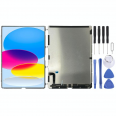
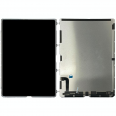
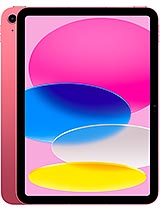
10.9-inch LCD Screen for iPad 2022 – Compatible Replacement for 10th Generation iPad
The iPad 2022 has become one of Apple's most popular models due to its iPad Air-like design, aluminum body, stereo sound, and A14 processor, perfect for daily tasks, studying, light work, and gaming. However, all that appeal diminishes if the screen is broken, stained, or not functional.
With this Premium Quality LCD screen for the 10th Generation iPad, you can:
- Enjoy content again on a 10.9-inch screen, ideal for watching videos, studying, or working.
- Fix issues with lines, stains, dark areas, or black screens.
- Leverage the power of the A14 processor and system fluidity without a screen ruining the experience.
- Avoid replacing your iPad when the real problem is just the screen.
This replacement is intended for those seeking a good quality screen for their iPad 2022 without technical hassle or the cost of official repairs.
Compatibility of the LCD Screen for iPad 2022 (Models and References)
Most importantly, ensure this LCD screen is compatible with your iPad model. This part is designed for the 10th generation iPad, the 2022 model with USB-C port and reduced bezel design.
The compatible references are:
- A3162
- A2757
- A2777
- A2696
- iPad13,18
- iPad13,19
To check:
- Go to the back of your iPad.
- Look for the word Model.
- Verify one of these codes appears: A3162, A2757, A2777, or A2696.
If it matches, this is the screen for your iPad 2022 you need. If not, better to look for the specific replacement for your model.
Features of the LCD Screen for 10th Generation iPad
This Premium Quality LCD screen is designed to provide a convenient day-to-day experience, ideal if you use your iPad for studying, watching series, working with documents, or occasional gaming.
| Feature | iPad 2022 LCD Screen Details |
| Replacement Type | LCD Screen for iPad 2022 (10th Generation iPad) |
| Size | 10.9 inches |
| Quality | Premium Quality |
| Compatibility | Apple Models A3162, A2757, A2777, A2696, iPad13,18, iPad13,19 |
| Device Type | iPad 2022 / 10th Generation iPad |
| Device Brand | Apple |
Being a Premium Quality LCD, it is designed to offer good sharpness, pleasant colors, and a suitable visual experience for everyday use of the iPad 10, whether for leisure or work.
When do you need to change your iPad 2022 screen?
It's not always necessary for the glass to be shattered for you to need to change your 10th Generation iPad screen. There are many signs that indicate the problem lies with the LCD, not just the outer glass.
Clear signs the LCD screen is damaged
- Colored stains (black, purple, blue, or droplet-shaped) that don't disappear.
- Vertical or horizontal lines crossing the screen.
- Areas where the image is very dark or not visible.
- The screen stays black, but the iPad makes sounds, vibrates, or responds to touch.
- Light leaks on edges or corners that weren't there before.
- After a drop or impact, the glass looks okay, but the image is distorted.
In these cases, the problem usually lies with the iPad 2022 LCD, and the solution is to replace the screen.
Advantages of Changing Your iPad 10 Screen Instead of Buying a New One
The iPad 2022 still has a long lifespan thanks to its A14 processor, good battery, and modern connectivity (WiFi 6, 5G, USB-C, compatibility with the first-generation Apple Pencil, etc.). Changing the screen is a smart way to extend the device's life.
- Cost-saving: a screen replacement is much cheaper than a new iPad.
- Less electronic waste: make the most of a device that's still very capable.
- Keep using your accessories: case, keyboard, stylus, etc.
- Ideal for studying and working: if you use it for class, notes, or remote work, getting the screen back is key.
If your iPad 10 only has a damaged screen, there's no point in giving up a device that can still perform very well day-to-day.
Tips Before Installing the LCD Screen for iPad 2022
If you're considering changing the 10th Generation iPad screen yourself, it's important to take your time and consider some details to avoid any mishaps.
What you should have ready
- An electronics tool kit (plastic pry tools, picks, screwdrivers, suction cup, etc.).
- A clean, spacious, and well-lit workspace.
- Patience and time, no rushing.
- If possible, an anti-static wrist strap to prevent discharges on the board.
General Steps to Change the 10th Generation iPad Screen
This is not an official guide but can serve as general guidance if you have some repair experience:
- Completely turn off the iPad 2022.
- If the glass is very broken, you can apply transparent tape over it to prevent pieces from detaching.
- Apply gentle heat to the screen edges using a hairdryer or heat gun, moving it constantly and not too close.
- Use a suction cup and plastic picks to slowly detach the screen assembly around the sides.
- Open the iPad carefully, like a book, without pulling too much on the internal cables.
- Disconnect the battery before handling the screen connectors.
- Disconnect the damaged LCD screen flex cables.
- Remove the old screen and carefully clean off adhesive residues.
- Place the new LCD screen for iPad 2022, connect the flex cables, and ensure they fit properly.
- Reconnect the battery and turn on the iPad to check the image is clear.
- If everything works, turn it off again, apply the appropriate adhesive, and close the screen by gently pressing around the edges.
If you're not comfortable doing this process, you can always go to a trusted service center with your own replacement screen for iPad 10.
Why Choose a Premium Quality LCD Screen for Your iPad 2022?
The 10th Generation iPad is a very balanced device: good 10.9-inch screen, aluminum design, stereo sound, all-day battery, and an A14 processor that handles both daily tasks and gaming quite well. It would be a shame to set it aside just because the screen is damaged.
With a Premium Quality LCD screen for iPad 2022, you get:
- Comfortable viewing for videos, online classes, and reading.
- Stable response for browsing, writing, drawing, or taking notes.
- A replacement specifically designed for models A3162, A2757, A2777, A2696, iPad13,18, and iPad13,19.
If your 10th Generation iPad is still performing well but the screen is giving you problems, this replacement is a simple way to make it a reliable companion for everything once again.
• Product Weight: 0.57 kg.The technical specs of Apple iPad (2022)
can help you to choose the correct repair part for your device. Make sure your model reference is the same as this element. Here are some tech specs to help you:
- Brand: Apple
- Apple iPad (2022) Size: 248.6 x 179.5 x 7 mm.
- Release date: 2022, October 18.
- Weight: 477 g / 481 g.
- Screen specs: Liquid Retina IPS LCD, 500 nits.
- Screen size: 10.9 inches, 359.2 cm2.
PVP:
SNK.IPAD016167.75€ AvailableInStockNewCondition