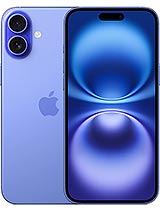
iPhone 16 Plus screen: when it needs replacing
Your phone falls onto the pavement and the glass cracks. Sometimes the image holds up for a few days; then a green line appears, a black spot starts to grow or an area stops responding to your finger. These symptoms mean the display panel is damaged.
If the glass is intact and only the touchscreen is faulty, the iLevante team would rule out the simple causes first: remove the case and screen protector, restart the phone and update iOS. There are also two unusual factory behaviours that can confuse people. When holding the phone in one hand, pressing Camera Control can make the touchscreen briefly unresponsive; this has been documented across the iPhone 16 family. This model also runs at 60 Hz, so animations feeling less fluid are not a sign of a fault.
About this complete screen for iPhone 16 Plus
This is a Premium-quality 6.7-inch replacement screen with a resolution of 2796 × 1290 pixels (460 ppi) and a Dynamic Island cut-out. It comes as a complete assembly, including the display panel, touchscreen glass, image controller and flex cable. There is no need to separate the glass. Its brightness specifications are:
- 900 nits typical maximum brightness
- 1,440 nits peak brightness for HDR content
- 1,800 nits peak outdoor brightness
The last figure applies in bright sunlight and is managed by automatic brightness. With manual brightness control, the display will normally stay close to its typical maximum. That is why the small ambient light sensor needs particular care during installation.
Your screen also comes with a screen protector and a tool kit containing screwdrivers, picks, pry tools and a suction cup. You will also need a heat gun or hairdryer, isopropyl alcohol of at least 90% concentration and new frame adhesive.
Replacing the iPhone 16 Plus screen: the iLevante team’s guide
Allow 30 to 60 minutes and expect a medium difficulty repair. One detail affects the whole process: the battery cannot be disconnected before opening the phone, so work with the phone switched off and avoid using metal tools to pry it open. The rear glass matters too. If it is already cracked, heat and pressure can make the damage worse.
- Make sure the battery is below 25%, switch off the iPhone and cover any broken glass with tape.
- Remove the two P2 pentalobe screws next to the USB-C port. Keep the screws separate according to their positions: putting a long screw into a short screw hole can damage the board.
- Heat each edge for about two minutes, starting at the bottom. Lift the screen with the suction cup over the USB-C port and cut through the adhesive with picks marked at 3 mm; deeper inside are delicate flex cables and contacts. The left side is the riskiest.
- Open the screen like a book towards the left, without putting strain on the flex cables. Remove the two covers (Y000 screws), disconnect the screen and front sensor, then carefully transfer the ambient light sensor to the new screen, making sure its adhesive does not touch the glass.
- Reconnect the screen and switch on the phone to test it before sealing: check touch response across the whole surface, brightness and Face ID. Switch it off again.
- Thoroughly clean the frame with alcohol, let it evaporate and fit the new adhesive, making sure it is correctly aligned. If it is crooked, replace it.
- Reconnect the cables, close the phone and replace the screws. Then place it face down on a cloth and distribute weight across the rear for at least 30 minutes; overnight is even better. A box lid can leave a gap around the cameras.
Would you rather not open the phone at home? Many repair services accept customer-supplied parts, so you can take them the screen and tool kit.
After installing the iPhone 16 Plus screen: what to expect
The Face ID module stays in the chassis, so it does not need replacing; just avoid touching it during the repair. Under Settings > General > About, the parts history will show the screen as an unknown part. This happens with any screen that is not an original Apple part. The phone can still be used normally, although this message may affect its resale value.
It is also worth checking Settings > Display & Brightness. True Tone and automatic brightness depend on Apple calibration and the iOS version, so availability may vary. And take care with water: the factory IP68 rating is no longer guaranteed once the phone has been opened, however well you seal the frame.
Is the touchscreen not working properly after installation? The most common cause is a connector that is not seated correctly, so check that first. Once everything has been checked, fit the included screen protector to the clean screen.
• Product Weight: 0.10 kg.The technical specs of Apple iPhone 16 Plus
can help you to choose the correct repair part for your device. Make sure your model reference is the same as this element. Here are some tech specs to help you:
- Brand: Apple
- Apple iPhone 16 Plus Size: 160.9 x 77.8 x 7.8 mm.
- Release date: 2024, September 09.
- Weight: 199 g.
- Screen specs: Super Retina XDR OLED, HDR10, Dolby Vision, 1000 nits , 2000 nits.
- Screen size: 6.7 inches, 110.2 cm2.
PVP:
SNK.AS15544427.25€ AvailableInStockNewCondition