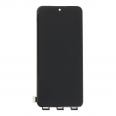
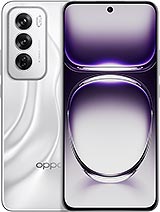
📱 Premium Oppo Reno 12 5G Screen (CPH2625): See Your Phone Clearly Again
Crack! 💥 That little sound nobody wants to hear. Your Oppo Reno 12 5G has been dropped and now the screen looks like a road map, the touchscreen is doing whatever it wants or, quite simply, everything is black. Don’t worry: here you have a screen for the Oppo Reno 12 5G in Premium quality, designed to bring your Reno 12 back to normal without spending a fortune or buying a new phone.
This replacement part is for the model with technical reference CPH2625, the Oppo Reno12 5G launched in 2024, with its 6.7-inch display. First, turn the phone over or go to Settings > About device to confirm that it says CPH2625. This ensures that it fits correctly the first time. 😉
✅ The essentials at a glance
- 🔧 Full screen assembly: the display panel and touchscreen glass come pre-assembled, with their connection flex cable.
- ⭐ Premium quality: a high-quality replacement with vivid colours, good brightness and a responsive touchscreen.
- 📏 6.7-inch format designed for the Oppo Reno 12 5G.
- 🛠️ You can install it yourself or take it to your trusted repair shop.
- 🚚 Express delivery available, so you do not have to stay disconnected for long.
📋 Quick specifications: screen compatible with Oppo Reno 12 5G
| Feature |
Details |
| Brand |
Oppo |
| Compatible model |
Oppo Reno 12 5G (Reno12 5G) |
| Technical reference |
CPH2625 |
| Phone launch year |
2024 |
| Screen size |
6.7 inches |
| Quality |
Premium |
| Replacement type |
Full screen assembly (display panel + touchscreen + flex cable) |
| Is it compatible with the Reno 12 Pro or Reno 12 F? |
❌ No, these are different models |
Be careful with similar names: the Reno 12 Pro, Reno 12 F and Reno 12 FS have different screens. This replacement is designed only for the Oppo Reno 12 5G CPH2625. It is better to check twice than to end up with a beautiful screen that does not fit. 🙃
🤔 What does Premium-quality screen mean?
There are all kinds of replacement parts available, and not all screens for the Oppo Reno 12 are the same. Premium quality is at the higher end of compatible replacement screens. It is the choice for anyone who wants their Reno12 to remain enjoyable to use every day: watching videos, browsing social media, taking photos, sending messages and everything else.
With this screen, you will get:
- 🎨 Beautiful, well-defined colours for enjoying series, photos and memes.
- ☀️ Good brightness for comfortable everyday use.
- 👆 Smooth and accurate touch response, without ghost touches or dead zones.
- 🔋 A replacement part designed to last if you treat it with care (and use a good case 😅).
In short, it offers a well-balanced combination of price and quality that gets your Oppo Reno 12 5G ready for another season.
🚨 How do you know if your Oppo Reno 12 screen needs replacing?
Sometimes it is obvious: the glass is shattered and there is nothing more to discuss. However, there are other signs that indicate that the Reno 12 5G screen needs replacing:
- The touchscreen has a mind of its own: it does not respond, responds slowly or opens apps you have not touched. If your Reno seems to have a life of its own, that is not a good sign. 👻
- Black, green or purple spots that gradually spread, especially after an impact.
- Vertical or horizontal coloured lines that were not there before.
- Flickering or unusual brightness changes without touching anything.
- Black screen even though the phone rings, vibrates and receives notifications.
- After being dropped in water, drop-shaped marks or blurred areas appear. 💧
If any of these things happen, you will most likely need to replace the screen on your Oppo Reno 12 5G. A friendly tip: do not wait too long, because cracked glass allows dust and moisture to enter, which can eventually damage other components.
🛠️ Replacing the Oppo Reno 12 5G screen: DIY or repair shop?
Everyone has their own style. Some people enjoy having a screwdriver in their hand, while others would rather not touch a single screw. Both options are valid.
👨🔧 The DIY option: install it yourself
If you have already carried out a repair and are patient, you can replace the Oppo Reno12 screen yourself. You will need precision tools, a gentle heat source, a suction cup, opening picks and new adhesive for resealing. Above all, take your time: rushing is the number one enemy here.
🏪 The easy option: take it to a repair shop
If you are not confident, many repair shops allow you to bring your own replacement part, helping you save a considerable part of the repair cost. Take them the Premium screen for the Reno 12 5G and they will take care of the rest.
🔍 How to replace the Oppo Reno 12 screen step by step
If you have decided to give it a go, here is a general guide to help you along the way:
- Switch off the Oppo Reno 12 5G and remove the SIM tray.
- Discharge any static electricity using an anti-static wrist strap or by touching an earthed metal surface. The components are sensitive. ⚡
- Apply gentle heat to the edges using a hairdryer or a heat gun at a low temperature and from a safe distance to soften the adhesive. Do not overdo it: we want to soften the glue, not barbecue the phone. 🔥
- Most Oppo models open from the back cover. Use a suction cup and an opening pick to separate it carefully.
- Remove the screws and metal shields covering the connectors, then disconnect the battery first.
- Disconnect the screen flex cable from the motherboard.
- Heat the front edges and slowly separate the damaged screen with the opening picks, working around all four sides.
- Clean all adhesive residue from the frame so that the new screen sits perfectly.
- Route the new screen flex cable, connect it without touching the contacts with your fingers, and reconnect the battery.
- Turn on the Reno 12 and test it before sticking anything down: display, touch response across the whole screen, brightness and fingerprint sensor. ✅
- If everything works, apply the adhesive, fit the screen and close the phone. Leave it for a few hours with some pressure so that the adhesive bonds properly.
Extra tip: keep the screws in order on a magnetic mat or a sheet of paper with diagrams. Your future self will thank you. 😄
❓ Frequently asked questions about the Oppo Reno 12 5G screen
Is this screen compatible with every Oppo Reno 12?
No. It is for the Oppo Reno 12 5G with reference CPH2625. The Pro, F and FS versions use different screens, so check the model carefully before buying.
Normally, no special configuration is required. However, we recommend registering your fingerprint again after the replacement so that the reader works as well as possible.
Will I lose my photos or data when replacing the screen?
No, the screen does not store any data. Even so, if the phone can still be used, making a backup before opening it is always a good idea. 💾
How long does delivery take?
Express delivery is available so that your Oppo Reno12 can be operational again as soon as possible. Being without a phone for a couple of days already feels like a long time. ⏱️
• Product Weight: 0.11 kg.The technical specs of Oppo Reno 12
can help you to choose the correct repair part for your device. Make sure your model reference is the same as this element. Here are some tech specs to help you:
- Brand: Oppo
- Oppo Reno 12 Size: 161.4 x 74.1 x 7.6 mm.
- Release date: 2024, June 18.
- Weight: 177 g.
- Screen specs: AMOLED, 1B colors, 120Hz, HDR10+, 1200 nits.
- Screen size: 6.7 inches, 108.0 cm2.
PVP:
SNK.AS14600422.76€ AvailableInStockNewCondition