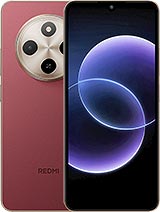
Complete 6.88-inch screen for Xiaomi Redmi 17C 4G – Premium Quality 📱
Have you dropped your Redmi 17C 4G face-down on the floor? 😩 Don’t worry—you don’t need to replace your phone. Here’s a Premium-quality complete screen for the Xiaomi Redmi 17C 4G, the model Xiaomi launched in 2026. This replacement part is designed to restore the crisp display and responsive touchscreen your phone had before, with a 6.88-inch panel covering the entire front of the device.
It comes with the display panel and touchscreen glass already assembled, along with its flex connection cable. This makes replacement straightforward: remove the damaged screen, connect the new one and you’re ready to go. You can install it yourself or take it to a repair shop you trust to save money on the repair 💸.
- ✅ Compatible with: Xiaomi Redmi 17C 4G
- ✅ Screen size: 6.88 inches
- ✅ Quality: Premium
- ✅ Type: complete screen (display + touchscreen)
- ✅ Phone launch year: 2026
Before you buy: check that you have a Redmi 17C 4G 🔍
This really is important. The Redmi family includes many models with similar names, and they don’t all use the same screen. This part is designed for the 4G version of the Redmi 17C. If you have another variant or a different model in the C series, such as a Redmi 15C or Redmi 14C, this screen won’t fit your phone.
How can you check in a moment? There are a few options:
- Go to Settings > About phone and check the device name. If the screen still turns on, this is the quickest option.
- Check the phone’s original box: it shows the product name and model number.
- If the screen is completely black, look for your purchase receipt or check your mobile network provider’s information.
| Feature | Details |
| 📱 Compatible model | Xiaomi Redmi 17C 4G |
| 🏷️ Device brand | Xiaomi (Redmi range) |
| 📅 Phone launch | 2026 |
| 📏 Screen size | 6.88 inches |
| ⭐ Replacement part quality | Premium |
| 🧩 Includes | Display panel and touchscreen glass assembled with flex cable |
Why it’s worth repairing your Xiaomi Redmi 17C 🛠️
The Redmi 17C is one of those phones that handles everyday use with ease. It features a MediaTek Helio G81 Ultra processor, a generous 5160 mAh battery with fast charging, HyperOS 3 based on Android 16, NFC, a headphone jack and even an IP64 rating. In other words, the rest of the phone is perfectly usable. If the screen is the only thing that’s broken, replacing it is much better value than buying another phone and setting everything up from scratch.
What’s more, the 6.88-inch screen is probably the part you use most on your Redmi 17C 4G: watching videos, browsing social media, using WhatsApp and checking maps… A cracked screen makes all of that uncomfortable and, be careful, it can even hurt your fingers if there are shards of glass.
Signs that your Redmi 17C 4G screen needs replacing
You won’t always see a spiderweb of cracks. Sometimes the problem is more subtle. Look out for these signs:
- 👆 Unresponsive touchscreen: areas that don’t respond, ghost touches or the keyboard typing by itself.
- 🌈 Vertical or horizontal coloured lines that weren’t there before.
- ⚫ Black or purple spots that gradually spread, often caused by an impact.
- 💡 Light leaks or brighter areas around the edges.
- 📴 Black screen even though the phone vibrates, makes sounds or receives notifications.
- 💧 Drop-shaped or circular marks after contact with liquids.
If your Xiaomi Redmi 17C has one or more of these symptoms, the display panel is most likely damaged, and a new screen should solve the problem.
Premium quality for the Redmi 17C 4G: what to expect ⭐
We’ve selected Premium quality because it offers a great balance between price and performance. This is a good-quality screen with pleasant colours, good brightness for everyday use and a responsive touchscreen for typing, gaming and scrolling through social media smoothly.
That said, we want to be clear: this is a compatible replacement part, not an official Xiaomi part. There may be slight differences in colour tone or brightness compared with the screen originally fitted to your phone. Most users will find these hard to notice in everyday use, but we’d rather let you know from the start 😉.
Who is this Redmi 17C screen ideal for?
- Anyone looking to get their phone working again without overspending.
- Technicians and repair shops looking for reliable stock for the Redmi 17C 4G.
- DIY enthusiasts who enjoy repairing their own devices.
- Anyone who wants to extend the life of their Xiaomi and reduce electronic waste ♻️.
Should you replace your Xiaomi Redmi 17C screen yourself or use a repair shop? 🤔
Both options are valid—it depends on your experience. Replacing a screen isn’t impossible, but it does require patience, a steady hand and the right tools. If you’ve never opened a phone before, it may be worth taking it to a repair shop: many will let you bring your own replacement part and charge you only for the labour.
If you’re planning to do it at home, make sure you have these tools ready:
- 🔧 Precision screwdrivers
- 🎸 Plastic picks and prying tools
- 🔵 Suction cup
- 🔥 Heat gun or hairdryer
- 🧴 Screen adhesive (such as B-7000 or specialist adhesive tape)
- ⚡ Anti-static wrist strap (highly recommended)
Basic steps for replacing the Redmi 17C 4G screen
- Turn off the phone and remove the SIM tray.
- Apply gentle heat around the edges to soften the adhesive. Hold the heat source a few centimetres away and don’t leave it in one place for too long.
- Use the suction cup to lift the front slightly, then insert a prying pick into the gap.
- Work your way around the edges with the picks to loosen the screen. Don’t insert them too far, or you could damage the flex cable.
- Access the motherboard, disconnect the battery first, then disconnect the screen flex cable.
- Thoroughly clean any adhesive residue from the frame.
- Connect the new Redmi 17C screen, reconnect the battery and turn the phone on to test it before sealing it in place.
- If everything works (display, touchscreen and brightness), apply the adhesive, position the screen and press down evenly.
- Leave the adhesive to cure for a few hours before using the phone as normal.
💡 Tip: opening the phone may affect its original protection against dust and splashes. Use good-quality adhesive and avoid exposing the phone to water after the repair.
Common mistakes when replacing the Xiaomi 17C screen (and how to avoid them)
- ❌ Not testing the screen before sealing it: always check that it works before you secure it in place.
- ❌ Applying too much heat: excessive heat can damage the battery or internal components.
- ❌ Bending the flex cable: the cable is delicate, so handle it without forcing it.
- ❌ Forgetting to disconnect the battery: this is one of the easiest ways to cause a short circuit.
- ❌ Touching the contacts with your fingers: static electricity can damage the connector.
Look after your new Redmi 17C 4G screen 🛡️
Once your Redmi 17C is back up and running, it’s worth protecting it. A tempered glass screen protector and a case with raised edges are the best combination to help prevent the next drop from ending in another repair. To clean the screen, use a microfibre cloth and avoid harsh products such as pure alcohol or glass cleaner.
At iLevante.com, you’ll also find other Xiaomi spare parts and accessories, so you can get everything you need in one order 📦.
• Product Weight: 0.20 kg.The technical specs of Xiaomi Redmi 17C 4G
can help you to choose the correct repair part for your device. Make sure your model reference is the same as this element. Here are some tech specs to help you:
- Brand: Xiaomi
- Xiaomi Redmi 17C 4G Size: 171.9 x 77.8 x 8.2 mm.
- Release date: 2026, June 23.
- Weight: 206 g.
- Screen specs: IPS LCD, 120Hz, 450 nits , 600 nits.
- Screen size: 6.88 inches, 112.4 cm2.
PVP:
SNK.LDCRIDMI17C4G91.75€ AvailableInStockNewCondition