Your basket

Your shopping cart is empty!
¡¡¡20 YEARS ONLINE!!!
ONLY TODAY: SHIPPING 1€
limited offer to first 120 orders

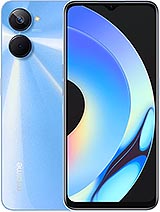
Full Screen for Realme 9i 5G / Realme 10 5G / Realme 10S

  • Full Screen for Realme 9i 5G / Realme 10 5G / Realme 10S 1
  • Full Screen for Realme 9i 5G / Realme 10 5G / Realme 10S 2
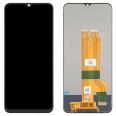
  • Full Screen for Realme 9i 5G / Realme 10 5G / Realme 10S 3
  • Full Screen for Realme 9i 5G / Realme 10 5G / Realme 10S 4
  • Full Screen for Realme 9i 5G / Realme 10 5G / Realme 10S 5
Realme 9i 5G / Realme 10 5G / Realme 10S Screen
17.50€
LIMITED OFFER
before 18.90 € (-7 %)
Available
  • Include free tools
  • Gift of 1 screen protector
or
You may also need...
Screen Adhesive for Mobile Phones 3ml B-7000 2.45€
Shipping cost
GB : 0.02 kg a United Kingdom 8.47€
GB : 0.02 kg
España Baleares
España Canarias
España Peninsula
Andorra
France
Italy
Portugal
Austria
Bolivia
Brasil
Chile
Colombia
Costa Rica
Denmark
Ecuador
Estonia
Finland
Germany
Greece
Guatemala
Hungary
Ireland
Liechtenstein
Luxembourg
México
Monaco
Netherlands
New Zealand
Norway
Panamá
Paraguay
Perú
Poland
Puerto Rico
Rep. Dominicana
Romania
Russian Federation
Slovenia
Sweden
Switzerland
Turkey
Ukraine
United Kingdom
Uruguay
Venezuela

Yugoslavia
Select shipping method and country to see the cost.
This is our commitment with you
Stress free buying
Safe payments with credit card or bank transfer. All protected with SSL security.
Relax when you buy
Our repair parts have passed two quality checks. One at the factory and the second at our warehouse. Make sure it will work perfectly.
Ask us for advice
Not sure if the repair part is for your device? Just write us!

Realme 9i 5G / Realme 10 5G / Realme 10S Screen

The replacement we offer is a brand-new screen so that you can dismantle and replace the one that broke. This screen is suitable for phones with references RMX3491, RMX3630 (Year 2022), which are models that do not support dual SIM. The replacement is a device integrated by several parts in one. Its components are:
  • The touch with protective glass.
  • An LCD screen.
  • The flex cable which attaches to the motherboard.
  • An integrated image controller IC.
  • The backlight to set the brightness.
Also, to make things easier when replacing it, we include a set of tools, so you can carry it out without any issues. This set includes:
  • Screwdrivers.
  • A plastic pick.
  • Levers.
  • And a suction cup.
Keep this kit well-stored, as it is indispensable. The Realme 10 5G screen we offer is well-packaged to avoid any damage during transport. We promise you the best in our replacements.

Quick Screen Replacement for Realme 9i

Firstly, you must have the correct tools for this job. You'll need a heat source to separate the damaged display from the phone. Also, you will need a guitar pick to perform the job of opening the Realme 9i Screen precisely, ensuring it is done neatly. You should also have a cotton cloth.
The screen you will receive will be well-packed, so handle it with care when unwrapping. Once you have all the tools and screen, here’s what you need to do:
  1. Before starting, it is essential to remove the battery.
  2. Ensure you are not carrying static electricity. It's good to have an anti-static wristband and wear anti-static footwear.
  3. To remove the smartphone module, use something that blows hot air, like a hairdryer or heat gun at 120°, never use one exceeding 120°, as it will damage essential circuits.
  4. Focus the heat on the edges so that the adhesive peels away. Use a pick, which is part of the necessary tool kit for the replacement, to completely detach the screen.
  5. Next, continue applying temperature, but on the central part of the smartphone, do it carefully and quickly to avoid damaging the battery (ideally, remove it).
  6. Finish separating the screen with the suction cup (included in the kit that comes with the Realme 10 5G Screen) and carefully separate it from the casing. Before completely removing it, check how the connector disassembles from the motherboard, so you don't damage the base where you'll place the Realme 10 5G Screen.
  7. Once removed, clean the area well with a soft cloth to remove all remaining adhesive. You can use liquids made for this purpose, but if you can't find any, do not use water as it will damage most buttons; instead, use a velvet cloth.
  8. Now, we are about to finish. Now connect the new display to the motherboard and connect the factory feature of the phone.
  9. Now, you just need to place the new display. These screens have pre-attached adhesive. You only need to heat the display slightly so the adhesive softens.
  10. When it's slightly melted, stick it where the previous screen of your phone was situated.
You are done, and now you have a new screen on your phone. Don't forget to put the battery and check its performance.

How much does this screen cost?

The price was explained at the beginning (17.50€), only the shipping cost will be added. Government fees are already included in the purchase. You can choose rapid delivery or standard shipping, which may have delays. In both options, you can be sure that what you acquired will arrive in optimal condition.

What color or colors are available?

Currently, we only have black available for all Oppo Realme 9i (including the colored one). As this model does not have any bezel.

Do I need to visit the original Realme service?

It's normal to feel daunted if you've never done this before, but remember there are no secrets for this job. Many books and tutorials have been published on how to replace the module of your Realme 10 (RMX3491, RMX3630).
On this page, I will show you how to do it yourself with a minimum investment of 17.50€. Make sure to read it thoroughly, don't skip any paragraph as it will depend on your effort's success. If needed, read it over and over again. So the answer is: Absolutely not to send it to an official service. Go for it!

Is it easy to repair this Realme 10 screen?

Of course! We have already mentioned the procedures to be done quickly and efficiently so your smartphone works again. From now on, we will show you how to know if your phone screen is broken.
If you follow the steps, there will be no problems. You will have the ability to solve the problem with your own hands and in record time.

Alternatives and tips from Realme

Without a doubt, we would be happy if the module were impossible to damage, but that would be spectacular. The truth is, an oversight or a fall can end with our screen shattered.
That's why the best advice is to cover it with a case. Cases work very well.
Many people have the habit of lending their smartphones, and the truth is no friend will take care of your Realme 10 as well as you do. If you don't want others to damage it, save yourself the trouble and don't lend it unless it's an emergency.
Whenever you plug your smartphone into electricity, find a safe place where no one can meddle with it while it's charging. This way, you'll avoid regrettable fractures.
One more thing, if you want to preserve the lifespan of your mobile phone, we advise you not to let babies come into contact with it. If they want to play, online stores offer very affordable gaming consoles tailored to the needs of our little ones.

How to diagnose if I need to change the screen

Most of the falls our phones receive could be said not to be accidents that completely destroy our phones. Generally, only the screen gets scratched and experiences no other permanent damage. Even so, there are times when our phone falls very hard, and we don't see any scratch at first glance, but even if it doesn't seem like it, it might have caused issues to our smartphone. That's when you need to follow these very important steps to check your phone's functionality.
  • First, when you turn on your electronic device, try using it by touching the screen. If it unlocks, it is assumed that there are still functions of your smartphone that have not suffered in the severe impact.
  • Secondly, observe very carefully the corners of your electronic device. The corners are the first place where cracks from the recent fall are found. Over time, these injuries will spread across the screen, making it almost impossible to read messages on the device. That's when you need to replace the module.
  • Additionally, your electronic device may not show almost any damage from the accident, but if the touch screen doesn't work or only works in some sections of the smartphone, you need to have a screen for your phone model.
Product Weight: 0.20 kg.

The technical specs of Realme 10s

can help you to choose the correct repair part for your device. Make sure your model reference is the same as this element. Here are some tech specs to help you:
  • Brand: Realme
  • Realme 10s Size: 164.4 x 75.1 x 8.1 mm.
  • Release date: 2022, December 16.
  • Weight: 191 g.
  • Screen specs: IPS LCD, 90Hz, 400 nits.
  • Screen size: 6.6 inches, 104.9 cm2.

PVP: SNK.EDA00422210817.50 AvailableInStockNewCondition

Brand and model

Spare part type