Your basket

Your shopping cart is empty!

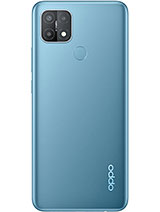
Full Screen for Oppo A35 PEHM00

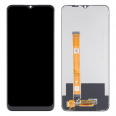
  • Full Screen for Oppo A35 PEHM00 1
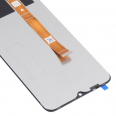
  • Full Screen for Oppo A35 PEHM00 2
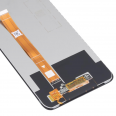
  • Full Screen for Oppo A35 PEHM00 3
  • Full Screen for Oppo A35 PEHM00 4
Oppo A35 Screen
13.90€
Available
Order it now, we ship it today at 19:45 and you get it tomorrow with expedited shipping available.
  • Includes free tool kit
  • Includes free screen protector
or
You may also need...
Screen Adhesive for Mobile Phones 3ml B-7000 2.45€
Shipping cost
GB : 0.02 kg a United Kingdom 8.47€
GB : 0.02 kg
España Baleares
España Canarias
España Peninsula
Andorra
France
Italy
Portugal
Austria
Bolivia
Brasil
Chile
Colombia
Costa Rica
Denmark
Ecuador
Estonia
Finland
Germany
Greece
Guatemala
Hungary
Ireland
Liechtenstein
Luxembourg
México
Monaco
Netherlands
Norway
Panamá
Paraguay
Perú
Poland
Puerto Rico
Rep. Dominicana
Romania
Russian Federation
Slovenia
Sweden
Switzerland
Turkey
Ukraine
United Kingdom
Uruguay
Venezuela

Select shipping method and country to see the cost.
Recomendado
OPPO A53 Pantalla
This is our commitment with you
Stress free buying
Safe payments with credit card or bank transfer. All protected with SSL security.
Relax when you buy
Our repair parts have passed two quality checks. One at the factory and the second at our warehouse. Make sure it will work perfectly.
Ask us for advice
Not sure if the repair part is for your device? Just write us!

Oppo A35 Screen

Has your Oppo A35 Full Screen broken? Not all replacements are compatible; in this case, it's for the Oppo model PEHM00.
The screen we provide includes all the components we'll show you below:
  • The IC that controls what you see.
  • The LCD screen where you see moving images.
  • The flex cable that connects with the Oppo module.
  • The touch screen, which sends the signal from the lines we draw with our hands on the phone.
Additionally, to ensure you have all the tools needed for the replacement, we include a utility set so you can do it easily. This pack includes:
  • Various Screwdrivers.
  • A plastic pick.
  • Levers to remove the display.
  • A suction cup as well.
Keep this kit well because you'll need it. The Oppo A35 Screen we provide is well packaged, ensuring no damage during transit. We guarantee quality in our products.

How to Easily Replace the Oppo A35 Full Screen

The first step is to watch videos on the Oppo A35 Full Screen and the tools you need to repair the Oppo A35 Screen, such as a lever. We will send you the screen for your PEHM00. It will arrive in excellent condition, as we ship it insured and securely packed to prevent any damage.
Once everything is ready, it's time to carry out the repair with great patience. The instructions to follow are:
  1. Before starting, it's essential to turn off the device by pressing the power button.
  2. Ensure you do not have static electricity. To do this, it's good to moisturize your skin and wear shoes that eliminate static energy.
  3. To detach the Oppo A35 Screen from the smartphone, you'll need something that emits hot air, like a hair dryer or a heat gun at 120°, but never use one that exceeds 120° as it will damage the essential parts.
  4. Heat each corner to dissolve the adhesive. To fully detach the display, use a pick, which is included in the essential repair tool kit.
  5. The next step involves continuing to apply heat, but in the middle of the smartphone; do it carefully and quickly to avoid damaging the battery (it's best to remove it).
  6. Finally, separate the LCD with the suction cup (included in the kit with the Oppo A35 Screen) and carefully disconnect it from the rest. Before removing it completely, check how it attaches to the motherboard, so you don't damage the base where you'll place the Oppo A35 Screen.
  7. Once disconnected, clean the surface thoroughly with a soft cloth to remove all the useless adhesive. You can use materials designed for this purpose, but if you don't have any, don't use water as it will damage many modules; simply use a soft cloth.
  8. We're almost done. Connect the new display to the motherboard and attach the cable that comes from the factory with the device.
  9. Now you just have to place the new display. These displays come with adhesive included; just heat the screen lightly to melt the adhesive.
  10. Once melted a bit, attach it to where the previous screen of your smartphone was located.
You're done, and you now have the new screen on your device. Don't forget to reconnect the power source and check that everything is functioning correctly.

What is the price of the Oppo A35 Full Screen?

The price is explained above (13.90€) and only the shipping cost will be added. VAT is already included in the purchase. You can choose expedited shipping or standard shipping, which may have delays. In both cases, ensure that the purchase arrives in excellent condition.

What colors can I buy?

For your Oppo color, the model of the screen you need only has black borders because it covers the entire contour of the smartphone. This way, you don't have to choose between many colors.

Should I go to the official service?

Not at all, we guide you step by step so you can do it yourself with all necessary precautions and you will see which tools are essential. So, you can install the screen (model PEHM0 quickly and save a significant amount of money.

Is it easy to replace the Oppo A35 Screen myself?

Absolutely! We've already outlined the procedures that should be done quickly and efficiently so that your smartphone functions better than before. From now on, we'll show you how to determine if your mobile screen is damaged.
By following the steps, you'll have no issues. You'll have solved the problem with just your ingenuity and in no time.

Various Original Recommendations for Oppo A35 PEHM00

Now that you have your new screen installed, you surely want to protect it so the same issue doesn't happen again.
There are many cases to protect your smartphone. The best and most popular ones are rugged cases that protect the bottom and top parts of your smartphone.
Next come tempered glass covers, which come with an adhesive, and are very easy to install. They withstand many impacts and may sometimes crack, but won’t damage the new smartphone screen. A very interesting innovation is the tempered liquid, which offers greater impact resistance and is less likely to scratch than tempered glass.
Additionally, there are very useful accessories. For instance, there is one designed to be placed on the smartphone cases, allowing you to hold it with a strap on your hand.

How to diagnose if I need to change the screen

Most of the impacts our devices receive are not severe. Usually, the screen just cracks slightly and doesn't have other damage affecting its functionality. However, sometimes our device falls in a way that permanently damages the screen without any visible scratches, but the impact does cause issues.
If the touchscreen fails, we will notice with a broken external surface, while the display still projects as normal. But the screen will be broken if the Oppo A35 PEHM00 stops working, meaning if only a part shows, vertical lines appear, or the screen is not lit up. To finally verify whether or not it needs replacement, access settings. Then, go to "About phone" and tap 7 times on "build number" to activate the "developer options."
In this section, select "pointer location," and draw lines over the entire screen. If these are not drawn, it means it is damaged, and you need to replace it.
Product Weight: 0.15 kg.

The technical specs of Realme C11

can help you to choose the correct repair part for your device. Make sure your model reference is the same as this element. Here are some tech specs to help you:
  • Brand: Realme
  • Realme C11 Size: 164.4 x 75.9 x 9.1 mm.
  • Release date: 2020, June 30. Released 2020, July 07.
  • Weight: 196 g.
  • Screen specs: IPS LCD.
  • Screen size: 6.5 inches, 103.7 cm2.

PVP: SNK.SPS152113.90 AvailableInStockNewCondition

Brand and model

Spare part type