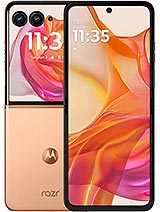
Full Screen for Motorola Razr 50 Ultra: Revitalize Your Foldable Mobile
If the screen of your Motorola Razr 50 Ultra is broken, has stripes, unresponsive touch areas, or strange spots, this black full screen is the replacement part you need to make your phone look new again. It's designed to replace the damaged screen module with one that is fully functional and ready to let you enjoy your foldable phone as if it were the first day.
Key Features of the Full Screen for Motorola Razr 50 Ultra
This part is specifically designed for Motorola Razr 50 Ultra models, respecting size, connectors, and compatibility. Being a full screen module, it includes everything needed to replace the damaged front assembly.
- Type of piece: Integrated full screen (front module)
- Color: Black, perfect to maintain the original design of the phone
- Compatibility: Motorola Razr 50 Ultra
- Position: Internal integrated screen of the device
- Approximate gross weight: 420 g (including packaging)
With this screen, you can solve image problems, touch functionality, or broken glass all at once without having to replace the entire phone.
When Should You Change the Screen of Your Motorola Razr 50 Ultra?
There are many daily situations that can leave you without a screen: a fall while opening the phone, a hit against a table, carrying it in a bag with keys, or simply a wrong gesture when folding it. If you notice any of these symptoms, this full screen replacement will help:
- Visible cracks or breaks in the glass, even if the image is still visible.
- Black spots, discolored areas, or vertical/horizontal lines.
- The screen stays black even though the phone turns on and vibrates.
- The touch doesn't work, some areas don't respond, or it registers ghost touches.
- The hinge has suffered a blow, and the screen part is not visible well anymore.
In all these situations, changing the full screen module is the quickest way to recover functionality and continue using your Motorola Razr 50 Ultra without spending as much as a new phone costs.
Recommended Tests Before Installing the Screen on the Motorola Razr 50 Ultra
Before mounting the screen in the mobile chassis, it's important to perform a small functionality test by connecting the flex cable to the motherboard. This ensures that everything works well before closing the device.
- 1. Do not remove protectors or films while testing, to avoid accidental damage.
- 2. Connect the screen flex to the corresponding connector on the board of the Motorola Razr 50 Ultra
- 3. Turn on the device and check that the image displays correctly and the touch responds across the surface.
- 4. Avoid excessively bending the flex cable: an angle greater than 90 degrees can cause a black screen or the appearance of lines.
Once everything is verified, you can proceed with the final assembly, sealing, and closing of the foldable phone.
Advantages of Using a Full Screen for Your Motorola Razr 50 Ultra
Choosing an integrated full screen offers several advantages over other improvised solutions:
| Option | Result | Risks |
| Continue using the phone with a broken screen | Partial functionality, poor visibility, and experience | Worsens the break, cuts on fingers, touch fails |
| Buy a new phone | Restores full functionality | Much more expensive than just replacing the part |
| Install full screen for Razr 50 Ultra | Same look and convenient use, phone operative again | Reasonable cost and repair focused only on the damaged part |
Thus, with a single black full screen piece, you can extend the lifespan of your foldable Motorola and continue enjoying its design and flawless screen.
Buy Your Full Screen for Motorola Razr 50 Ultra at iLevante
At iLevante.com, you'll find this and many other spare parts for mobile and tablet, always focused on real compatibility with each model. This full screen for Motorola Razr 50 Ultra allows you to quickly solve image and touch problems with a replacement specifically designed for your device.
If your foldable has suffered a fall or the screen simply no longer responds as it should, changing the full module is the best way to go back to enjoying your Motorola Razr 50 Ultra with a clear image and smooth touch sensitivity.
• Product Weight: 0.50 kg.The technical specs of Motorola Razr 50 Ultra
can help you to choose the correct repair part for your device. Make sure your model reference is the same as this element. Here are some tech specs to help you:
- Brand: Motorola
- Motorola Razr 50 Ultra Size: Unfolded: 171.4 x 74 x 7.1 mmFolded: 88.1 x 74 x 15.3 mm.
- Release date: 2024, June 25.
- Weight: 189 g.
- Screen specs: Foldable LTPO AMOLED, 1B colors, Dolby Vision, 165Hz, HDR10+, 3000 nits.
- Screen size: 6.9 inches, 107.6 cm2.
PVP:
SNK.AS147009130.95€ AvailableInStockNewCondition