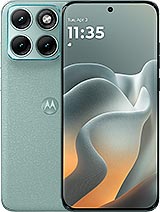
Premium Screen for Motorola Edge 70 Fusion - iLevante.comScreen for Motorola Edge 70 Fusion 6.8" now available!
Bam! Your Motorola Edge 70 Fusion just took a hit, and the screen turned into a mess. Don't worry, because at iLevante.com we have the perfect quality Premium screen for Motorola Edge 70 Fusion so you can enjoy your phone like the first day. This 6.8-inch replacement is specially designed for the Edge 70 Fusion that Motorola will release in 2026, so it fits like a glove.
Forget about missing TikToks, epic photos, or that wallpaper you love so much. With this screen for Motorola Edge 70, everything returns to normal in the blink of an eye. It’s a high-quality replacement part that allows you to continue using your phone without having to go through official service.
Why choose this screen for the Motorola Edge 70 Fusion?
The Edge 70 Fusion screen we offer is similar to the original in many important aspects. It's ready to install with all the necessary components: the LCD panel, touch glass, connector flex, and IC driver. So, you won’t have to hunt around for loose parts.
Moreover, it includes a screen protector as a gift so you can take care of it right from the start. And because we know home repairs can be a hassle, we also send you a complete tool kit with screwdrivers, picks, levers, and a suction cup. Everything you need to make the change easier!
Main features of the Motorola Edge 70 Fusion screen
- Size: 6.8 inches, ideal for the Edge 70 Fusion
- Premium quality with good clarity and vivid colors
- Compatible with the model Motorola will release in 2026
- Includes flex and all necessary connectors
- Free tool kit for installation
How to know if your Motorola Edge 70 needs a screen replacement?
Sometimes, the screen doesn’t need to be completely shattered to notice something is wrong. Here are the most common signs that indicate it's time to renew your Motorola Edge 70 Fusion screen:
- The touch responds late or doesn’t function at all in certain areas
- Black spots, blue spots, or strange colors appear
- It fell into water, and now you see circles or droplets on the screen
- There are light leaks at the edges or in the center
- Colors appear dull or different depending on the angle
If any of these situations sound familiar, don't hesitate any longer. A Premium screen for Motorola Edge 70 Fusion will solve the problem without complications.
Premium Quality for your Motorola Edge 70 Fusion
This screen stands out for its Premium quality. It's a highly sought-after option because it offers a great balance between price and performance. Although it’s not Motorola’s original replacement, it's manufactured to high standards ensuring a user experience very similar to what you had before the accident.
Users who have tried it praise how well it responds to touch and how videos and photos look. Perfect for daily use, gaming, or watching series on your 6.8-inch Edge 70 Fusion.
Quick Quality Comparison
| Feature | Premium Quality |
| Brightness and colors | Very good |
| Touch response | Quick |
| Ease of installation | High |
| Price | Affordable |
Repair it at home or take it to a technician?
Many prefer to replace the Motorola Edge 70 Fusion screen themselves because it’s faster and saves money. Others choose to take it to a trusted service technician. The good news is that most workshops accept that you bring your own replacement, so you only pay for labor.
If you've never done a repair, no worries. The included tool kit will help a lot, and there are tutorials everywhere. Just work calmly and in a clean place.
Step-by-step guide to replacing the Motorola Edge 70 Fusion screen
Ready to try it yourself? Here’s a clear and simple explanation to ensure everything goes well:
- Turn off your Motorola Edge 70 Fusion completely.
- Discharge static electricity by touching something metallic or using an anti-static wristband.
- Apply gentle heat with a hairdryer along the edges for a few seconds to soften the adhesive.
- Insert the picks from the kit along the sides and gently separate the screen.
- Use the suction cup to carefully lift the broken screen.
- Disconnect the flex gently and remove the old screen.
- Clean adhesive residue from the casing.
- Place the new screen for Motorola Edge 70 and connect the flex.
- Turn on the phone to ensure everything works correctly.
- Glue the new screen and let it rest for a few hours for the adhesive to set.
And that's it! Your Edge 70 Fusion will have the clear 6.8-inch display you love once more. Remember to take it step by step and don't rush. If you get stuck, you can always pause and search for professional help.
With this Premium screen for Motorola Edge 70 Fusion, you regain the joy of using your phone without any worries. Whether for social media, games, or photos, everything will look much better. Don't let a broken screen stop you!
• Product Weight: 0.20 kg.The technical specs of Motorola Edge 70 Fusion
can help you to choose the correct repair part for your device. Make sure your model reference is the same as this element. Here are some tech specs to help you:
- Brand: Motorola
- Motorola Edge 70 Fusion Size: 162.8 x 75.6 x 7.2 mm.
- Release date: 2026, March 02.
- Weight: 177 g.
- Screen specs: AMOLED, 1B colors, 144Hz, HDR10+, 5200 nits.
- Screen size: 6.8 inches, 113.1 cm2.
PVP:
SNK.LCDMOTOE70F85.99€ AvailableInStockNewCondition