Motorola Edge 50 and Edge 50 Pro Screen - iLevante.com
Screen for Motorola Edge 50 and Edge 50 Pro: the replacement your Moto needs now! 📱
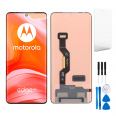
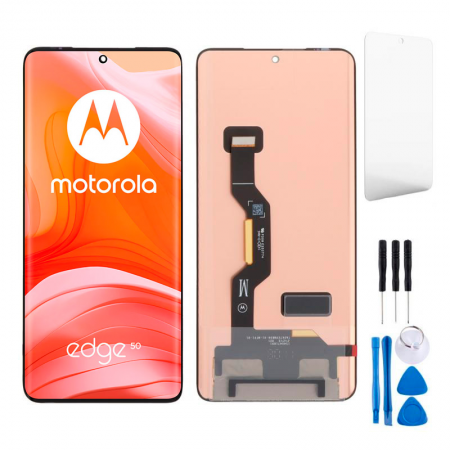
Hey! Did the screen of your Motorola Edge 50 or Edge 50 Pro break and now your phone is a mess? Don't worry, here at iLevante.com we have the perfect Motorola Edge 50 screen of Premium quality so you can enjoy your Moto Edge 50 like the first day. This replacement is designed specifically for the models released in 2024, with references XT2407-1 and XT2403-2, and measures 6.7 inches to fit like a glove.
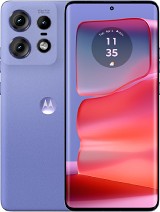
The Motorola Edge 50 Pro is a hit with its stunningly beautiful design, a pearlescent back cover that reflects light in many ways, and that raised camera module in the lower right corner. Imagine seeing everything again with that curved 6.7-inch screen that shines with vibrant colors and responds to touch as if nothing happened. It's the detail that makes your Edge 50 the life of the party again!
Why choose this Premium screen for your Motorola Edge 50 Pro?
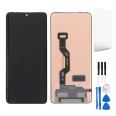
This Premium quality screen is made to feel similar to the original one of the Motorola Edge 50. It comes complete with all the components you need: the panel, the touch glass, the connection flex, and the IC controller. So you won't have to look for loose parts. It's ideal for the Edge 50 Pro which boasts a high refresh rate and stunning colors, and also for the standard Motorola Edge 50 that shares the same 6.7-inch size.
The Moto Edge 50 Pro has a Snapdragon 7 Gen 3 processor that handles everything effortlessly, 12 GB of RAM (plus 4 GB virtual) and 512 GB of storage. With this new screen, you can continue to take advantage of its 50-megapixel front camera with autofocus and the 50 MP main camera that is one of the brightest on the market. Stunning night photos all over again!
Clear signs that your Edge 50 screen needs replacement 😱
Sometimes it doesn't need to shatter into a thousand pieces for you to realize. Look at these symptoms that indicate your Motorola Edge 50 is crying out for a new screen:
- The touch is acting up: you touch and it doesn't respond, or responds where it wants.
- Strange color spots that weren't there before (black, blue, or rainbow).
- After a dip, circles or drops appear that don't go away.
- Light leakage at corners or edges.
- Colors look dull or weird in the side areas.
If any of these sound familiar, it's time to act. With the Motorola Edge 50 Pro screen of Premium quality, everything returns to normal in a snap.
What your complete Edge 50 screen includes
When you buy this screen for the Motorola Edge 50 you get the complete kit: 6.7-inch panel, touch glass, flex, and controller. Plus, we include a tool kit with screwdrivers, picks, levers, and a suction cup so you can do it yourself without hassles. Say goodbye to relying only on expensive technical services!
DIY or take it to the technician? You decide
Many prefer to change the Edge 50 Pro screen at home because it's faster and saves money. However, if you've never done it before, take it easy. The Motorola Edge 50 is a delicate device, but with patience and the tools we provide, it's doable. If you prefer professionals to do it, many workshops accept that you bring your own replacement to reduce the final cost.
Step-by-step guide to changing your Motorola Edge 50 screen 📋
Ready to get hands-on? Here's a detailed and friendly explanation for changing your Moto Edge 50 screen without any scares:
- Turn off the phone completely. No screens on while you manipulate.
- Discharge static electricity. Touch something metallic or use an anti-static wristband to avoid frying the flex.
- Apply heat carefully. Use a hairdryer or heat gun 5 cm away around the edges. Only 2 seconds per area to soften the glue without damaging anything.
- Insert the picks. Start on one side and move them up and down. Repeat on all four sides of the Edge 50 Pro.
- Use the suction cup. Heat the center a bit and gently pull to detach the full screen.
- Disconnect the flex. Use the lever to lift the connector very carefully. Do not force!
- Clean off glue residue. Remove all old glue from the frame of the Motorola Edge 50 before placing the new one.
- Fit the new screen. Connect the new flex to the board (avoid touching the copper contacts with your fingers).
- Test before sticking. Turn on the phone and check that the touch, colors, and brightness work perfectly.
- Stick and wait. Once everything is OK, glue the screen and let it set for 3-4 hours so the adhesive holds well.
Extra tip: record the process with a friend's phone for reference. And if something doesn't fit, stop and review. Better safe than sorry!
Total compatibility with XT2407-1 and XT2403-2
This Premium screen is specifically made for the Motorola Edge 50 with reference XT2407-1 and the Edge 50 Pro with XT2403-2. Both 2024 versions share the 6.7-inch size and the design that makes the Moto Edge 50 Pro stand out with its pearlescent finish and Dolby Atmos stereo sound. The replacement maintains that smooth experience you expect from the Snapdragon 7 Gen 3 and the 4500 mAh battery with super-fast 125 W charging.
Tips for your new screen to last longer
- Always use a case and tempered glass protector from day one.
- Avoid leaving the Edge 50 in direct sunlight for too long.
- Update the software to keep everything optimized.
- Clean the screen with microfiber cloths, no harsh products.
The Motorola Edge 50 Pro is a very cool phone due to its curved OLED 144 Hz screen and its camera that takes amazing photos at night. With this Premium quality screen, you regain all that magic without complications. The sound remains perfect thanks to stereo speakers and the 50 MP front camera continues to focus like a champ.
If your Moto Edge 50 comes with Android 14 and you want to keep enjoying its 512 GB of storage and 12 GB of RAM, this is the most direct solution. Changing the screen yourself is an engaging experience when done well, and with our tool kit, everything is easier.
Remember that the Edge 50 Pro has a raised camera module that gives it a unique touch, and the new screen respects that premium design. Whether you have the standard or Pro model, references XT2407-1 and XT2403-2 are covered with this 6.7-inch replacement that feels similar to the original.
Ready to revive your Motorola Edge 50? Let’s get to work and make it shine again!
• Product Weight: 0.13 kg.The technical specs of Motorola Edge 50 Pro
can help you to choose the correct repair part for your device. Make sure your model reference is the same as this element. Here are some tech specs to help you:
- Brand: Motorola
- Motorola Edge 50 Pro Size: 161.2 x 72.4 x 8.2 mm.
- Release date: 2024, April 03.
- Weight: 186 g.
- Screen specs: P-OLED, 1B colors, 144Hz, HDR10+, 2000 nits.
- Screen size: 6.7 inches, 107.4 cm2.
PVP:
SNK.AS15126150.37€ AvailableInStockNewCondition