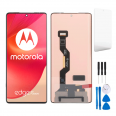
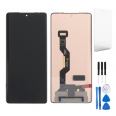
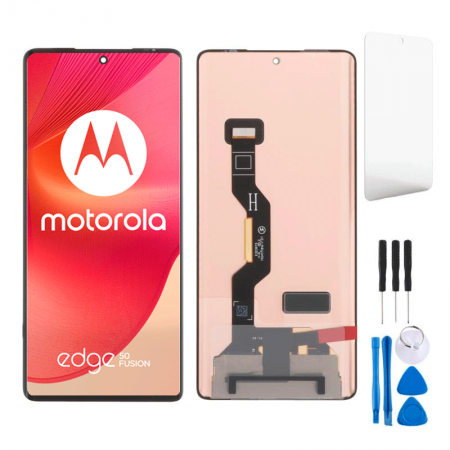
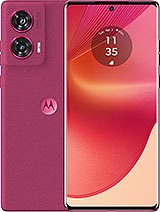
Screen for Motorola Edge 50 Fusion: Recover the Magic of Your Phone!
Oh no! Did your Motorola Edge 50 Fusion take a hit and now the screen looks like an abstract puzzle? 😨 Don't worry, friend, at iLevante.com we have just what you need: a Premium quality screen for the Motorola Fusion Edge 50, that fresh 2024 model with the technical reference XT2429-1. Imagine gliding through that 6.7-inch display as if nothing happened. It's similar in quality to the original, but with an accessible touch that lets you repair without hassle. Let's dive into the details so you know why this is your salvation!
Why Choose a Premium Screen for Your Motorola Edge 50 Fusion?
The Edge 50 Fusion from Motorola debuted in 2024 and has become the ideal companion for those seeking a powerful and stylish phone. With its 6.7-inch screen, it's perfect for watching videos, gaming, or just browsing. But what happens when a mishap leaves it out of action? That's where our Premium replacement screen for the XT2429-1 comes in. This beauty is not just a piece of glass; it's a complete set that gives you vibrant colors and a touch response that makes you feel brand new. 😎 Unlike cheaper options on the market, this Premium offers durability that withstands daily wear without those annoying glitches that leave you scratching your head.
Did you know the Motorola Edge 50 Fusion is known for its curved and fluid design? Well, this screen fits perfectly, maintaining that premium vibe you love so much. We won't bore you with exclusive technicalities, but we will say it's of high quality, ideal for users who want no compromises. And hey, it's 100% compatible with your model, so no surprises!
Components Included in Your Edge 50 Fusion Screen
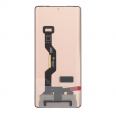
You're not just buying a screen; you're getting a comprehensive solution! This Premium screen for Motorola Edge 50 Fusion comes with all the essentials: the LCD panel, durable touch glass, image controller, and the flex cable to connect to the phone. And how about an extra screen protector? Yes, included so you start off on the right foot. It's like a survival kit for your Fusion Edge 50, ready for you to install or take to a pro. Forget about going to the official Motorola store and waiting forever; with this, you're a step ahead. 🚀
- LCD Panel: For sharp and bright colors on your 6.7 inches.
- Touch Glass: Responds to your touches with precision, no lags!
- Control IC: The brain that makes everything run smoothly.
- Flex Cable: Secure connection to your XT2429-1's interior.
- Screen Protector: A bonus to prevent scratches from day one. 😊
Feeling adventurous? Great! Because we include a free tool kit with your screen for Motorola Edge 50 Fusion. It's not just for show; it’s so you can replace that broken screen without breaking a sweat. Imagine: precise screwdrivers, picks for careful separation, soft levers, and a suction cup that does the heavy lifting. It’s like having a mini workshop in your pocket. 😂 If you're someone who enjoys a good DIY, you’re going to love this. And if not, you can always hand it to a technician and save on costs.
Signs Your Motorola Edge 50 Fusion Screen Needs a Change
We've all been there: a slip, a bump, and bam! Your Edge 50 Fusion is not the same anymore. But it's not always obvious. Here's a fun list of symptoms that scream "Change it now!":
- Rebellious touch: Touch here, responds there... or doesn’t respond at all. Frustrating!
- Mysterious spots: Weird colors appearing out of nowhere, like unwanted abstract art. 🎨
- Water effects: If it got wet and now there are circles or droplets on the screen, it’s time.
- Light leaks: Edges shining where they shouldn’t, stealing the show.
- Faded colors: Especially at the edges of those 6.7 inches, where everything looks dull.
These issues turn your Motorola Fusion Edge 50 into a headache. But with our Premium screen, bye-bye dramas! It's the quick way to get back in action.
Premium Screens for Motorola Edge 50 Fusion: Quality that Shines
At iLevante.com, we focus on the best for your XT2429-1. This Premium screen is top in the replacement market, offering optimal thickness and a touch response that makes you forget it's a replacement. Compared to others? Well, cheaper ones might not hold up in durability or visibility, but this one does. It's ideal for the Edge 50 Fusion 2024, keeping that Motorola essence without complications. And with frequent discounts, it’s a steal! 💸
Quick Feature Comparison | Aspect | Premium Screen | Cheap Options |
| Touch Response | Fast and accurate 😄 | Sometimes erratic |
| Durability | High, for daily use | More prone to failures |
| Visibility | Excellent in sunlight | May become dull |
| Price | Affordable with discounts | Lower, but with risks |
Technical Service or DIY? Options for Your Motorola Edge 50 Fusion Screen
Go to the official Motorola service? It could be, but why wait when you can act now? Many choose to change the Edge 50 Fusion screen on their own to save time and money. If you're not confident, take it to a local technician—many accept replacements like this and charge only for labor. It's win-win! And if you go DIY, our kit has got your back. Just remember: handle with care, it's a delicate part of your Motorola XT2429-1. 😉
How to Change Your Motorola Edge 50 Fusion Screen: Step-by-Step Guide
Ready for the adventure? Changing the Premium screen for Edge 50 Fusion isn’t rocket science, but it requires patience. Here goes a simple and fun guide to do it like a pro:
- Turn off the phone: Safety first, we don't want shocks! 🔌
- Discharge static: Use an anti-static wrist strap or touch something metallic. Avoid frying circuits with your electric superpower. ⚡
- Apply heat: With a hairdryer or heat gun, warm the edges carefully (5 cm distance, no more than 2 sec per spot) to loosen the glue.
- Separate with picks: Insert the picks from the kit and move them around all four sides. Smooth, like peeling a ripe fruit! 🍌
- Use the suction cup: Heat the center and pull with the suction cup to lift the old screen.
- Disconnect: Gently remove the flex and take out the broken screen.
- Clean: Remove glue residues from the frame for a perfect fit.
- Install the new one: Connect the flex of the Premium screen, avoiding touching sensitive parts.
- Test: Turn on and check that everything works: touch, colors, everything!
- Glue and wait: Apply new glue and let it rest for 3-4 hours. Patience, young padawan! ⏳
Et voilà! Your Motorola Edge 50 Fusion is back, ready for more adventures. This guide is to empower you, but if you doubt, a technician is your best friend.
Beyond the repair, this Premium screen brings positive vibes: higher resistance to everyday scratches, colors that pop on your 6.7 inches, and an installation that makes you feel like a hero. For the Edge 50 Fusion 2024, it's like an upgrade disguised as a replacement. Do you game a lot? Watch series? Everything looks better. And with fast shipping, you don't wait forever! 📦
Explore how this screen integrates with the curved design of the Fusion Edge 50, maintaining the fluidity that Motorola loves. It's versatile for any user, from gamers to social media pros. Enjoy your renewed phone!
• Product Weight: 0.11 kg.The technical specs of Motorola Edge 50 Fusion
can help you to choose the correct repair part for your device. Make sure your model reference is the same as this element. Here are some tech specs to help you:
- Brand: Motorola
- Motorola Edge 50 Fusion Size: 161.9 x 73.1 x 7.9 mm.
- Release date: 2024, April 16.
- Weight: 174.9 g.
- Screen specs: P-OLED, 1B colors, 120Hz , 144Hz , 1600 nits.
- Screen size: 6.7 inches, 108.4 cm2.
PVP:
SNK.AS14285138.26€ AvailableInStockNewCondition