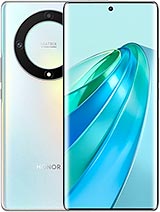
Full Screen for Honor X9a: Make Your Mobile Like New
If the screen of your Honor X9a is broken, scratched, has stains, or is unresponsive to touch, this full screen is the part you need to get your mobile ready to use for many more months. It is a replacement specifically designed for these models, with the exact size, connectors, and design to fit perfectly.
Features of the Full Screen for Honor X9a
This full screen includes the panel and the touch digitizer already assembled, making the replacement process more convenient and efficient. It is designed to offer a good touch response and clear display, ideal for those who use the mobile daily for social media, videos, work, or games.
- Type of replacement: full screen with integrated touch
- Color: black
- Compatible models: Honor Magic5 Lite and Honor X9a
- Approximate weight of the replacement: 120 g
- Specific flex connectors for these models, no unusual adapters needed
Being a specific part for these Honor models, you will have no issues with size, fit, or alignment with the chassis or sensor readers.
Compatible Models: Honor X9a 📱
This replacement is designed solely for the following devices:
- Honor Magic5 Lite
- Honor X9a
If you have any of these two mobiles and the screen has been damaged by a fall, a corner impact, pressure in the pocket, or simply stopped displaying well, this is the right part. Always make sure to check the exact model of your phone in Settings > About phone or on the original box.
How to Test the Full Screen Before Installing it on Your Honor
Before closing the mobile with the new screen, it is very important to do a quick functionality test. This way, you ensure everything works perfectly and avoid having to disassemble it again.
- Do not remove the protective plastics or stickers during the initial test.
- Carefully connect the flex of the new screen to the Honor X9a's motherboard connector.
- Turn on the phone and check that the full image is visible without stains, lines, or dark areas.
- Swipe across the screen (up, down, left, right) to ensure the touch responds well in all areas.
If everything functions correctly, you can proceed with the final assembly and close the phone with confidence.
Mounting Tips and Flex Care for the Honor X9a Screen
The screen's flex is one of the most delicate parts of this component. It is the flat "cable" that connects the screen to the mobile's motherboard.
- Do not bend it at sharp angles; avoid more than 90 degrees to prevent black screens or lines.
- Try to work in a clean area without static electricity to protect the components.
- Align the screen well with the chassis before applying pressure so the flex is not stressed.
By following these steps, when replacing the screen of your Honor X9a, you will have a mobile ready to function like the first day, with clear visuals and precise touch.
Benefits of Replacing Your Honor Screen versus Buying a New Mobile
Opting for a full screen for Honor X9a is a smart way to extend your mobile's lifespan. The device still has a good processor, camera, and battery, so often the only serious issue is the broken screen.
| Option | Cost | Outcome |
| Change full screen | More economical | Functional mobile as always |
| Buy a new mobile | More expensive | Requires data migration and complete setup from scratch |
With this replacement, you have a quick and effective solution to continue enjoying your Honor without overspending or sacrificing your current data, apps, and settings.
• Product Weight: 0.14 kg.The technical specs of Honor X9a
can help you to choose the correct repair part for your device. Make sure your model reference is the same as this element. Here are some tech specs to help you:
- Brand: Honor
- Honor X9a Size: 161.6 x 73.9 x 7.9 mm.
- Release date: 2023, January 04.
- Weight: 175 g.
- Screen specs: AMOLED, 1B colors, 120Hz, 800 nits.
- Screen size: 6.67 inches, 107.4 cm2.
PVP:
SNK.EDA00443810137.95€ AvailableInStockNewCondition