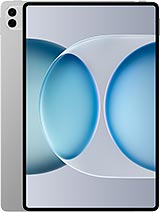
Screen Honor MagicPad 3 Pro 12.3" YLE-W09 – Premium Quality to Bring Your Tablet Back to Life
Has your Honor MagicPad 3 Pro fallen and the screen is a mess? Keep calm. At iLevante.com, you have this screen for Honor MagicPad 3 Pro 12.3 inches, technical reference YLE-W09, in Premium quality, ready to make your tablet that perfect machine again for studying, working, drawing, or binge-watching series.
It is specifically designed for the model Honor MagicPad 3 Pro 2026, so it fits the needs of this model and allows you to restore a comfortable, smooth user experience without weird image lines. If your current screen is broken, stained, or the touch is failing, this is the replacement you're looking for.
Screen for Honor MagicPad 3 Pro 12.3" – What's Included in This Replacement?
This complete screen for MagicPad 3 Pro is ready for you to install at a repair service or, if you're brave, at home with a little patience.
- Screen panel of 12.3 inches for the Honor MagicPad 3 Pro.
- Touch glass (the glass you touch with your fingers).
- Digitizer assembly to ensure the touch responds correctly.
- Flex connection cable with the technical reference YLE-W09, which links the screen to the motherboard.
- Integrated front frame for easy installation (depending on the batch).
It's a premium quality screen, ideal if you want good touch response and a clear image without going for exorbitant prices. It is not an official manufacturer replacement, but it's designed to offer stable and comfortable performance for daily use.
Features of the Screen Honor MagicPad 3 Pro YLE-W09
To make things clearer for you, here is a quick summary of the main features of this replacement screen for Honor MagicPad 3 Pro 2026:
| Feature | Detail |
| Compatible model | Honor MagicPad 3 Pro (released in 2026) |
| Technical reference | YLE-W09 |
| Screen size | 12.3 inches |
| Type of replacement | Complete screen with touch and flex |
| Quality | Premium Quality |
| Recommended use | Repair of broken screen, defective touch, stains, or lines |
Thanks to this replacement, you will still be able to make the most of your MagicPad 3 Pro for everything: taking notes, drawing, watching movies, or using it as a second screen at work. The important thing is that you don't have to retire your tablet just because of one bad fall.
When to Change the Screen of the Honor MagicPad 3 Pro?
Sometimes the screen of the Honor MagicPad 3 Pro looks “half okay”, but in reality, it's already asking for retirement. These are the typical signs that you need a new screen for your MagicPad 3 Pro:
- Visible cracks or breakages: the glass is cracked, lines are visible everywhere or there are areas with a cobweb-like appearance.
- Color spots or black areas: black, purple, or blue spots appear that weren't there before.
- Ghost touches: the tablet presses itself, opens apps without you touching anything, or the touch goes completely crazy.
- The touch does not respond: you have to press hard or there are parts of the screen that do not react.
- Vertical or horizontal lines: fixed stripes appear in the image, even if you restart the tablet.
- Light leaks: you see strange brightness on the edges or areas with uneven lighting.
- Moisture damage: after getting wet, spots with the shape of drops or circles start to appear on the screen.
If any of these symptoms sound familiar, the most practical thing is to install a new YLE-W09 screen for Honor MagicPad 3 Pro and forget about struggling with a half-dead screen.
Screen Honor MagicPad 3 Pro 2026 – Advantages of Using a Premium Replacement
Choosing a premium quality screen for the MagicPad 3 Pro is a good option if you want something balanced between price and user experience. Some advantages of this type of replacement:
- Good touch response for typing, drawing, or browsing without annoying delays.
- Clear image for reading, watching videos, or using work apps without blurriness.
- Compatibility with the MagicPad 3 Pro 2026 model, specifically designed for this Honor device.
- Ideal for extending the life of your tablet without having to buy a new one just because of the screen.
If you use your Honor MagicPad 3 Pro for studying, working, or playing, a decent screen is key. With this replacement, you can continue making the most of your tablet without each touch being a gamble.
Compatibility: Screen YLE-W09 for Honor MagicPad 3 Pro
This replacement is designed for the Honor MagicPad 3 Pro released in 2026. It's important to check:
- That your tablet is the model MagicPad 3 Pro (not MagicPad 2, nor regular MagicPad, nor other Honor models).
- That the screen reference matches YLE-W09 if you are comparing to the original part.
If you have doubts about the model, you can check the settings of your tablet or the original box, where the full name of the device usually appears.
How to Change the Screen of the Honor MagicPad 3 Pro Step by Step
If you enjoy tech DIY and want to attempt the change yourself, here is a general guide to replacing the screen of the Honor MagicPad 3 Pro. Do it calmly and at your own risk, as it is a delicate repair.
1. Preparation Before Opening the MagicPad 3 Pro
- Completely shut down the Honor MagicPad 3 Pro.
- Remove cover, accessories, and any connected cables.
- Work on a clean, well-lit surface.
- If possible, use an anti-static wrist strap to prevent discharges on the board.
- Have precision tools like screwdrivers, plastic picks, an opening lever, and a suction cup ready.
2. Open the Tablet and Detach the Broken Screen
- Apply gentle heat around the screen edges using a hairdryer or low-power heat gun.
- Carefully, insert a plastic pick between the frame and the screen.
- Slide the pick all around the contour to come unstuck the adhesive.
- If the screen is heavily damaged, use a suction cup to lift it gradually.
- Do not pull hard: the screen is still connected by the flex cable to the board.
3. Disconnect the Screen from the Honor MagicPad 3 Pro
- Once lifted, open the screen like a lid, without forcing.
- Locate the area where the screen flex YLE-W09 is connected.
- Carefully remove any cover or shield protecting the connectors (if present).
- Disconnect the flex by gently levering with a plastic tool.
- Completely remove the damaged screen.
4. Prepare the Installation of the New YLE-W09 Screen
- Clean adhesive remnants from the tablet frame.
- Ensure there are no loose glass pieces or dust.
- Present the new screen for MagicPad 3 Pro without sticking it yet.
- Connect the flex cable of the new screen to the motherboard.
5. Test the Screen Before Sticking It
- With the screen connected but not fully closed, turn on the Honor MagicPad 3 Pro.
- Check that the image displays correctly.
- Test the touch in various areas of the screen.
- Turn off the tablet again once you've verified that everything works.
6. Final Sticking of the MagicPad 3 Pro Screen
- Apply specific screen adhesive or place adhesive strips if they are pre-installed.
- Position the screen in its final position, fitting well within the frame.
- Gently press along the edges to make contact with the adhesive.
- Let the tablet sit for a while so the glue sets correctly.
After this, your Honor MagicPad 3 Pro should be ready for the daily grind with its new 12.3" Premium Screen YLE-W09. If you're not confident about doing it yourself, you can always take the replacement to a trusted repair service and save on repair costs by providing your own part.
Why It's Worth Replacing the Screen on Your Honor MagicPad 3 Pro
The Honor MagicPad 3 Pro 2026 is a powerful, highly versatile tablet. Replacing the screen instead of buying a new one is a smart way to:
- Save money by taking advantage of the rest of the components that are still working well.
- Reduce electronic waste by extending the useful life of your Honor device.
- Continue enjoying your setup, apps, and data without having to migrate everything to another tablet.
With this replacement screen for Honor MagicPad 3 Pro YLE-W09 in premium quality, your tablet can keep performing for much longer, without stains, without cracks, and without crazy touch.
• Product Weight: 0.20 kg.The technical specs of Honor MagicPad 3 Pro 12.3
can help you to choose the correct repair part for your device. Make sure your model reference is the same as this element. Here are some tech specs to help you:
- Brand: Honor
- Honor MagicPad 3 Pro 12.3 Size: 273.4 x 178.8 x 4.8 mm.
- Release date: 2026, April 23.
- Weight: 450 g.
- Screen specs: OLED, 1B colors, 165Hz, 5280Hz PWM, HDR Vivid, 3000 nits.
- Screen size: 12.3 inches, 443.2 cm2.
PVP:
SNK.LCDHM3PPRO252.00€ AvailableInStockNewCondition