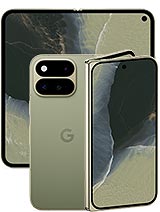
Samsung Galaxy Pixel 11 Pro Fold 8.0" GZDQ6 Premium Quality Screen
Has the screen of your Samsung Galaxy Pixel 11 Pro Fold broken, leaving your luxury foldable looking like a disaster? Don't worry, at iLevante.com we have the full screen for Samsung Pixel 11 Pro Fold you need to bring your 2026 smartphone back to life without breaking the bank.
This is an 8.0-inch screen, technical reference GZDQ6, of Premium quality, designed for your Galaxy Pixel 11 Pro Fold to return to being that spectacular foldable that captivated you from day one. Ideal if you want to repair your phone yourself or take it to a trusted technician with the replacement already in hand.
Screen for Samsung Galaxy Pixel 11 Pro Fold GZDQ6 – The Highlights
- Specific Compatibility: designed for the Samsung Galaxy Pixel 11 Pro Fold (foldable model 2026).
- Size: 8.0-inch screen, perfect for enjoying content, games, and multitasking.
- Replacement Type: complete screen module (display + touch).
- Quality: Premium, with good touch response and clear image for daily use.
- Technical Reference: GZDQ6, very useful to confirm compatibility with your technical service.
- Ideal for replacing screens with cracks, deep scratches, stains, lines, or failing touch.
This screen for Galaxy Pixel 11 Pro Fold is a great option if you're looking for a balance between quality and price, without needing to go to the official service. It's a high-quality replacement, designed so you can continue using your foldable normally.
When do you need to change the screen of the Samsung Galaxy Pixel 11 Pro Fold?
Your Samsung Pixel 11 Pro Fold screen doesn't have to look like a spider web before you decide it's time to change it. There are several clear signs that this GZDQ6 replacement will be of great benefit:
- Visible cracks or breaks: the classic bump leaving the screen shattered or with a crack spanning side to side.
- Touch issues: areas of the screen that do not respond, ghost touches, or delays in sliding and typing.
- Colored spots or black areas: dark areas, purple, green, or blue spots that weren't there before.
- Vertical or horizontal lines: stripes that suddenly appear and do not disappear even by restarting the Galaxy.
- Flickering and unstable brightness: the screen lights up and fades, or brightness levels fluctuate without reason.
- Humidity damage: circles, shadows, or whitish areas start appearing after getting wet.
- Folding part issues: if upon opening or closing the 11 Pro Fold the image distorts, goes black, or the touch stops working in the crease area.
If your phone displays any of these symptoms, changing the screen of the Samsung Galaxy Pixel 11 Pro Fold is the best way to extend its life and keep enjoying your 8-inch foldable as if it were new.
Key Features of the Samsung Pixel 11 Pro Fold GZDQ6 Screen
The GZDQ6 reference identifies this replacement as a full screen for Galaxy Pixel 11 Pro Fold of Premium quality. This means it is designed to offer:
- Good clarity to watch videos, social media, and read text with comfort.
- Precise touch response for typing, playing, and navigating apps without frustration.
- Compatibility with the device's system so that the Galaxy recognizes it correctly upon installation.
- Module-type assembly: includes integrated display + touch, ready for installation.
It is not an original screen or service pack, but a Premium replacement designed to offer a solid daily experience. Perfect if you want to repair your Samsung 11 Pro Fold without paying the price of a new phone.
Quick Specifications Table
| Product | Detail |
| Compatible Model | Samsung Galaxy Pixel 11 Pro Fold (foldable 2026) |
| Screen Size | 8.0 inches |
| Replacement Type | Complete module (integrated display + touch) |
| Quality | Premium |
| Technical Reference | GZDQ6 |
| Device Brand | Samsung |
Galaxy Pixel 11 Pro Fold Premium Screen: Who is it for?
This Samsung Pixel 11 Pro Fold GZDQ6 screen is perfect if:
- Your Galaxy Pixel 11 Pro Fold works fine, but the screen is broken or damaged.
- You don't want to change your phone because you love the 8-inch foldable format.
- You're looking for a high-quality replacement without going through the official service.
- You like the idea of buying the part yourself and taking it to a trusted technician.
- You want to control the cost of the repair by choosing the screen yourself.
With this screen, your Samsung 11 Pro Fold can continue to accompany you at work, in games, on travels, and in everything you throw at it, without cracks or touch failures ruining the experience.
Tips before changing the screen of the Samsung Galaxy Pixel 11 Pro Fold
The Galaxy Pixel 11 Pro Fold is an advanced foldable phone, meaning its interior is somewhat more delicate than a regular phone. Before embarking on the adventure of changing the GZDQ6 screen, consider the following:
- Back up your data in case something goes wrong during the repair.
- Work on a clean surface, well-lit and dust-free.
- Use specific smartphone tools: precision screwdrivers, picks, plastic levers, etc.
- Discharge your static electricity using an anti-static wristband or by touching a grounded metallic surface.
- If you have never opened a foldable phone, seriously consider taking the screen to a specialized technician.
How to change the screen of the Samsung Galaxy Pixel 11 Pro Fold (guide)
If you still want to give it a try, here is a general and simplified explanation of the standard process for replacing a screen for Samsung Pixel 11 Pro Fold. Keep in mind it may vary depending on the technical service and tools used.
- Completely turn off the Galaxy Pixel 11 Pro Fold and, if possible, remove the SIM tray.
- Gently heat the back of the device with a hairdryer or low-power heat gun to soften the adhesive. Maintain distance and move the heat constantly.
- With the help of picks and a suction cup, carefully separate the back cover. Avoid forcing too much to prevent breaking the glass or damaging internal cables.
- Once the back is open, disconnect the battery before touching any other component. This is crucial to prevent short circuits.
- Locate the screen flex cables of the Galaxy 11 Pro Fold and remove the screws and metallic protections covering them.
- Disconnect the flex cables from the damaged screen using a plastic tool, without applying metallic leverage on the board.
- Apply gentle heat to the front area to gradually detach the foldable screen with great care. On a phone like the Pixel 11 Pro Fold, this part is delicate: proceed slowly without bending the panel excessively.
- Remove the old screen and clean the adhesive residue from the frame, ensuring it's as even as possible.
- Place the new GZDQ6 screen on the device without fully sticking it and connect the flex cables to the main board.
- Reconnect the battery and turn on the Samsung to verify that the screen looks good and the touch responds across the entire surface, including the crease area.
- If everything is working correctly, turn off the phone again, apply the appropriate adhesive on the frame, and carefully stick the screen, keeping the foldable in the position recommended by the technician (usually semi-open).
- Reattach the protections, screws, and back cover. Gently press the edges to ensure the adhesive makes good contact.
After assembly, allow the adhesive to set well for a few hours before using the Galaxy Pixel 11 Pro Fold intensively. This ensures the new GZDQ6 screen is properly secured.
Install it yourself or go to a technical service?
Changing the screen of the Samsung 11 Pro Fold isn't as straightforward as on a normal phone, because the foldable format adds internal flex cables and more delicate areas. Therefore:
- If you’ve repaired phones before, this GZDQ6 Premium screen allows you to make the replacement yourself with the proper tools.
- If you lack experience, it's best to take the replacement to a technical service. Many accept that you bring your own screen, thus controlling the cost of the part and only paying for labor.
In any case, with this screen for Samsung Galaxy Pixel 11 Pro Fold 8.0", you'll have the main component you need for your foldable to shine as it deserves.
• Product Weight: 0.20 kg.The technical specs of Google Pixel 11 Pro Fold
can help you to choose the correct repair part for your device. Make sure your model reference is the same as this element. Here are some tech specs to help you:
- Brand: Google
- Google Pixel 11 Pro Fold Size: Unfolded: 155.2 x 150.4 x 5 mmFolded: 155.2 x 76 x 10.1 mm.
- Release date: 2026, August 12.
- Weight: 239 g.
- Screen specs: Foldable LTPO OLED, 120Hz, HDR10+, 2000 nits , 3600 nits.
- Screen size: 8.0 inches, 206.3 cm2.
PVP:
SNK.LCDPIXEL11PROF285.99€ AvailableInStockNewCondition