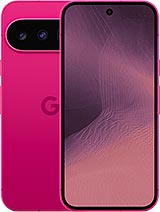
Google Pixel 11 6.3" Premium Screen – Give Your Pixel a New Life
Has your Google Pixel 11 taken an epic fall, and the screen has taken the brunt? 😅 If the touch screen is glitchy, you see strange lines, or it's not showing anything at all, this 6.3-inch screen for Google Pixel 11 is just what you need to get your phone back to its former glory.
It is a premium quality full screen, designed so you can repair your Pixel 11 without having to replace your phone or spend a fortune. It's compatible with the model launched in 2026 by Google and has the technical references GUJ0N and GPQQ7, perfect for ensuring you are buying the correct replacement.
With this screen, you can:
- Resolve issues like breaks, impacts, stains, and lines on your Google Pixel 11.
- Regain a smooth touch experience for typing, gaming, and browsing without frustration.
- Avoid buying a new phone due to a damaged screen.
Google Pixel 11 6.3" Screen – Key Features
This full screen for Pixel 11 is designed to be a premium quality replacement, ideal for those seeking a reliable repair with a good daily usage experience.
| Feature | Detail |
| Compatible model | Google Pixel 11 (2026 version) |
| Screen size | 6.3 inches |
| Replacement type | Full screen (panel + touch + connection flex) |
| Quality | Premium |
| Brand | Google (device), compatible replacement |
| Technical references | GUJ0N, GPQQ7 |
| Recommended use | Repair of broken screen, defective touch, or damaged image |
As a full screen, it's ready to replace the damaged set of the Google Pixel 11, making the task easier both for skilled users and professional technicians.
When Do You Need to Change the Screen of Google Pixel 11?
Your Pixel 11 doesn't have to look like a cobweb for it to be time to change the screen. There are many signs that something isn't right and that this 6.3" screen replacement for Google Pixel 11 could be your salvation:
- Ghost touches or crazy touch screen: the phone presses itself, doesn't respond, or requires more force than usual.
- Strange stains: black, purple, or colored spots that weren't there before and keep growing.
- Vertical or horizontal lines: lines crossing the screen that don't disappear even after rebooting.
- Light leaks: areas where there is an odd brightness, especially with dark backgrounds.
- Black screen but phone sounds: the Pixel 11 is on, but you can't see anything.
- Visible glass breaks: cracks, impacts, or chipped pieces that hinder usage.
If any of these symptoms sound familiar, your Google Pixel 11 is probably crying out for a new Premium screen. With this replacement, you can go back to using it normally without having to change phones.
Google Pixel 11 Premium Screen – What Makes It Interesting?
At iLevante.com, we are committed to premium quality replacements to ensure the repair outcome is comfortable and long-lasting. This screen for Pixel 11 is designed for daily use: social media, videos, work, gaming, and anything you ask of it.
Some advantages of choosing this screen:
- Specific compatibility with the Google Pixel 11 2026, thanks to the references GUJ0N and GPQQ7.
- Good touch response for typing, swiping, and making gestures without annoying delays.
- Correct colors and brightness for comfortable daily use.
- Complete replacement, ideal for direct substitution of the damaged screen.
It's a very interesting option if you want your Pixel 11 to stay with you for a few more years without the screen ruining the experience.
Compatibility of the 6.3" Screen for Google Pixel 11
This 6.3-inch screen for Pixel 11 is specifically designed for the model Google launched in 2026. To make sure it's the right one, you can:
- Check in the phone settings that the model is Google Pixel 11.
- Verify the references GUJ0N and GPQQ7 if your technician has provided them.
- Compare the general design of your device with the 6.3" Pixel 11.
If you're torn between several Pixel models (Pixel 10, Pixel 11, etc.), it's important to confirm the exact model before buying the screen to avoid incompatibilities.
What Does the Pixel 11 Full Screen Include?
This full screen for Google Pixel 11 is prepared to be installed as a replacement for the original damaged screen. It includes the necessary elements for the module to function correctly once mounted:
- Screen panel to display the image.
- Touch glass to detect your taps and gestures.
- Connection flex to link the screen with the Pixel 11's motherboard.
With this set, you can replace your broken Google Pixel 11 screen and have it ready to use as always.
How to Change the Google Pixel 11 Screen – A Guiding Overview
If you enjoy tech DIY and want to attempt the change yourself, here is a simple explanation of how the screen replacement process generally goes on a phone like the Pixel. Keep in mind that it is a general guide and that the Google Pixel 11 may have specific steps.
Before You Begin
- Make a backup of your data just in case.
- Completely turn off the Pixel 11.
- Work on a clean and well-lit surface.
- If possible, use an anti-static wristband to avoid damaging components.
- Precision screwdrivers.
- Plastic picks or opening tools.
- Suction cup to lift the screen.
- Plastic spudger.
- Soft heat source (heat gun or hair dryer).
General Steps for Changing the Pixel 11 Screen
- Turn off the Google Pixel 11 and remove any case or accessory.
- Gently heat the edges of the screen with a hairdryer or heat gun, keeping a distance and moving it constantly.
- Place a suction cup on the front and pull carefully while inserting a plastic pick at one of the edges.
- Slide the pick around the entire outline to peel off the adhesive holding the screen to the chassis.
- When the screen is detached, lift it carefully, without pulling too hard to avoid damaging the connection flex cables.
- Disconnect the battery if the Pixel 11 design allows it, to work more safely.
- Disconnect the flex cables of the old screen from the motherboard, using a plastic tool.
- Completely remove the damaged screen from the Google Pixel 11.
- Clean the adhesive remnants from the phone frame so the new screen sits well.
- Connect the new premium screen module (references GUJ0N / GPQQ• to the motherboard.
- Turn on the Pixel 11 before permanently sticking the screen to check:
- That the image displays correctly.
- That the touch responds across the entire surface.
- If everything works well, turn off the phone again, apply suitable adhesive (if necessary), and place the screen in its place by gently pressing around the edges.
- Reassemble all the components and turn on the Google Pixel 11 to use it as usual.
If you're not confident about doing all this, you can always take your 6.3" Google Pixel 11 Premium Screen to a trusted technical service. Many workshops accept that you bring your own replacement, so you can save on the repair using this screen purchased at iLevante.com.
Tips for Caring for Your New Pixel 11 Screen
Once your new screen for Google Pixel 11 is mounted, ideally, it will last a long time. Some simple tips:
- Apply a screen protector from day one.
- Use a case with a good edge to protect the sides.
- Avoid carrying your Pixel 11 in the same pocket as keys or coins.
- Don't charge it in unstable places where it could easily fall.
This way, your Google Pixel 11 with a newly changed screen can continue to accompany you without mishaps for much longer.
• Product Weight: 0.20 kg.The technical specs of Google Pixel 11
can help you to choose the correct repair part for your device. Make sure your model reference is the same as this element. Here are some tech specs to help you:
- Brand: Google
- Google Pixel 11 Size: 152.8 x 72 x 8.6 mm.
- Release date: 2026, August 12.
- Weight: 197 g.
- Screen specs: OLED, 120Hz, HDR10+, 2000 nits , 3000 nits.
- Screen size: 6.3 inches, 94.7 cm2.
PVP:
SNK.AS184369195.86€ AvailableInStockNewCondition