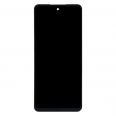
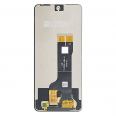
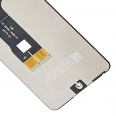
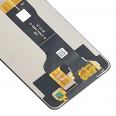
ZTE Blade A75 5G screen: what this replacement includes and how to check it’s the right one
The ZTE Blade A75 5G screen from iLevante is a complete, original-quality part. It combines the LCD panel, touch glass, flex cable and IC controller in one assembly. This matters if only the glass is broken: with this type of screen, the glass cannot be replaced separately, so the whole assembly must be changed.
The panel specifications match those of the phone as supplied by the manufacturer:
- Technology: IPS LCD with 16 million colours
- Size: 6.6 inches, 20:9 aspect ratio
- Resolution: HD+, 720 x 1612 pixels (around 266 ppi)
- Refresh rate: 120 Hz
- Front: centre punch-hole for the 8 MP camera
ZTE A75 screen: beware of the 4G model
This is the most likely source of confusion when buying a replacement. There are two phones with almost identical names and displays of the same size. The Blade A75 5G has the model code Z2357N, uses a Unisoc T760 processor and has a 120 Hz refresh rate. The Blade A75 4G is associated with the Z2359 code, has a Unisoc T606 processor and has a 90 Hz refresh rate.
It only takes a minute to check: you can find the model in the phone information under Settings. This part is designed for the 5G version. The phone is also a variant of the nubia Focus, but a similar appearance does not guarantee that parts are interchangeable. If you have a different model, check with the iLevante team first.
When to replace the ZTE Blade A75 5G screen
Cracks are an obvious sign. Other symptoms can be harder to interpret: a touchscreen that responds slowly or ignores certain areas, black or coloured spots that spread after an impact, light bleeding around the edges, or faded colours near the frame. These can all point to a problem with the screen assembly.
There’s a useful check if the image has disappeared completely. Call the phone or connect it to the charger: if it rings or vibrates, it’s still starting up, which makes the screen the first thing to suspect. It’s worth checking this before ordering a replacement, as a phone that is completely unresponsive may have a different fault.
What to expect from your new ZTE Blade A75 5G screen
At iLevante, we prefer to clarify a few things in advance, as some features of this phone can be mistaken for faults with the replacement part.
The first is brightness in sunlight. The screen works well indoors and in most situations, but it can be difficult to read in strong midday sun. This is a known limitation of the phone, including with its original screen. We haven’t found an official brightness figure from ZTE in nits, so we won’t quote one.
The second relates to video. Widevine L3 certification limits playback to standard definition on some streaming platforms, so a programme may look slightly soft even when the screen is working perfectly.
Then there’s the area around the camera. It can sometimes look like an oversized cut-out, although the panel only has a conventional punch-hole: the rest is a software effect that expands to show notifications.
Good news if you’re replacing the part: the fingerprint reader is on the side button, outside the screen, so it isn’t involved in this repair.
How to replace the ZTE Blade A75 5G screen: a guide from the iLevante team
Your order includes a free screwdriver kit and one screen protector as a gift. For the rest of the job, you’ll need a hairdryer, a pick or plastic card, isopropyl alcohol at 90% or higher, and adhesive designed for screens.
This guide describes the general procedure for an LCD panel bonded to the frame. On similar phones from the same brand, accessing the connectors requires removing the back cover and internal screws, so you may need to do the same here. If you’d rather not open the phone at home, ask a repair shop whether they’ll fit a part you supply.
- Prepare the phone. Back up your data, switch it off and have a tray ready for the screws. Taking a photo of the inside will help when it’s time to put everything back together.
- Soften the adhesive. Use the hairdryer on a low setting around the edges for 2 or 3 minutes, without holding it too close. The battery is sensitive to heat: stop if it looks swollen.
- Separate the screen. Slowly work the pick in along the edge without pushing it in too far. Avoid using metal tools near the board, as they can cause a short circuit.
- Disconnect the cables. Disconnect the battery first, then the screen flex cable. Lift the connector vertically and don’t pull on the cable.
- Clean the frame. Remove all the old adhesive with isopropyl alcohol. Any residue can stop the new part sitting flush.
- Test before bonding. Connect the new screen and switch on the phone. Check the image, test touch response across the entire surface with a testing app, and make sure scrolling is smooth. Then switch off the phone and disconnect the screen again.
- Apply the adhesive. Pre-cut strips give a neater result. If using B-7000-type liquid adhesive, apply a thin bead in a well-ventilated area, as excess adhesive can stain the panel.
- Close and press. Align the punch-hole with the camera, make sure the flex cable isn’t trapped, and press gently for a few minutes. Allow the adhesive to cure for the recommended time before fitting the screen protector.
Common mistakes when fitting a ZTE A75 screen
Closing the phone without testing it is the costliest mistake, as you may have to remove a part you’ve just bonded in place. Another common issue is trapping the flex cable in the frame, which can cause image or touch problems that weren’t there during the test.
The Blade A75 5G has one detail worth noting: sound comes through the earpiece slot at the top, not through a bottom speaker. Any adhesive residue in that area could affect calls as well as audio from videos and music, so check it carefully before pressing the screen into place.
• Product Weight: 0.15 kg.The technical specs of ZTE Blade A75 5G
can help you to choose the correct repair part for your device. Make sure your model reference is the same as this element. Here are some tech specs to help you:
- Brand: ZTE
- ZTE Blade A75 5G Size: 163.6 x 74.9 x 8.6 mm.
- Release date: 2024, September.
- Weight: 205.5 g.
- Screen specs: IPS LCD, 120Hz.
- Screen size: 6.6 inches, 105.4 cm2.
PVP:
SNK.EDA00615481420.15€ AvailableInStockNewCondition