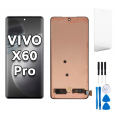
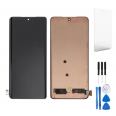
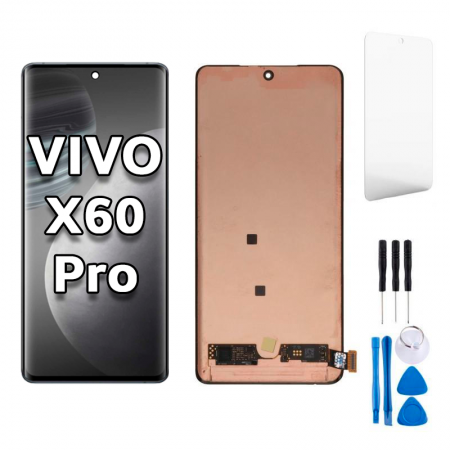
Vivo X60 Pro (V2047A) 6.56-inch Premium-quality screen 📱✨
Crack! That’s the sound nobody wants to hear. Your Vivo X60 Pro has hit the floor, and now its screen looks like a modern mosaic. Take a deep breath, save the drama for your favourite series and focus on what matters: we have a Premium-quality screen assembly for the Vivo X60 Pro, ready to get your phone back to its former best. 😎
This replacement part is compatible with the Vivo X60 Pro with the technical model number V2047A, the model Vivo launched in 2020, which made a name for itself among mobile photography fans thanks to its famous gimbal-style camera stabilisation. This 6.56-inch screen assembly is designed to bring back touch functionality, image quality and, above all, peace of mind.
A tip before you add it to your basket: check that your phone is the V2047A. You can find this under Settings > About phone or on the original box. If your X60 Pro shows a different model number, get in touch before buying and we’ll help you find the right part. 🔍
Quick specs: screen for the Vivo X60 Pro
| Feature |
Details |
| 📱 Compatible model |
Vivo X60 Pro |
| 🔢 Technical model number |
V2047A |
| 🏷️ Brand |
Vivo |
| 📅 Phone launch year |
2020 |
| 📏 Screen size |
6.56 inches |
| ⭐ Quality |
Premium |
| 🛠️ Use |
DIY repair or professional repair service |
Why choose a Premium screen for your Vivo X60 Pro?
Premium quality is a great choice if you want a reliable replacement part with responsive touch functionality and a clear, pleasant image for everyday use, without paying the price of an official repair. It’s ideal for getting back to your usual routine: WhatsApp, social media, videos, browsing and, of course, checking out all those photos you love taking with your X60 Pro. 📸
It offers a good balance between price and quality, which is why it’s a popular replacement part with people who don’t want to retire a phone that still has plenty to offer. Let’s be honest: the Vivo X60 Pro is still a stylish phone, and it would be a shame to leave it in a drawer just because of a broken screen.
- ✅ Responsive touch functionality for typing, swiping and gaming with ease.
- ✅ Clear images and pleasant colours for everyday use.
- ✅ Designed to fit the X60 Pro V2047A for easier installation.
- ✅ Affordable price compared with an official repair.
Signs that your Vivo X60 Pro needs a new screen
You don’t always need to see a completely shattered screen to know something is wrong. Sometimes your Vivo X60 Pro gives you more subtle signs, almost like Morse code. Here are some of the most common ones:
- 👆 The touchscreen has a mind of its own: apps open by themselves, certain areas don’t respond or it types letters you haven’t pressed. We can assure you, it’s not ghosts.
- 🖤 Black, green or purple spots that gradually get bigger.
- 📏 Vertical or horizontal lines that suddenly appear and won’t go away.
- 💧 It’s had an encounter with water and now you can see shadows or unusual marks on the display.
- ⚫ The screen stays black even though the phone rings, vibrates and receives notifications.
- 🌀 Constant flickering or brightness that goes up and down without you touching it.
If any of these sound familiar, your Vivo X60 Pro screen probably needs replacing. The sooner you do it, the better: a cracked screen can let dust and moisture in, making the repair more complicated.
Replacing the Vivo X60 Pro screen: at home or at a repair shop?
Everyone has their own approach. Some people love having a screwdriver in their hand; others would rather not go near a screw. Both options are perfectly valid. 🤓
If you’re a DIY kind of person
Replacing the screen on your X60 Pro yourself is possible, but take your time. This Vivo has curved edges, which means it requires more patience than a phone with a flat screen. Have precision tools, opening picks, a suction cup, a gentle heat source (a hairdryer will do) and, above all, a steady hand ready.
If you’d rather leave it to the experts
Take your Vivo X60 Pro and the replacement screen to a repair shop you trust. Many repair shops are happy for you to supply your own part, so you only pay for the labour and save a good portion of the cost. The best of both worlds: an affordable part and the peace of mind that comes with professional installation. 💪
Basic guide to replacing the Vivo X60 Pro V2047A screen
If you’ve decided to give it a go yourself, here are the main steps. Think of it as a relaxed DIY session, not a race against the clock.
- Switch the phone off completely and remove the SIM tray.
- Discharge any static electricity using an anti-static wrist strap or by touching a metal surface. The internal components are very sensitive.
- Apply gentle heat to the back cover to soften the adhesive. On the X60 Pro, access to the connectors is usually from the back.
- Use a suction cup and opening picks to lift the cover, working gradually around the sides without forcing it.
- Remove the screws and covers over the board, then disconnect the battery before anything else.
- Carefully disconnect the screen flex cable, taking care not to touch the contacts.
- Heat the front of the phone to loosen the damaged screen. Take care around the curved edges: patience is essential here. 🧘
- Thoroughly clean any adhesive residue from the frame so the new screen sits correctly.
- Connect the new screen temporarily, reconnect the battery and switch on the phone to check the display and touch functionality before gluing anything in place.
- If everything works, switch the phone off, apply new adhesive, position the screen and reassemble everything in reverse order.
- Leave it to rest for a few hours under light pressure so the adhesive can bond properly.
⚠️ If you’re unsure about any step, stop and consult a professional. Pulling a flex cable too hard can turn a straightforward repair into an adventure.
A little history: the Vivo X60 Pro, a phone with a photographer’s spirit
When Vivo introduced the X60 series in late 2020, the focus was firmly on the camera. The X60 Pro arrived with a gimbal-style stabilisation system and a partnership with ZEISS that raised more than a few eyebrows in the industry. All of this came in a slim body with curved edges and an elegant design that still looks great today.
That’s why it makes so much sense to repair your Vivo X60 Pro rather than replace it. Its camera can still bring you plenty of joy, and with a new screen you can enjoy it all over again without spending a fortune. Plus, extending the life of your phone is a small gesture the planet appreciates. 🌍💚
Frequently asked questions about the Vivo X60 Pro screen
Will this screen fit every Vivo X60?
No. It’s designed for the Vivo X60 Pro with model number V2047A. The standard Vivo X60 and the X60 Pro+ are different models and use different parts. Check your phone’s model number in the settings before buying.
Will the fingerprint reader work?
The under-display fingerprint reader depends a lot on the type of screen installed. If this feature is essential for you, we recommend contacting us before placing your order and we’ll be happy to advise you.
How long does delivery take?
We know being without your phone can feel like being without a compass, so you can choose express delivery to get your X60 Pro screen as soon as possible. 🚀
What should I do if I have questions during the repair?
Get in touch. At iLevante.com, we love to help. We’ve spent years helping phones like your Vivo X60 Pro get back in action, and we’ll be happy to answer your questions. 🤝
• Product Weight: 0.14 kg.The technical specs of vivo X60 Pro
can help you to choose the correct repair part for your device. Make sure your model reference is the same as this element. Here are some tech specs to help you:
- Brand: vivo
- vivo X60 Pro Size: 158.6 x 73.2 x 7.6 mm.
- Release date: 2020, December 29. Released 2021, January 08.
- Weight: 178 g.
- Screen specs: AMOLED, 120Hz, HDR10+.
- Screen size: 6.56 inches, 104.6 cm2.
PVP:
SNK.AS08798621.75€ AvailableInStockNewCondition